29
4 SETTING UP
FM9 AS AUDIO INTERFACE
Global Settings: Default
Presets: Factory or Custom
FM9
IN 1
(INSTR)
STUDIO MONITORS
COMPUTER
OUTPUT
1L
OUTPUT
1R
USB
INPUT INPUT
IN YER FACE
24-bit/192kHz
PEAK PEAK USB+48v
INPUT OUTPUT PHONES
IN 1
(INSTR)
STUDIO MONITORS COMPUTER
OUTPUT
1L
OUTPUT
1R
USB
INPUT INPUT
FM9
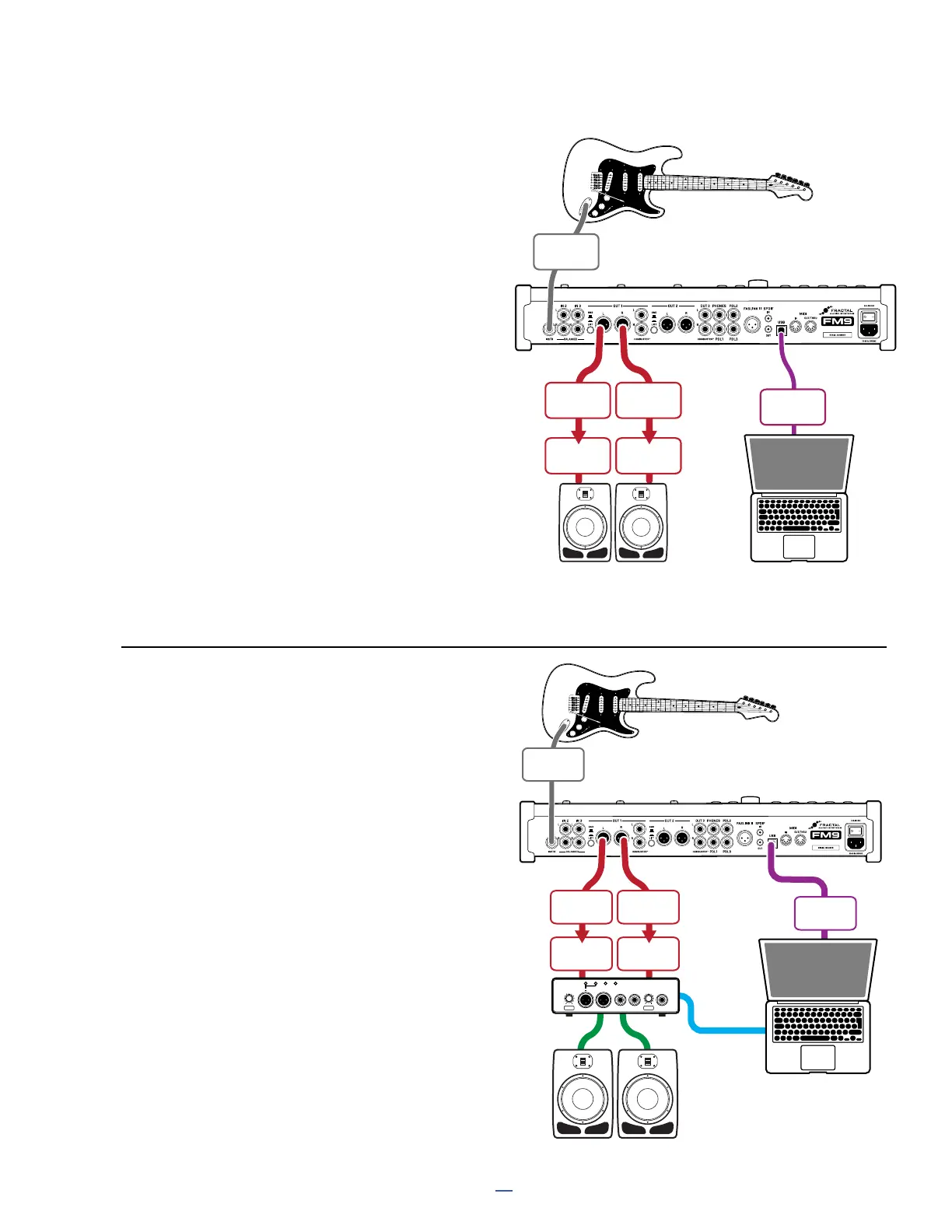
The FM9 is a high quality audio interface that can be
used for recording or playback. The setup shown here
has the advantage of allowing easy USB re-amping.
Note that all computer audio and project settings must
be set to 48 kHz, which is the xed rate of the FM9.
Connect studio monitors directly to Output 1 L+R.
The top panel OUT 1 level of the FM9 is the master
volume, adjusting the overall levels of the FM9 and
computer playback simultaneously. For USB audio
playback level control, adjust levels inside the
computer or use the level parameters of the FM9
found in SETUP: I/O: USB.
Besides Input 1, the other inputs of the FM9 can also be
used to record microphones, keyboards, and more.
FM9-Edit and Fractal-Bot use the same USB connection.
As detailed above, the FM9 is a high-quality, standalone
USB audio interface, but it can also be used to add
world-class guitar processing and effects to an existing
studio setup with a third-party audio interface.
While this does not allow re-amping over USB, there are
many reasons why you might prefer an existing interface,
such as the ability to run at sample rates other than 48k,
or to take advantage of additional inputs or outputs, mic
preamps, etc.
Connect your guitar to FM9 Input 1 (Instrument).
Connect your studio monitors and computer
to your audio interface according to the
instructions of its manufacturer.
Connect FM9 Output 1 L+R to a stereo line
level input pair on your audio interface.
Connect the FM9 to the computer via USB
to enable FM9-Edit and Fractal-Bot.
FM9 + THIRD-PARTY
AUDIO INTERFACE



 To Next Page