46
5 PRESETS
EDITING EFFECT BLOCKS
Blocks are fully programmable, allowing you to dial in every setting as desired. The Edit menu for every block
contains one or more pages, each with multiple parameters which control various functions. Here’s a quick
overview of how to access and work with the different types of block Edit menus.
OPENING AN EDIT MENU
On the Layout grid, select the desired block and press EDIT.
OR... from anywhere on the FM9, just press EDIT to jump right to the Edit menu for the selected block.
CHANGING PAGES
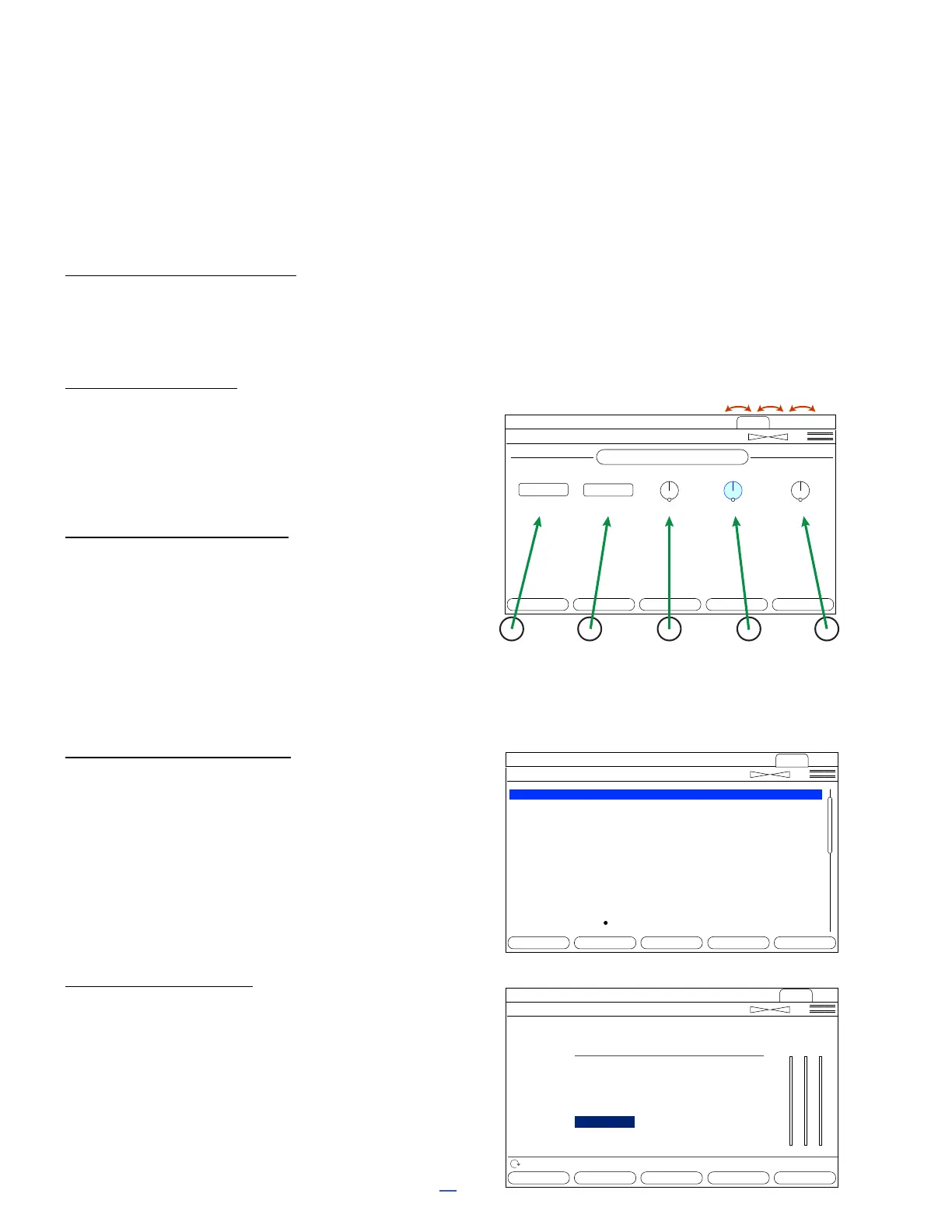
Most Edit menus have multiple pages, shown as “tabs”
at the top of the menu (red arrows, right).The color of
the tabs matches the color of the block on the grid.
Tap the <<PAGE>> buttons to page left or right.
EDITING “KNOB” PAGES
Most Edit menu pages show rows of ve knobs,
switches or selectors. To make changes, use the
ve physical knobs below the display (green arrows,
right) or the NAV buttons and VALUE knob.
You will hear all changes in real time.
If a menu page has two rows of knobs, use
NAV UP/DOWN to switch between them.
EDITING “MENU” PAGES
Some pages have vertical lists of parameters.
Use the NAV UP/DOWN buttons to step through
the list or NAV LEFT/RIGHT buttons to jump.
The A knob and the VALUE knob operate
the selected parameter.
B, C, D, and E knobs control other parameters in
the list, as shown by blue labels on the list.
OTHER PAGE TYPES
Some blocks have special Edit menus, with parameters
arranged in rows and columns. Some of these include
interactive meters or graphs. Use NAV and VALUE or
A,B,C,D,E knobs to move around and make changes.
For TYPE pages, such as Amp Type, just NAV through
the list to make a selection and turn the page or press
EXIT when nished. Selections take effect instantly.
Chorus 1
Analog Stereo Scene: 1 Channel: A
50.0 %
RESET BYPASS MODIFIER ROW MORE 1 of 2
Voices Rate
Depth Time
Type Basic Expert Mix
2
Tempo
2
Chorus 1
Analog Stereo
Low Cut
High Cut
LFO Phase
LFO Type
Auto Depth
Phase Reverse
Drive
Width
LFO2 Rate
LFO2 Depth
Stereo Spread
20.00 Hz
8000 Hz
90.0 deg
TRIANGLE
LOW
NONE
3.33
50.0 %
0.050 Hz
0.0 %
100.0 %
A
B
C
D
E
Scene: 1 Channel: A
RESET BYPASS MODIFIER ROW MORE 1 of 2
Type Basic Expert Mix
Multiband Compressor 1
Scene: 1 Channel: A
RESET BYPASS MODIFIER ROW MORE 1 of 2
Config Mix
Nav Value Value Value
LOW MID HI
Low Mid High
Crossover Freq
Threshold
Ratio
Attack
Release
Level
Detector
Mute
500.0 Hz
-80 db
1.000
10.00 ms
10.00 ms
6.0 dB
Fast RMS
OFF
-20 db
20.00
10.00 ms
1000 ms
-20.0 dB
Peak
10000 Hz
-10 db
2.000
10.00 ms
500 ms
-6.00 dB
RMS+Peak
--



 To Next Page