6
1 INTRODUCTION
HUMBUSTER™ CABLES
The 1/4" jacks of Output 1 and Output 3 on the FM9 feature Fractal Audio’s proprietary Humbuster™ Technology,
which can signicantly reduce the unwanted hum of ground loops when used with special Humbuster™ cables.
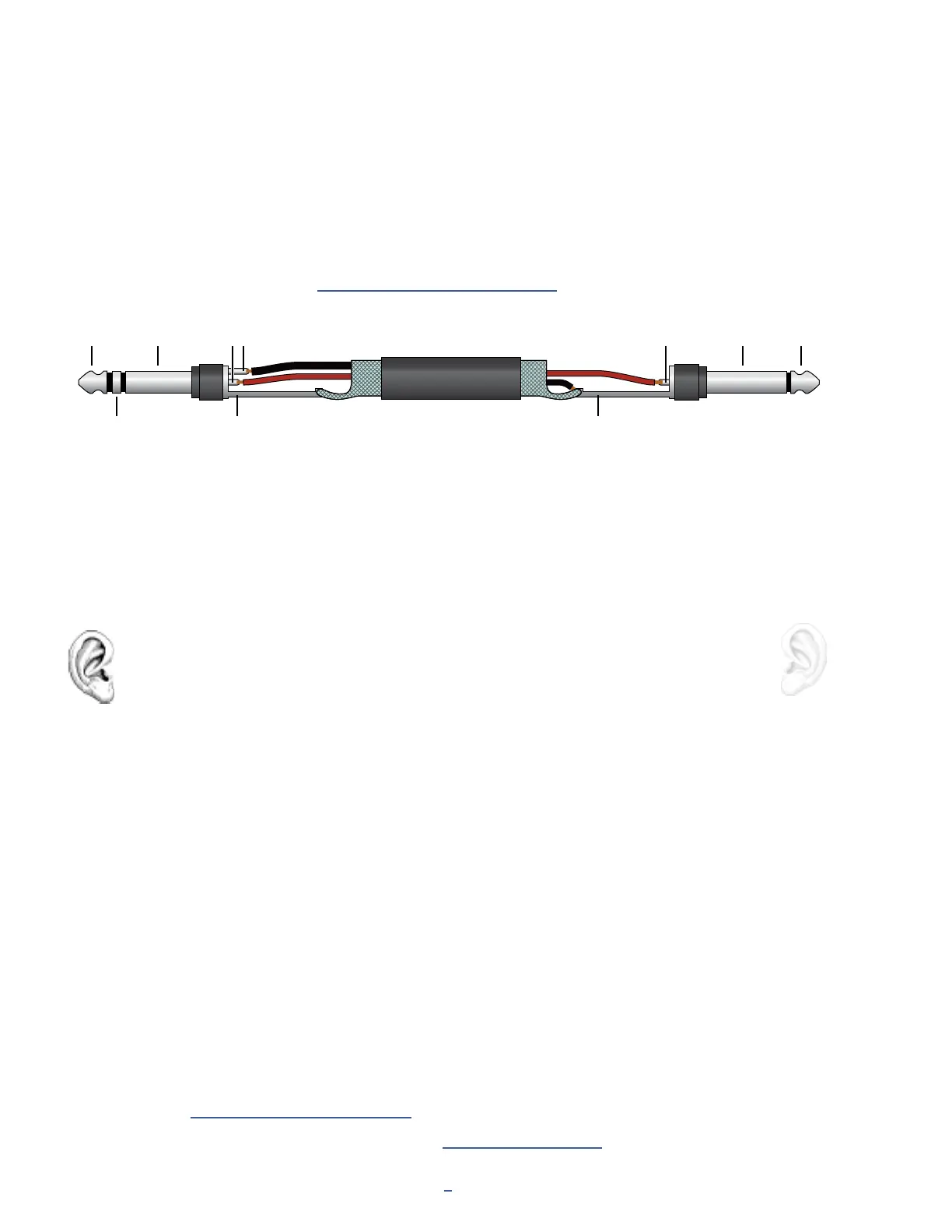
A Humbuster™ cable has one TRS end (like a balanced cable) and one TS end (like a guitar cable). The TRS end
connects to the FM9. The TS end connects to your amp or other device.
Humbuster cables are available from http:/www.fractalaudio.com/cables. You can make your own by following
the diagram below. Be sure to use high-quality connectors and shielded cable.
The FM9 comes precongured for stereo but you can connect it in mono with no issues. If you
are NOT running in stereo, you may nd that certain presets or settings produce unexpected
results. For example, a panner sounds like a tremolo when one channel is missing. A ping-pong
delay may “ping” but never “pong.” Stereo enhancers or certain types of modulation may not be
apparent at all. Tone can even change completely if amps or cabs have been hard panned. Here
is an overview of several scenarios, with recommended settings for each.
MONO VS. STEREO
Stereo: No special settings required.
Half-Stereo: Leaving the FM9 in its default stereo conguration but connecting
only its left or output results in a “half-stereo” setup. This works ne, aside from the
exceptions mentioned above (ping-pong, panning, etc). No special settings required.
Dual Mono: If you want to force your rig to mono, dual mono is a good choice. Sonically, this
is identical to half-stereo, with the same limitations, except that mono signal is produced
at both the left and right jacks so you can connect to two monitors. To switch to dual
mono, open SETUP: I/O: Audio and set Mode for the desired output to “COPY L->R”.
Summed Mono: In this setup, left and right channels are added together resulting in an identical
mono signal at both left and right outputs. This has the advantage of not discarding half of
the sound, but summing has its own issues. For example, short delays or phase differences
between channels can result in strange artifacts or even cancellation. To switch to summed
mono, open SETUP: I/O: Audio and set Mode for the desired output to “SUM L+R”.
On the FM9, a flexible block-based I/O system makes it easy to use different outputs for different
purposes. See the “The Fractal Audio Blocks Guide” for more on Input and Output Blocks.
All options of the I/O menu under SETUP are detailed in Section 13: Setup Menu.
TIP TIP
RING
SLEEVE SLEEVETR
S
T
S
Note: Use Humbuster cables only when connecting the FM9 to unbalanced 1/4" inputs on other devices. When
connecting to a 1/4" balanced TRS input, use a standard 1/4" patch cable — or better still, connect the balanced
XLR outputs of the FM9 via XLR-to-TRS cables or adapters.



 To Next Page