36
4 SETTING UP
Global Settings: Default, but see “Tip” Below Presets: Custom
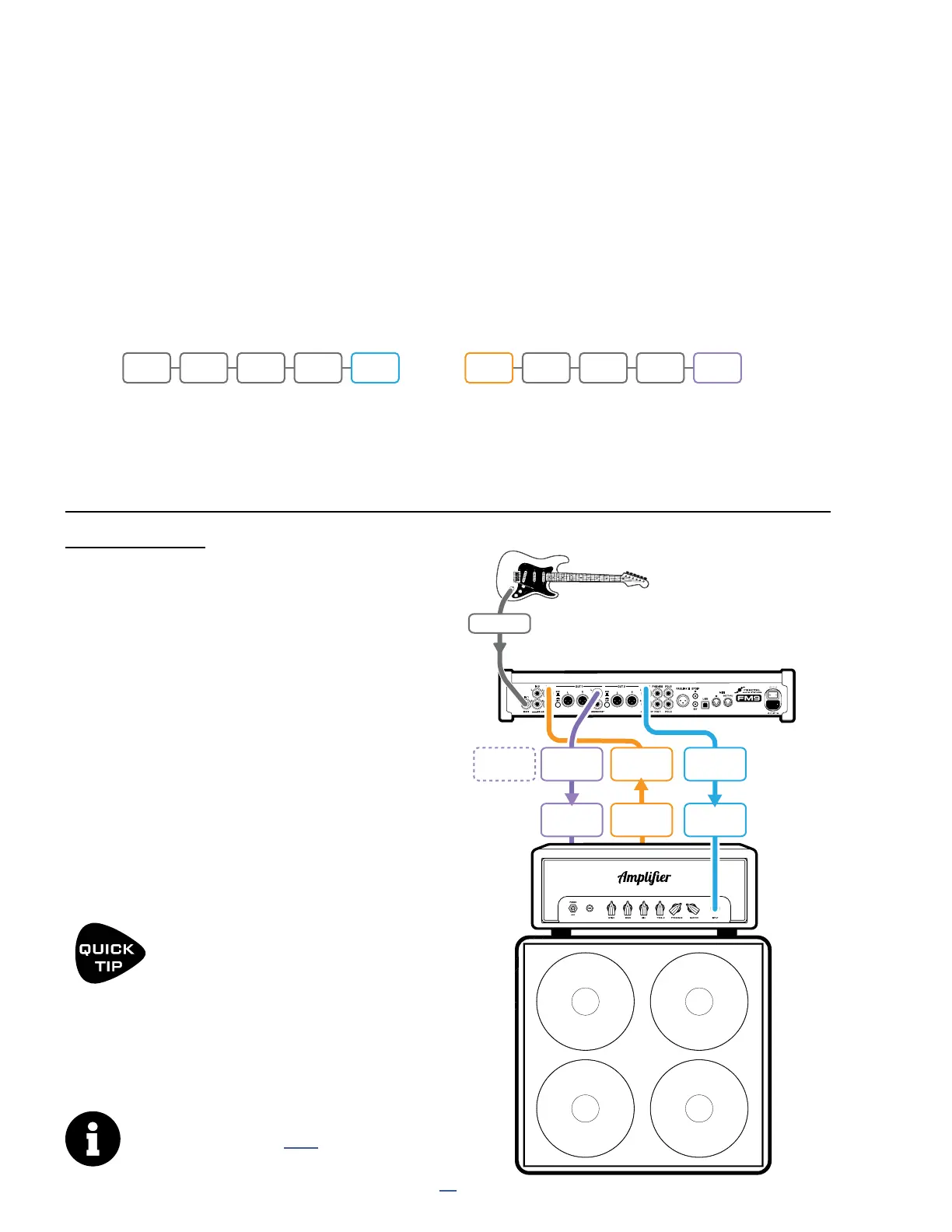
The Four-Cable Method (“4CM”) uses custom presets to insert the FM9 at two different points along a long signal
chain. This setup was more popular years ago, but as amp modeling improves, fewer and fewer players use it.
First, a chain of “pre” effects like wah and drive are used between the guitar and your amp’s preamp section.
Next, a chain of “post” effects like delay and reverb are placed in your amp’s FX loop. The 4CM preset therefore
contains two independent paths, each requiring its own separate in, out, and FX blocks. A 4CM presets contain no
Amp or Cab blocks. A stylized illustration appears below.
FOUR-CABLE METHOD (“4CM”)
FM9
IN1 (Instr)
Guitar
Amp
INPUT
3L
FX
SEND
FX
RETURN
Amplifier
Model 50
OUTPUT
1L
OUTPUT
1R
OUTPUT
3L
MAIN
INPUT
Optional
for Stereo.
IN1 WAH DRV OUT3 IN 3 DLY REV OUT1
etc. etc.
CONNECTIONS
Connect your guitar to FM9 Input 1 (Instrument).
Connect FM9 Output 3 L to the front input of
your amp using a Humbuster™ cable to combat
hum from ground loops. Set the front panel OUT
3 knob fully clockwise for unity gain operation.
Connect your amp’s FX Send to Input 3 L.
FM9 Input trim can be adjusted in SETUP: I/O:
Audio. On the same page, set Input 3 Mode
to “LEFT ONLY”. Also see the “Tip” below.
Connect Output 1 L (1/4”) to the FX Return
of your amp using a Humbuster™ cable. Set
the front panel OUT 1 knob as desired for
appropriate volume. To extend this conguration
for optional stereo, connect Output 1 R to
the FX Return of a second amplier.
TIP: OPTIMIZE FOR LOW NOISE
Even with Humbuster cables, the 4CM can
be noisy. The optional Boost/Pad function
on Out 3 can help to lower the noise floor.
To nd the right setting, adjust this to be as high as
possible without clipping, as indicated by a red LED on
the top panel. The volume won’t change but you should
hear the FM9’s noise floor drop as you increase boost/
pad. Find this option under SETUP: I/O: Audio.
If your amp has a parallel FX loop,
please see the note on p. 35
Signal hits the FM9 rst, where it is processed by the pre effects. Output 3 feeds the front of your amplier. The
amp’s FX Send is connected to Input 3, and a chain of post effects processes signal and passes it to Output 1
and your amp’s FX Return. Note that the pre and post chains are not connected to each other at all on the FM9
grid. In fact, either chain can be as simple or as complex as desired.



 To Next Page