19
2 HARDWARE OVERVIEW
THE TOP PANEL
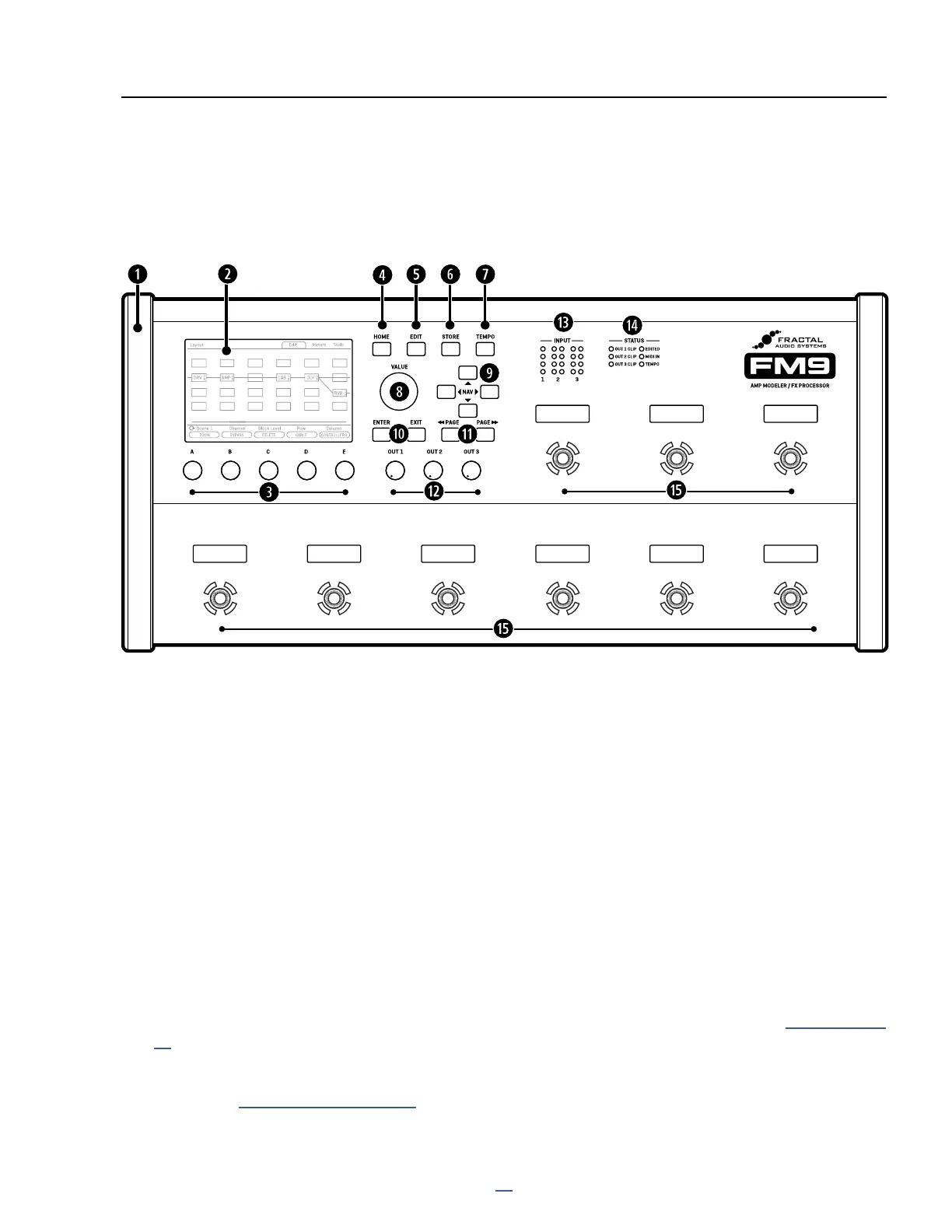
q
Chassis — The FM9 is housed in a rugged steel chassis with high-durability protective plastic end caps.
w
Color Display — A large 800×480 color display is optimized for readability even in the most difcult
environments, with excellent brightness and contrast.
e
A, B, C, D, and E knobs — Five “endless rotary” push-knobs perform different functions in different areas of
the FM9. Push functions are shown as “buttons” in the display above the knobs. Most Edit pages show one
or two rows of ve knobs for easy 1:1 operation. On vertical menu pages, knob functions have “A,B,C,D,E”
labels on the left to indicate control mapping. (You can also use NAV and VALUE to edit any parameter.)
HOME Button — This button loads the Home menu, a convenient place to select presets, access the tuner,
edit presets on the Layout grid, view Controllers, or turn the page to access meters, performance controls, or
the presets directory.
EDIT Button — This is used to Edit blocks in the current preset. You can jump right to the current block from
the home menu or any other page and then tap EDIT sequentially to step through all blocks in the preset
(top-to-bottom, left-to-right), or select a block on the Layout grid rst and then press Edit. See “Presets” on p.
39 for more on editing presets.
STORE Button — Enters the Store menu where you can save presets and also edit the names of presets and
scenes. See “Saving Changes” on p. 47.
2 HARDWARE OVERVIEW
Preset 1 Preset 2 Preset 3 Preset 4 Preset 5
SCENES Tap Tempo
NEXT BANK
PREV BANK



 To Next Page