21
2 HARDWARE OVERVIEW
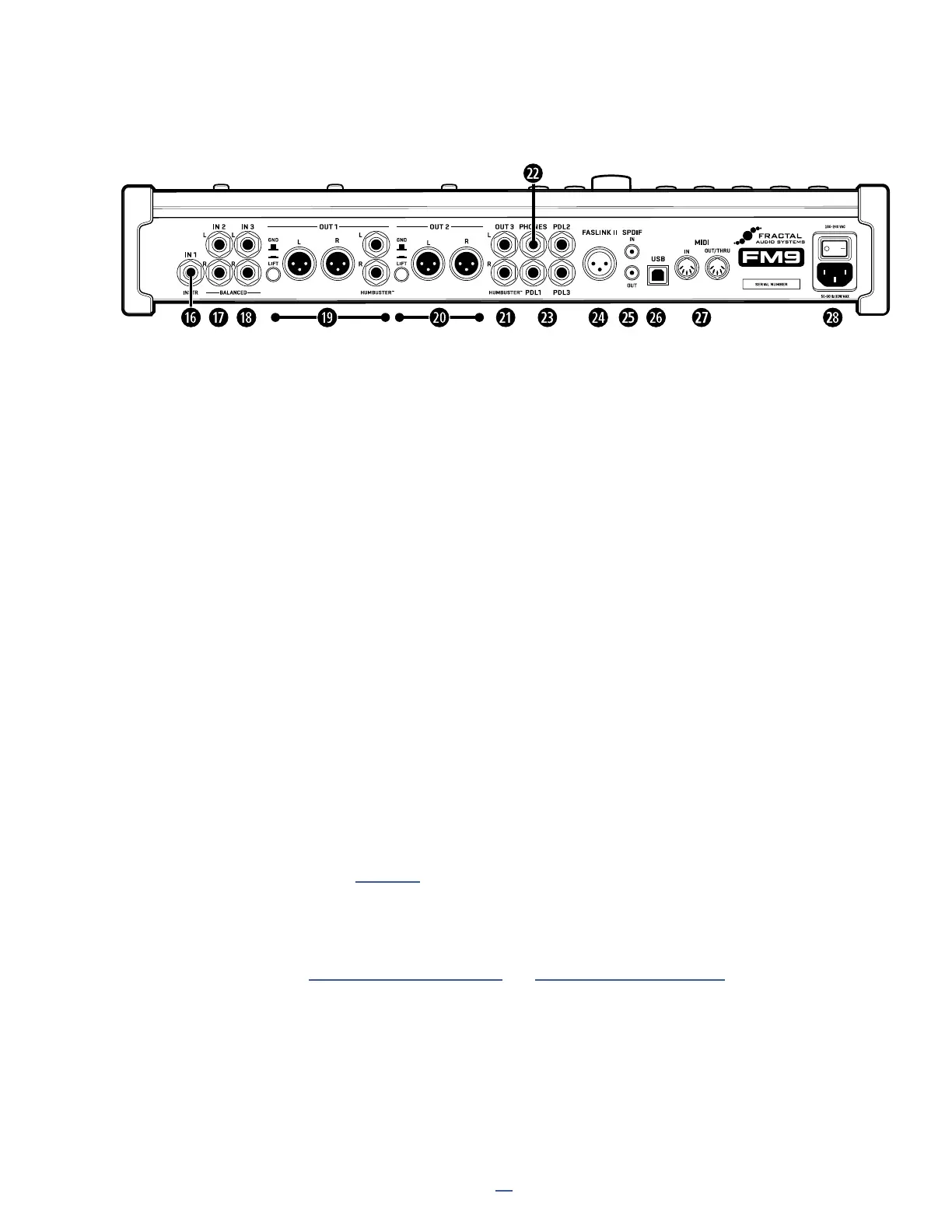
THE REAR PANEL
1^
Input 1 [Instrument] (mono) — (1) 1/4" Jack (unbalanced) — Connect your guitar, bass or other “instrument
level” outputs to this input featuring our proprietary “Secret Sauce IV” circuitry.
1&
Input 2 — (2) 1/4” Jacks (balanced) and
1*
Input 3 — (2) 1/4” Jacks (balanced)
Connect balanced or unbalanced line level signals here. Inputs 2 and 3 can be used as auxiliary inputs with
any mono or stereo line level source like a guitar processor, mixer, synthesizer, backing track player, etc.,
or paired with Out 2 and/or 3 for “send and return” applications involving pedals, processors, preamps, and
more. These inputs can also be used for guitar or bass but do not have the “secret sauce” circuit like Input 1.
TIP: Balanced audio connections are resistant to noise and interference. It is best to use XLR or TRS
(3-conductor) cables when connecting balanced devices. Use regular TS-type cables or adapters (2-conductor)
with the unbalanced outputs of guitars, preamps, and many other guitar products.
1(
Output 1 L+R (stereo) — (2) XLR-Male (balanced) AND (2) 1/4” Jacks (Humbuster™) — This is typically
the “Main” output. Use the XLR jacks to connect to balanced FRFR speakers, mixers, studio monitors, etc.,
using the ground lift switch if necessary to reduce 60-cycle hum. An additional pair of Humbuster 1/4” jacks
produces the same signal as the XLR jacks and can be used at the same time.
2)
Output 2 L+R – (Stereo) — (2) XLR-Male (balanced) — Use the XLR jacks to connect to the balanced inputs
of FRFR speakers, mixers, monitors, etc., using the ground lift switch if needed to reduce 60-cycle hum. You
can also use XLR to TS cables to connect to unbalanced inputs.
2!
Output 3 L+R (stereo) — (2) 1/4” Jacks (Humbuster™) – Output 3 can be used for a variety of applications. It
differs from Out 1 and Out 2 in that it is designed for unity gain applications such as the popular “Four-Cable
Method” and other scenarios involving pedals, tube amps, analog DI recording, etc. Set the OUT 3 Level knob
fully clockwise for unity gain. Section 4 covers some of these applications in detail.
2@
Headphones Output — 1/4” Stereo Jack — Connect headphones here to monitor Output 1 (see above).
2#
Pedal Inputs — (1,2,3) 1/4" Jacks — used to connect external expression pedals or switches to control
various functions. See “Expression Pedals” on p. 10 and “External Switches” on p. 12.
2$
FASLINK II Connector — This allows you to connect the FM9 with one or two FC-6 or FC-12 foot controllers.
FASLINK™ uses a standard XLR cable for 2-way communication and also powers the rst FC without an
external “wall wart” adapter. (See your FC Owner’s Manual for more on daisy chaining and other options.)
NOTE: The FASLINK II port on the FM9 is designed for our FC Series of foot controllers and is NOT compatible
with the FASLINK port on our MFC-101 MIDI foot controller.
2%
SPDIF In and Out — (Coaxial “RCA” type connectors) — Digital in and out ports allow the FM9 to interconnect



 To Next Page