37
4 SETTING UP
INSERTING OUTBOARD GEAR
Global Settings: As per your usual setup, check I/O Mono/Stereo Settings
Presets: Custom
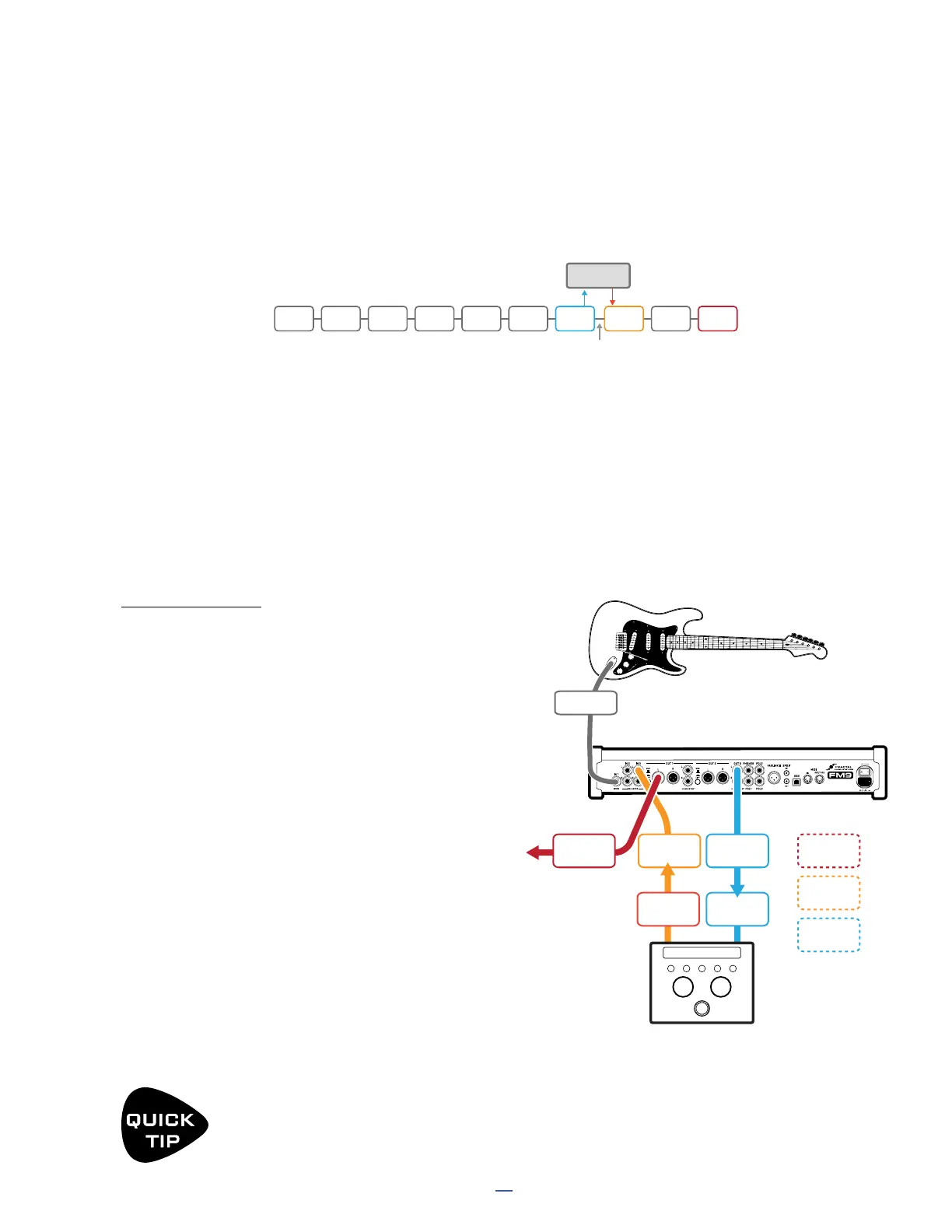
The extra ins and outs of the FM9 can be used in a “send-and-return” loop for outboard gear. Custom presets are
required for this setup, with output and input blocks added for the send and the return (see illustration below).
FM9
Main
Out
INPUT
3L
OUTPUT
OUTPUT
3L
INPUT
3R
OUTPUT
3R
INPUT
OUTPUT
1L
OUTPUT
1R
Optional
for Stereo
OUTBOARD GEAR
(PREAMP, PROCESSOR, PEDAL, ETC.)
INSTR IN
PEDALY THING
Knob Oddy Nose
IceZine
DatRubble
CONNECTIONS
Connect your guitar to FM9 Input 1 (Instrument).
This example assumes Output 1 is connected to a
PA or FRFR monitors, but the principles you learn
here can be applied to other rig designs as well.
Connect Output 3 L as a “send” to the input
of your outboard device using a Humbuster™
cable. Use Output 3 R for optional stereo.
Adjust output levels using the front panel
OUT 3 knob, remembering that setting it
fully clockwise provides unity gain.
Use input trim and/or output level controls on
your outboard device as needed for optimal
gain staging.
Connect the output of your outboard device to
Input 3 L as a “return.” Use Input 3 R for optional
stereo. Use guitar cables or balanced cables
as appropriate. Adjust Input 3 levels as needed
in SETUP: I/O: Audio. Also see the TIP about
noise optimization on the preceding page.
NOTE: Other FM9 inputs and outputs can be
used in the same way for additional inserts.
IN1 CMP WAH
Serves as a SEND Serves as a RETURN
Don’t miss this cable
AMP CAB OUT1DRVOUT3IN 3DLY
OUTBOARD
in out
Signal passes through the grid to the OUT 3 block where it leaves the FM9 to be processed by the external device.
The outputs of the external device are connected to Input 3. Additional blocks can be used before nally passing
signal to Out 1. Notice that the Out 3 block IS connected to the IN 3 block. This is because Input 3 is specially
designed to work as a bypass for the entire loop, allowing signal to flow even when the outboard gear is not in
use. You can operate this with a footswitch, or control it with scenes.
One nal comment: don’t jump to the conclusion that an insert is the best way to use 3rd party gear. You can
achieve great results simply by connecting things in series like traditional pedals. The FM9 works great when
used with pedals between your guitar and its input. Similarly, you can connect FM9 outputs to the inputs of other
processors. One advantage of using an insert, however, is that outboard gear can be controlled by FM9 presets,
scenes, and footswitches, or even recorded via USB.
The FM9 can send MIDI to control 3rd party devices. Connect a MIDI cable from the MIDI Out of the
FM9 to the MIDI IN of the connected device. Then program the required MIDI messages using either a
“Scene MIDI Message” or a “Control Switch MIDI Message”.



 To Next Page