88
13 SETUP MENU
PARAMETER Description
Hold Function Mode
AUTOMATIC,
SWITCH UP
Normally, Hold functions re automatically after a timeout (above). With this
setting changed from AUTOMATIC to SWITCH UP, they wait for the switch
to be released, granting precise control over the timing of a hold function.
Now, you can use HOLD, for example, to change a Scene precisely on the
downbeat.
Per-Preset Overrides
ENABLED, DISABLED
Any preset can override the function of any footswitch in any layout. This
offers extreme flexibility, making it possible to handle exceptions easily in
a system where everything is normally global. This setting allows you to
globally DISABLE Per-Preset overrides to prevvent 3rd party presets from
taking over essential footswitches.
See "The Footswitch Functions Guide" for more on per-preset functions.
Footswitch Tuner Mode
ENABLED, DISABLED
Turn this feature ON to enable a special mode where the rst three
footswitches visually enhance the tuning process.
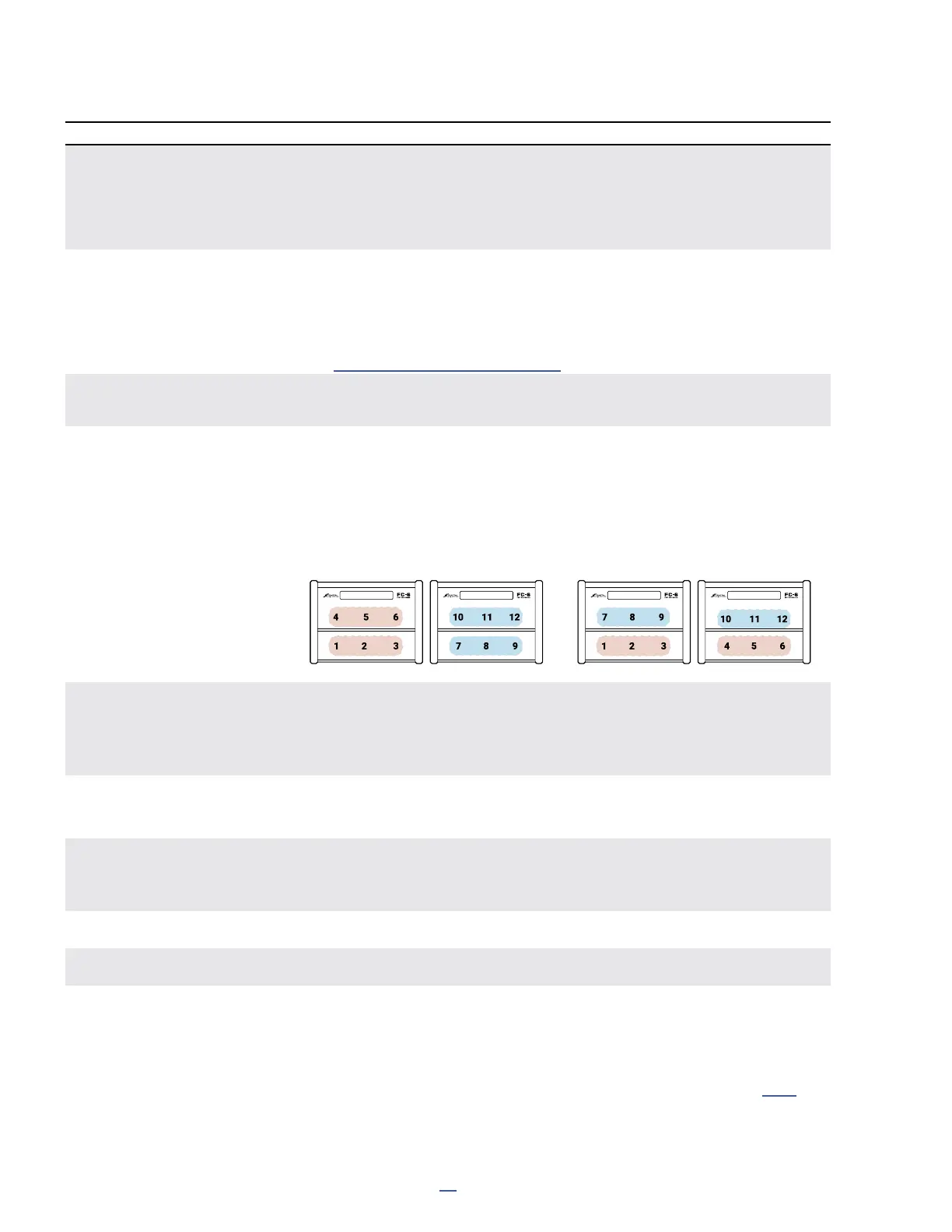
FC-6 Layout Mode This changes how layouts are displayed on a connected FC-6. Normally, the
FC-6 shows switches 1–6 from any layout — just as you would expect. If you
design layouts on an FC-12 and then load them on an FC-6, however, this
results in things being arranged differently, especially when Views are used.
To counter this, you can enable FC-12 mode on the FC-6 (Formerly called "FC-
6/FC-12 Compatibility Mode"), illustrated below:
FC-6 Default Mode
FC-6 in FC-12 Mode
FC MAIN DISPLAY
Show Preset Numbers,
Show Scene Numbers
ON/OFF
The main display of a connected FC controller shows the name and number
of the current preset and current scene. These two options allows you to
individually hide the numbers so a greater number of characters can be
dedicated to the names. This has no effect except on a connected FC.
Message Hold This determines the duration for special footswitch messages to be shown
in the main display of the FM9 or the display of a connected FC controller.
Example: Effect BYPASSED or ENGAGED)
Ring Intensity Bright,
Ring Intensity Dim
25–100%, 1–50%,
Each FC footswitch has its own LED ring. These rings change between off,
dim, and bright to show switch states. The Ring Intensity parameters allow
you to independently adjust the brightness of dim and bright states.
Mini-Display Contrast This sets the contrast in the onboard mini-displays.
Mini-Display + Ring Brightness This sets the master brightness of the onboard mini-displays and LED rings.
CS1 Exclusive, etc. Six options allow you to add each of the six Control Switches to a mutually
exclusive group. Any switch with Exclusivity enabled becomes a member of a
group in which only ONE switch can be turned on at once. Turning any switch
in the group ON will turn all others in the group OFF automatically.
For more on Control Switches, see the Footswitch Functions Guide (p. 18)



 To Next Page