124
Viewing Pictures on a Computer
Connecting the Camera
1
Find a memory card containing pictures you want to copy to the computer and insert the card into
the camera.
R Windows users may require the Windows CD when starting the software for the rst time.
Q Loss of power during transfer could result in loss of data or damage to the memory card. Insert a fresh or
fully-charged battery before connecting the camera.
2
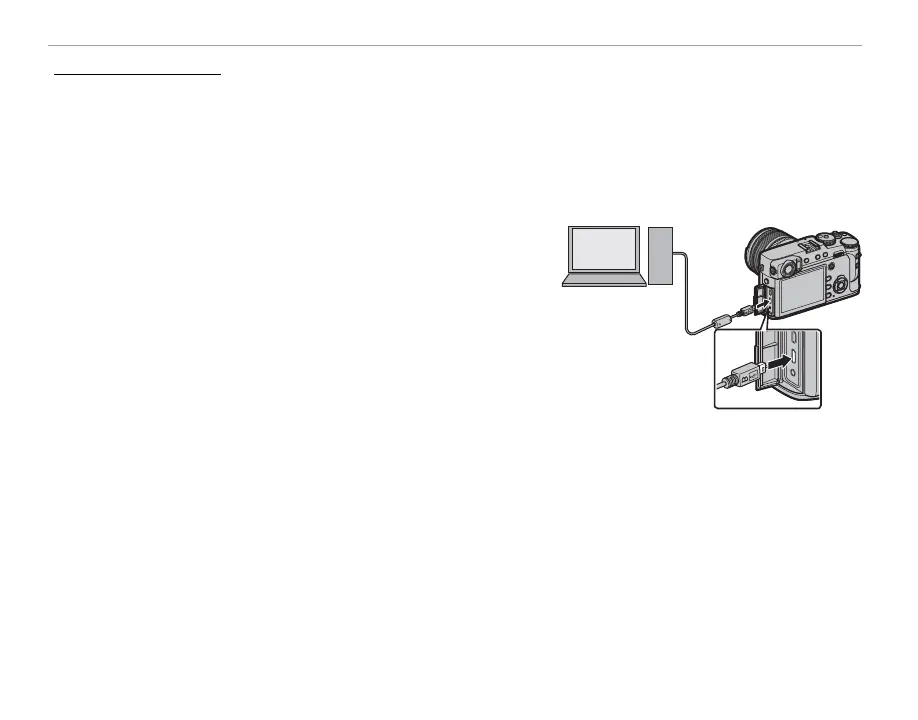
Turn the camera o and connect a USB cable (available
separately from third-party suppliers) as shown, making
sure the connectors are fully inserted. Connect the cam-
era directly to the computer; do not use a USB hub or key-
board.
Q The USB cable must be no more than 1.5m (4.9ft.) long and be
suitable for data transfer.
3
Turn the camera on.
4
Copy pictures to the computer using MyFinePix Studio or applications provided with your operat-
ing system.
For more information on using the software, start the application and select the appropriate option
from the Help menu.



 To Next Page