4
Parts of the Camera
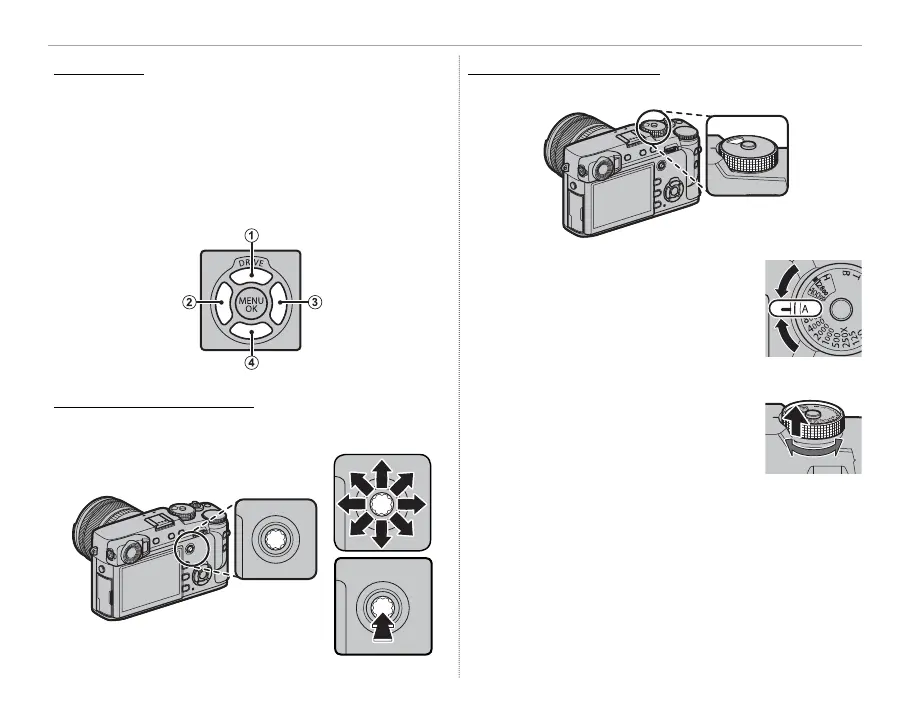
The Selector
Press the selector up (
q
), right (
e
), down (
r
), or
left (
w
) to highlight items. The up, left, right, and
down buttons also double as the DRIVE (P 52), Fn4
( lm simulation; P 60), Fn5 (white balance; P 61),
and Fn6 (AF mode; P 66) buttons, respectively
(P 50).
The Focus Stick (Focus Lever)
The Focus Stick (Focus Lever)
Tilt or press the focus stick to select the focus
area (P 67).
The Shutter-Speed/ISO Dial
The Shutter-Speed/ISO Dial
Choose a shutter speed and ISO sensitivity.
Rotate the dial to choose a shutter
speed (P 35, 36, 37, 38).
R If the dial is in the A position, press
the lock release while rotating the
dial.
Lift and rotate the dial to choose ISO
sensitivity (P 58).



 To Next Page