69
More on Photography and Playback
Focus Mode
■ Zone AF
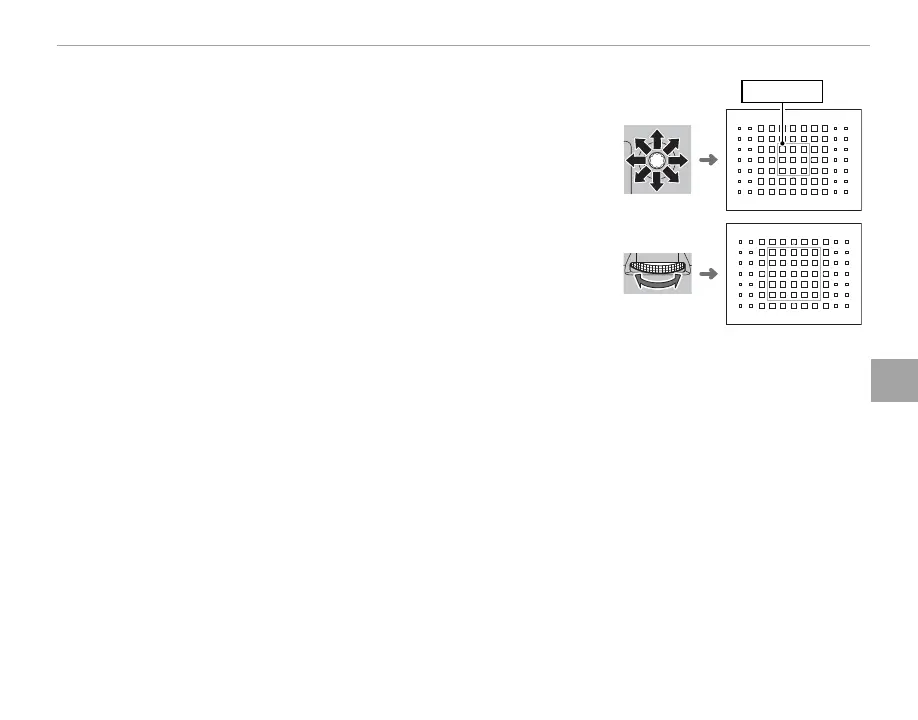
Press the center of the focus stick to display the focus zone. Use the
stick to position the zone or press the center of the stick to return the
zone to the center of the display.
Focus zone
To choose the number of focus frames in the zone, rotate the rear com-
mand dial. Rotate the dial right to cycle through zone sizes in the or-
der 3 × 3, 5 × 5, 7 × 7, 3 × 3…, left to cycle through zone sizes in reverse
order, or press the center of the dial to select a zone size of 3 × 3. Press
MENU/OK to put your selection into e ect.



 To Next Page