31
First Steps
Display Settings
The View nder Display
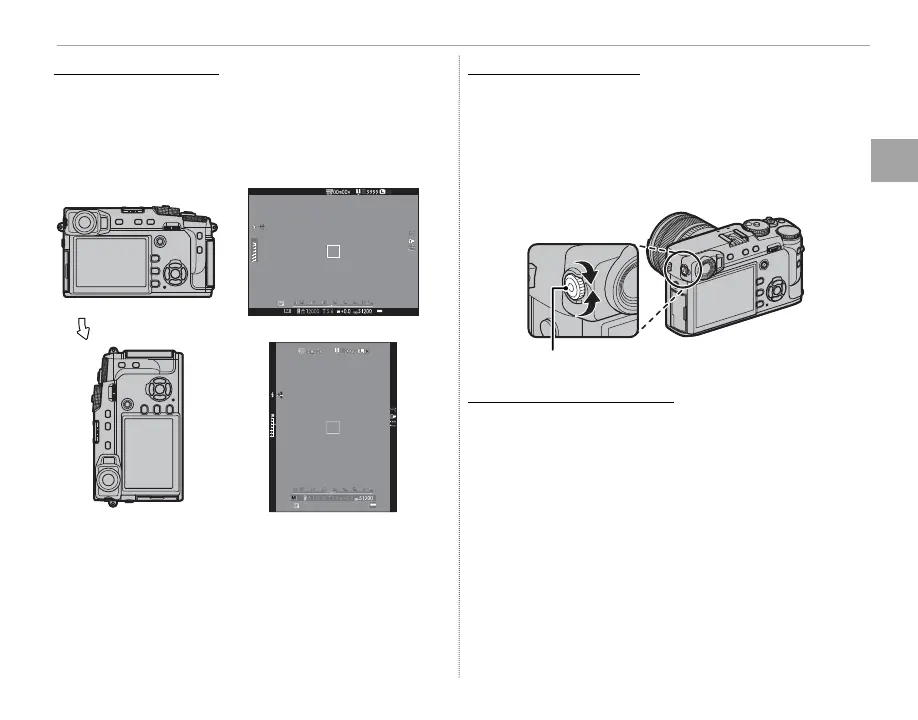
When ON is selected for D SCREEN SETTING>
EVF AUTOROTATE DISPLAYS
(P 110)
, the indi-
cators in the view nder automatically rotate to
match camera orientation.
Orientation changed from “wide” to “tall”
Q The display in the LCD monitor is una ected.
Focusing the View nder
The camera is equipped with diopter adjustment
in the range –4 to +2 m
–1
to accommodate indi-
vidual di erences in vision. Rotate the diopter
adjustment control until the view nder display is
in sharp focus.
Diopter adjustment control
Adjusting Display Brightness
Adjusting Display Brightness
The brightness and hue of the view nder and LCD
monitor can be adjusted using the options under
D SCREEN SETTING
. Choose EVF BRIGHTNESS
or EVF COLOR to adjust view nder brightness or
hue (P 110), LCD BRIGHTNESS or LCD COLOR to
do the same for the LCD monitor (P 110).



 To Next Page