67
More on Photography and Playback
Focus Mode
Focus-Point Selection
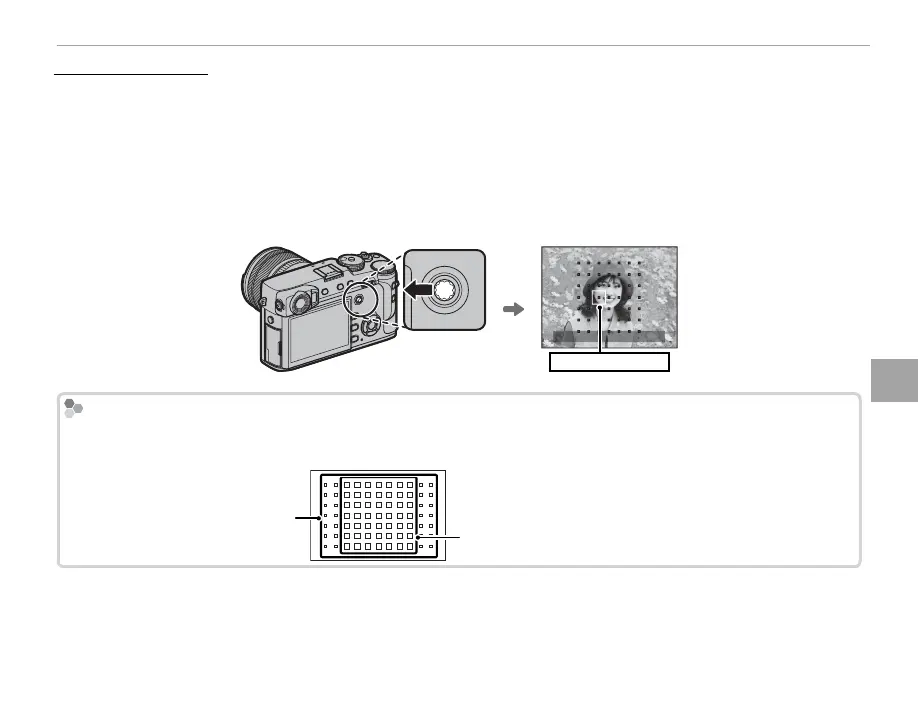
Use the focus stick (focus lever) to choose a focus point for autofocus. The procedure for selecting the
focus point varies with the option chosen for AF mode (P 66).
R Focus-area selection can also be used to choose the focus point for manual focus and focus zoom.
R The focus-area grid is reduced to 9 × 7 at an aspect ratio of 1 : 1 (P 88).
Tilt the focus stick to position the focus frame, or press the center of the stick to return to the center
focus point.
Focus frame
Available Focus Points
Fewer focus points are available for intelligent hybrid AF, which combines phase-detection with TTL contrast-
detect AF.
Intelligent hybrid AF
(TTL contrast-detect AF + phase-detection AF)
TTL contrast-detect



 To Next Page