35
Basic Photography and Playback
Basic Photography and Playback
Basic Photography and Playback
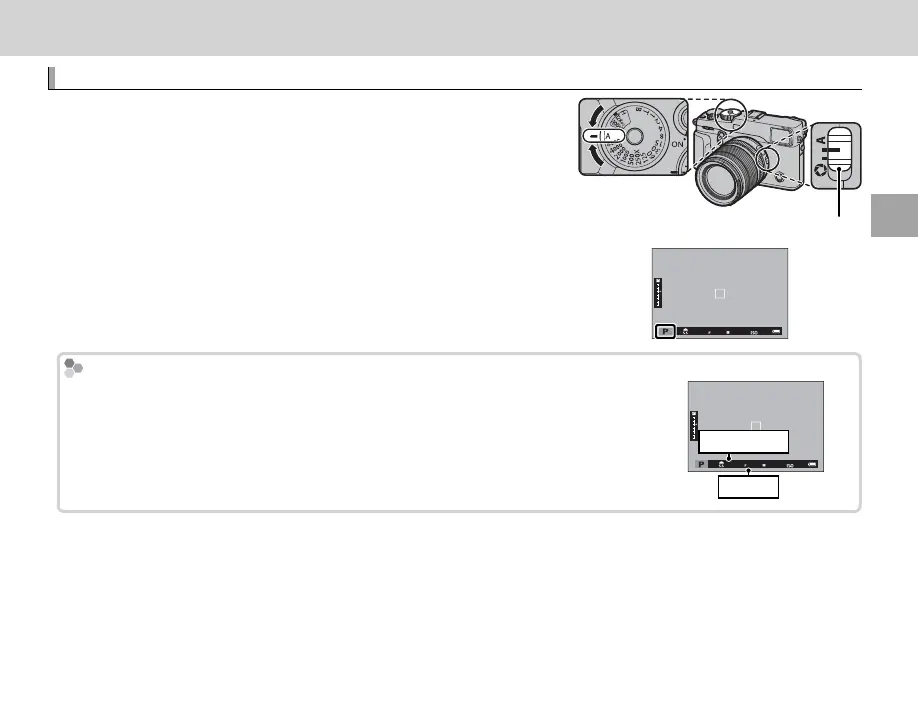
Program AE (P)
To allow the camera to adjust both shutter speed and aperture
for optimal exposure, set shutter speed and aperture to A. P will
appear in the display.
Q If the subject is outside the metering range of the camera, the shutter
speed and aperture displays will show “– – –”.
Aperture mode switch
Program Shift
If desired, you can rotate the front or rear command dial to select other combi-
nations of shutter speed and aperture without altering exposure (program shift).
Program shift is not available if the attached ash supports TTL auto, or if an auto
option is selected for H IMAGE QUALITY SETTING> DYNAMIC RANGE (P 89).
To cancel program shift, turn the camera o .
Shutter speed
Aperture



 To Next Page