78
1
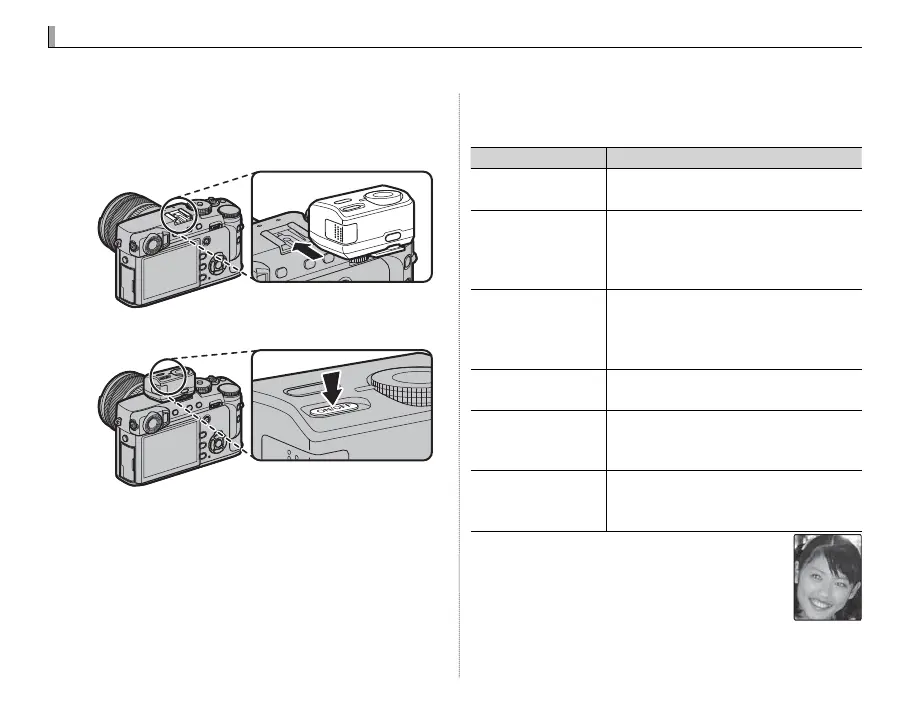
Remove the hot shoe cover and slide the ash
onto the hot shoe as shown, stopping when it
clicks into place.
2
Turn the ash on.
R For more information, see the documentation
provided with the ash unit.
3
Choose a ash mode in the F FLASH SET-
TING> FLASH MODE menu (P 87).
Mode
Description
A
(AUTO FLASH)
/
K
(RED EYE REDUCTION)
*
The ash res when required. Recom-
mended in most situations.
N
(FORCED FLASH)
/
L
(FORCED FLASH)
*
The ash res whenever a picture is
taken. Use for backlit subjects or for
natural coloration when shooting in
bright light.
F
(SLOW SYNCHRO)
/
M
(RED EYE & SLOW)
*
Capture both the main subject and
the background under low light (note
that brightly lit scenes may be overex-
posed).
l
(2ND CURTAIN SYNC.)
/
d
(2ND CURTAIN SYNC.)
*
The ash res immediately before the
shutter closes.
D
(COMMANDER)
A ash mounted on the hot shoe can
be used to control optional remote
ash units.
P
(SUPPRESSED FLASH)
The ash does not re even when the
subject is poorly lit. A tripod is recom-
mended.
* Red-eye removal is available in these modes
when Intelligent Face Detection is active (P 92)
and red-eye removal is on (P 98). Red-eye re-
moval minimizes “red-eye” caused when light
from the ash is re ected from the subject’s
retinas as shown in the illustration at right.
Flash Photography
Use an optional ash unit for additional lighting when shooting at night or indoors under low light.



 To Next Page