79
More on Photography and Playback
Flash Photography
Q Depending on the distance to the subject, some
lenses may cast shadows in photos taken with the
ash.
R Lowering the ash turns the ash o (P) and pre-
vents it ring even when the subject is poorly lit; use
of a tripod is recommended. Lower the ash where
ash photography is prohibited or to capture natu-
ral lighting under dim light. We also recommend
that you lower the ash when the camera is o .
R If p is displayed when the shutter button is pressed
halfway, the ash will re when the photo is taken.
R Except in commander mode, the ash may re sev-
eral times with each shot. Do not move the camera
until shooting is complete.
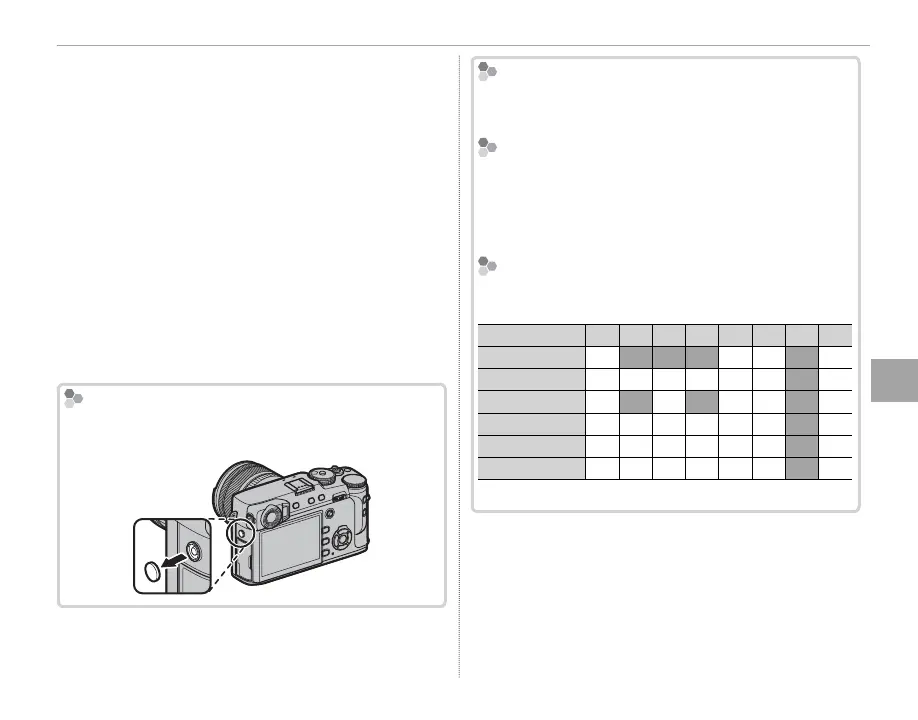
The Sync Terminal
Use the sync terminal to connect ash units that re-
quire a sync cable.
Flash Sync Speed
The ash will synchronize with the shutter at shutter
speeds of
/
s or slower.
Optional Flash Units
The camera can be used with optional FUJIFILM
shoe-mounted ash units (P 132). Do not use third-
party ash units that apply over 300 V to the camera
hot shoe.
Flash Mode and Shooting Mode
Flash Mode and Shooting Mode
The ash modes available vary with the shooting
mode (P 153):
Flash mode
P
S
A
M
j
Y
F
r
*
A
✔
✔
✔
✔
N
✔
✔
✔
✔
✔
✔
✔
F
✔
✔
✔
✔
✔
l
✔
✔
✔
✔
✔
✔
✔
D
✔
✔
✔
✔
✔
✔
✔
P
✔
✔
✔
✔
✔
✔
✔
* Wireless remote photography.



 To Next Page