30
Display Settings
The Hybrid (EVF/OVF/ERF) View nder
The Hybrid (EVF/OVF/ERF) View nder
The features of the di erent displays are described below.
Display
Description
OVF
The optical display is sharp and free of blur so that your subject’s expression is always visible. In addition, the
OVF shows the area just outside the frame, making it easier to compose shots on the y. Because the view nder
window is a slight distance from the lens, the area visible in photographs may however di er slightly from the
display in the view nder due to parallax.
EVF
The live view display gives you a preview of the nal picture (including depth of eld, focus, exposure, and white
balance) with exactly the same frame coverage.
ERF
(dual display)
As for the optical view nder but with a focus preview. A magni ed view of an area of the frame including the
current focus position is shown at the bottom right corner of the display.
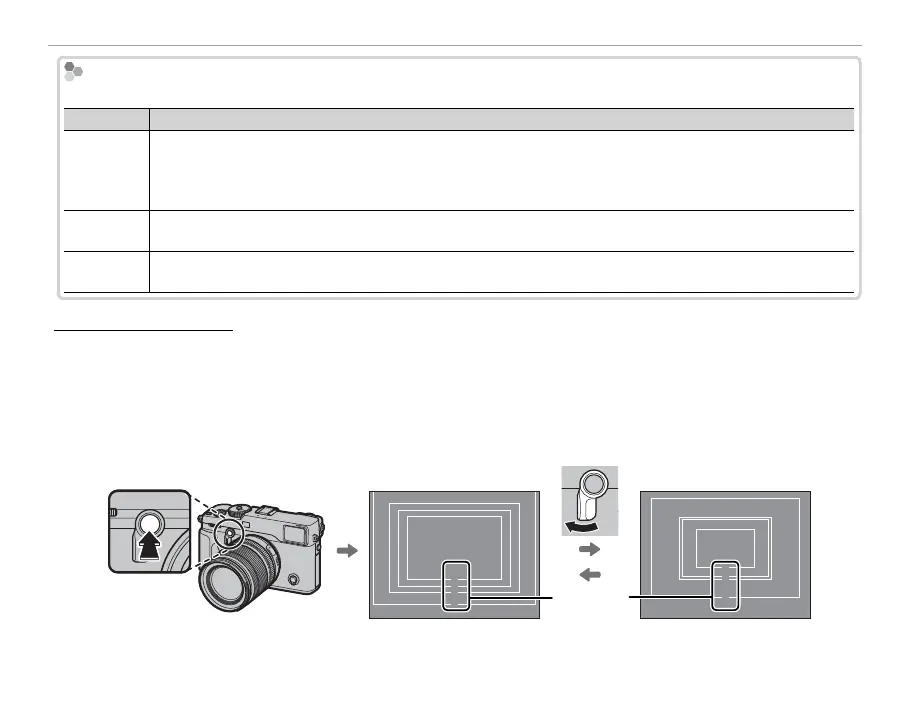
Bright Frame Simulation
The angle of view covered by the bright frame in the OVF display varies with the focal length of the
lens. Pressing a function button (by default, Fn2) displays a bright frame simulation that shows the area
covered by the bright frame at di erent focal lengths.
R Keep the view nder selector pressed up to toggle between the bright frames for maximum and minimum
aperture.
32
27
23
18
Focal
length
90
60
56
35
Wide (0.36 ×) Tele (0.6 ×)



 To Next Page