21
Vapodest 50s carousel
5 Assembly and installation
5.7. Connection of PC / Laptop
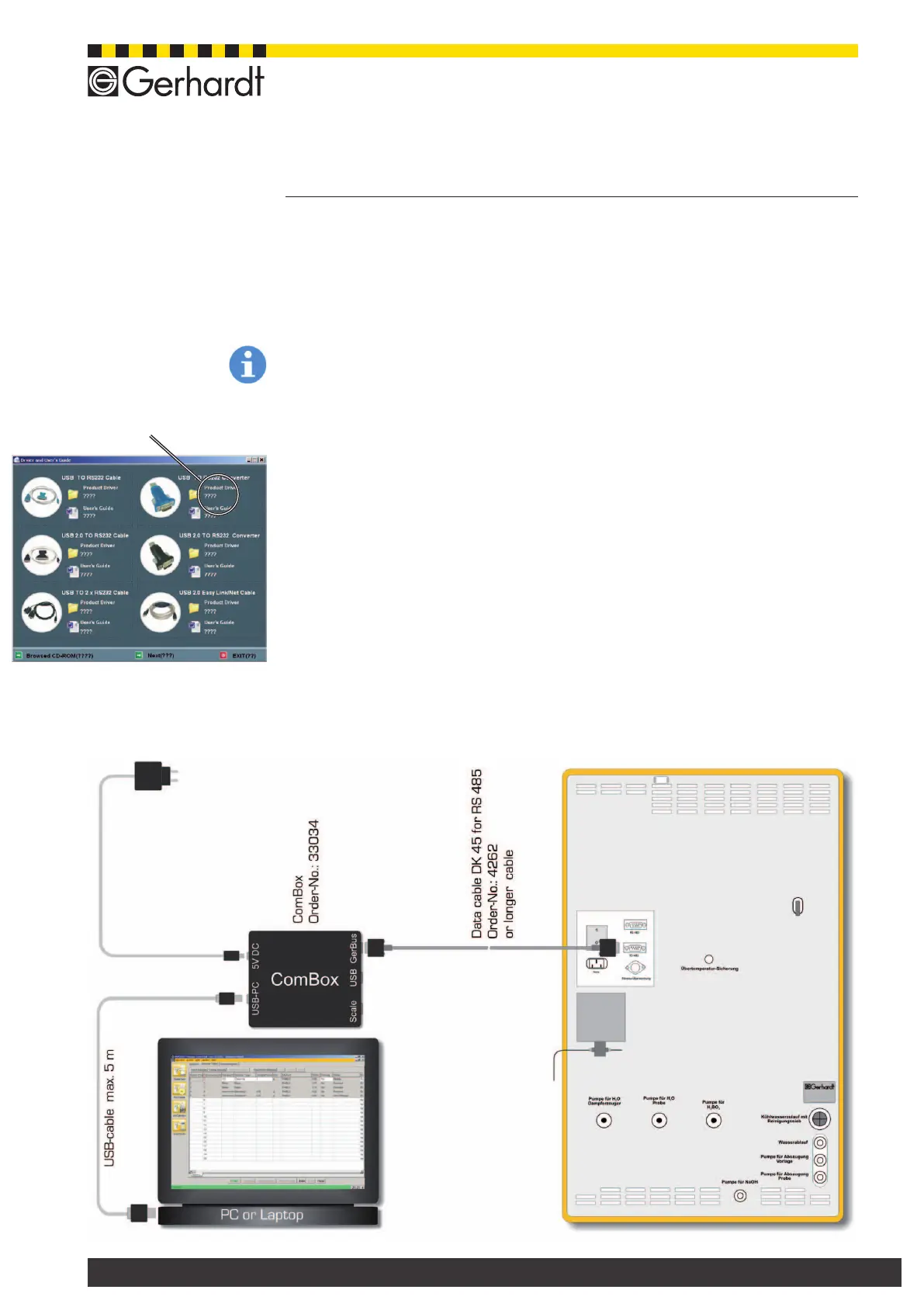
The data exchange between the Vapodest and the PC is done using the Gerhardt
Com-Box. The customer needs a USB-interface for connecting GerBus to the
PC. The ComBox is part of the instrument and cannot be combined with other
Vapodest-instruments.
Please note!
To avoid problems during the installation, please make sure that the USB-driver
is installed on the PC PRIOR to connecting it to the ComBox!
1. Switch on PC or Laptop
2. InstallUSB-driverfortheComBox.
Insert the CD-ROM "Driver and user's guide" and Install the driver "USBto
RS 232 Converter" according to the instruction of the manufacturer.
3. Connect mains cable with ComBox and the mains connection.
4. Connect USB-data cable (max. 5m) with USB-interface of the ComBox and
the USB-interface at the PC.
5. Connect data cable DK 45 (5m) with the RS 485 interface of the Vapodest and
the RS 485 for the ComBox.
Note: It is possible to connect a longer data cable with e.g. a length of 100 m
or longer. This has the advantage that the Vapodest and the PC don’t have to
be in the same room.
Fig 5.6.
choose this USB-driver



 To Next Page