DESCRIPTION OF THE SOUND MODULES
65
AUDIO AND VIDEO DOOR ENTRY SYSTEM - CODED DOOR PANEL
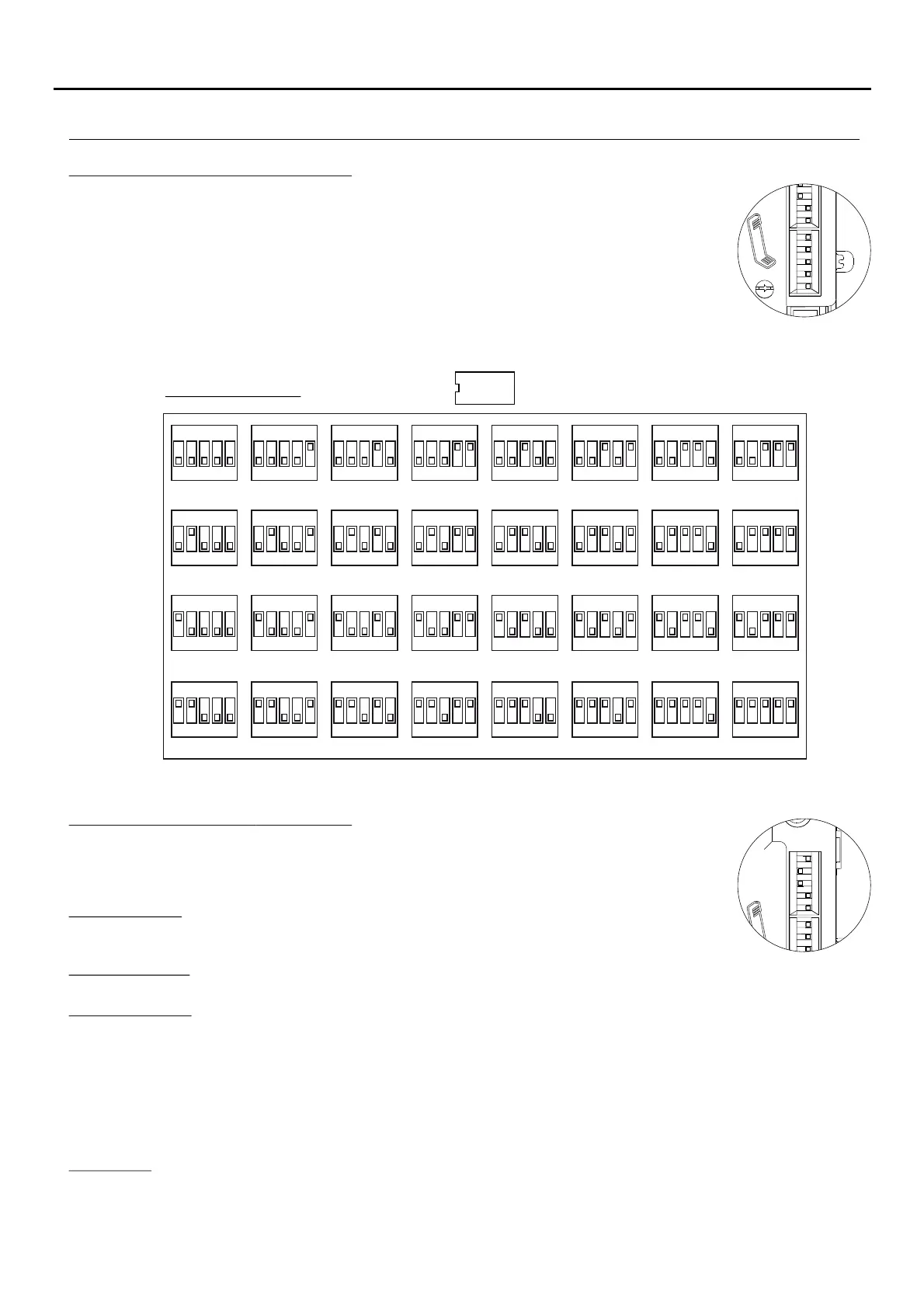
The SW1 configuration dip-switch is located on the upper right side of the back of the sound
module.
ID
ON DIP
4321 5
ID=0
ON DIP
4321 5
ID=1
ON DIP
4321 5
ID=2
ON DIP
4321 5
ID=3
ON DIP
4321 5
ID=4
ON DIP
4321 5
ID=5
ON DIP
4321 5
ID=6
ON DIP
4321 5
ID=7
ON DIP
4321 5
ID=8
ON DIP
4321 5
ID=9
ON DIP
4321 5
ID=10
ON DIP
4321 5
ID=11
ON DIP
4321 5
ID=12
ON DIP
4321 5
ID=13
ON DIP
4321 5
ID=14
ON DIP
4321 5
ID=15
ON DIP
4321 5
ID=16
ON DIP
4321 5
ID=17
ON DIP
4321 5
ID=18
ON DIP
4321 5
ID=19
ON DIP
4321 5
ID=20
ON DIP
4321 5
ID=21
ON DIP
4321 5
ID=22
ON DIP
4321 5
ID=23
ON DIP
4321 5
ID=24
ON DIP
4321 5
ID=25
ON DIP
4321 5
ID=26
ON DIP
4321 5
ID=27
ON DIP
4321 5
ID=28
ON DIP
4321 5
ID=29
ON DIP
4321 5
ID=30
ON DIP
4321 5
ID=31
SW1 DIP-SWITCH:
*
( )
Factory default.
*
( )
*
( )
ID: .Door panel code
Set a code from to for master door panel r from to for slave door panel as shown in the0 3 o 0 31
table belowID .
.
There must not be two master door panels with the same slave door panels may coexist withID; 2
the same ID but with different address or see table in page 66(0 1), .AUX
In case of slave door panel, the ID must be the same as the backbone ID configured on the riser multiplexer "MC-GTWIN",
if present.
The SW2 configuration dip-switch is located on the upper right side of the back of the sound
module.
Description of the SW DIP switch:2
AUX: .Auxiliary settings
Door panel type: The door panel can be configured as master (General) or slave. From the master
door panel, all the system users can be called; from slave door panel only the users of that
backbone (building) can be called. Users can identify the source of the call by the ring tone.
Slave door panel: Two slave door panels my be present in a riser multiplexer "MC-GTWIN" and must have a different
address (0 or 1).
Door lock release: The electric lock can be managed in "privacy or "free" mode. The door unit works as follows in the two
cases:
"Privacy": The electric lock may only be activated by pressing the door opening button on the monitor / telephone
when an audio conversation has been established or when after having received a call or autoswitch-on function
either a video connection has been established (does not allow activation of the electric lock in an auto-spy process).
"Free": The electric lock may be activated by pressing the door opening button on the monitor / telephone if the door
panel is configured as master or as slave and the user belongs to the same backbone (building) as the door panel.
This function is typically used on secundary door panels.
Interruption: During an intercom conversation, autoswitch-on or auto-spy function is active, the backbone (building) or ,
more in general, the system devices in busy channel , can be interrupted by a call coming from a door panel (according
to the configuration of this dip-switch).
Note: The parameter "interruption" has to be configured the same in all the door panels present in the system.
*
( )
Description of the SW1 DIP switch:
Continued overleaf



 To Next Page
 Loading...