Error messages/operating state (LED display)
MP85A A0293_06_E00_03 HBM: public 107
12 Error messages/operating state (LED display)
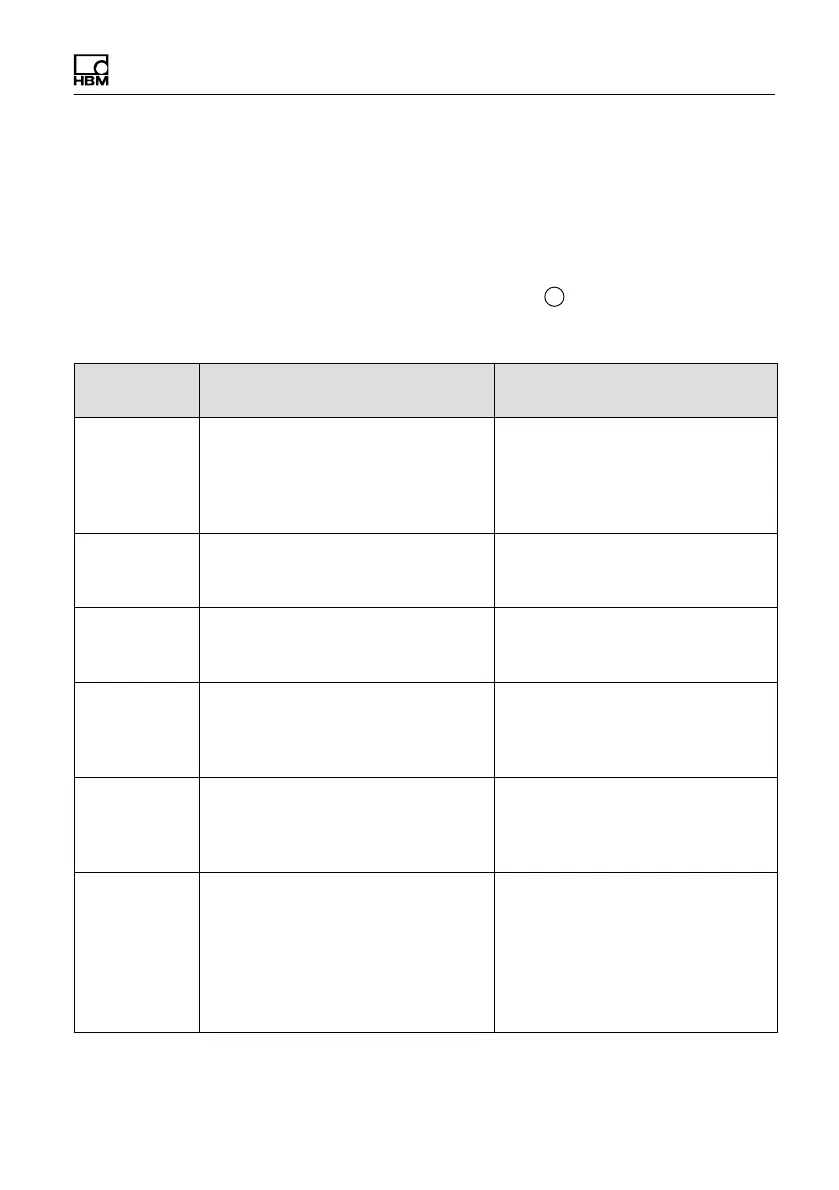
Depending on the display mode, various error messages may be displayed on
the LCD display of the MP85A process controller (or the PME Assistant),
instead of the measured value.
Current errors are displayed continuously. Press the
+
key to go to the
“ERROR” display mode.
Error
message
Cause Remedy
TransdErr Input signal overflow, transducer
not connected, transducer
incorrectly connected, amplifier not
adapted to transducer model, no
sense leads connected
Connect transducer, see pin
assignment, connect sense leads
ADC Ovfl. Input signal of measurement
channel A/D converter too large
Adapt hardware measuring range
(menu: Preparing for measure
ment/Amplifier/Transducer)
Grv Ovfl. Gross value overflow of a
measurement channel
Reduce display by one decimal
place (menu: Preparing for mea
surement/Amplifier/Transducer)
Scal.Err Input characteristic curve too steep Change input characteristic curve
(menu: Preparing for measure
ment/Amplifier/Calibrate
characteristic curve)
Flash error An error occurred while reading out
data from the flash EPROM of the
MP85A process controller.
This may be a one-off read error,
please repeat the process. If the
error occurs again, please
contact HBM Service.
CAN bus
error
An error has occurred on the CAN
bus
Check that the termination
resistors are present or whether
a channel is faulty. Then switch
the devices back on. If this does
not help, connect the devices to
the CAN bus one at a time, to
find out which device is faulty.



 To Next Page