Communication with a control system
90 A0293_06_E00_03 HBM: public MP85A
10 Communication with a control system
10.1 MP85A process controller in the machine control
system
For integration in a machine control system, digital inputs/outputs and the CAN
bus, PROFIBUS-DP, Profinet and Ethernet digital interfaces are available. In
all cases, the same device functions (object table) of the MP85A process con
troller are accessed. Firstly, control commands can be exchanged between the
MP85A process controller and the machine control system to ensure that pro
duction runs smoothly; secondly, status information can be exchanged and
indicated to the machine operator. The signals described below are available in
real time as control inputs/outputs (e.g. for protection of the machine).
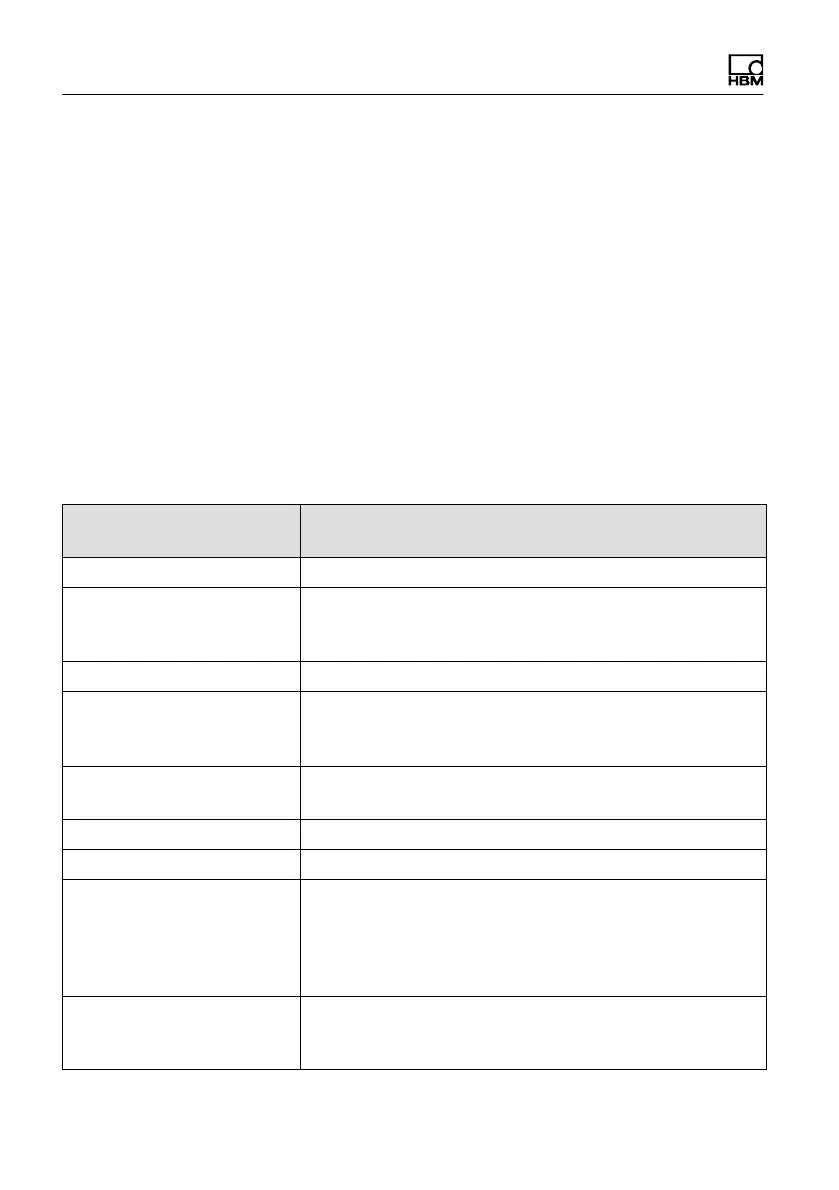
MP85A(DP)(‐S) ⇒
digital input PLC
Description
Process started/running Shows whether a measurement is underway
Process complete/valid Shows that the process has taken place and the result is
available. The next process may only be started once
this signal has been sent
Process OK/NOK Shows the result of a process
Reset piezosensor Allows you to set a channel with piezoelectric sensor to
zero until measurement starts. This enables the zero
drift of these sensors to be suppressed.
Result tolerance window x With this message, specific windows can be checked
and evaluated
Limit value …, channel … The limit value status of this channel is output
Transducer test result Shows the result of a transducer test
Error channel x/y There is a measurement error in the affected channel.
This could be a transducer error (e.g. in the connection),
an error in the A/D converter, the scaling, amplifier
calibration (initial calibration), a TEDS error or a gross
overflow.
MMC/SD card memory full The MultiMedia/SD card is almost full, there are less
than 5 MB remaining. Replace the card with a new card
or delete files.



 To Next Page