Parameter Descripon
ECO Mode (1:1) Set the matching threshold when authencang via ECO mode 1:1
matching mode. The larger the value, the smaller the false accept rate
and the larger the false rejecon rate. By default, the value is 75.
Face with Mask&Face
(1:N) (ECO)
Matching threshold for face with mask 1: N in ECO mode. The larger the
value, the smaller the false accept rate and the larger the false rejecon
rate. The Max. value is 100.
6.8.3 Set Time
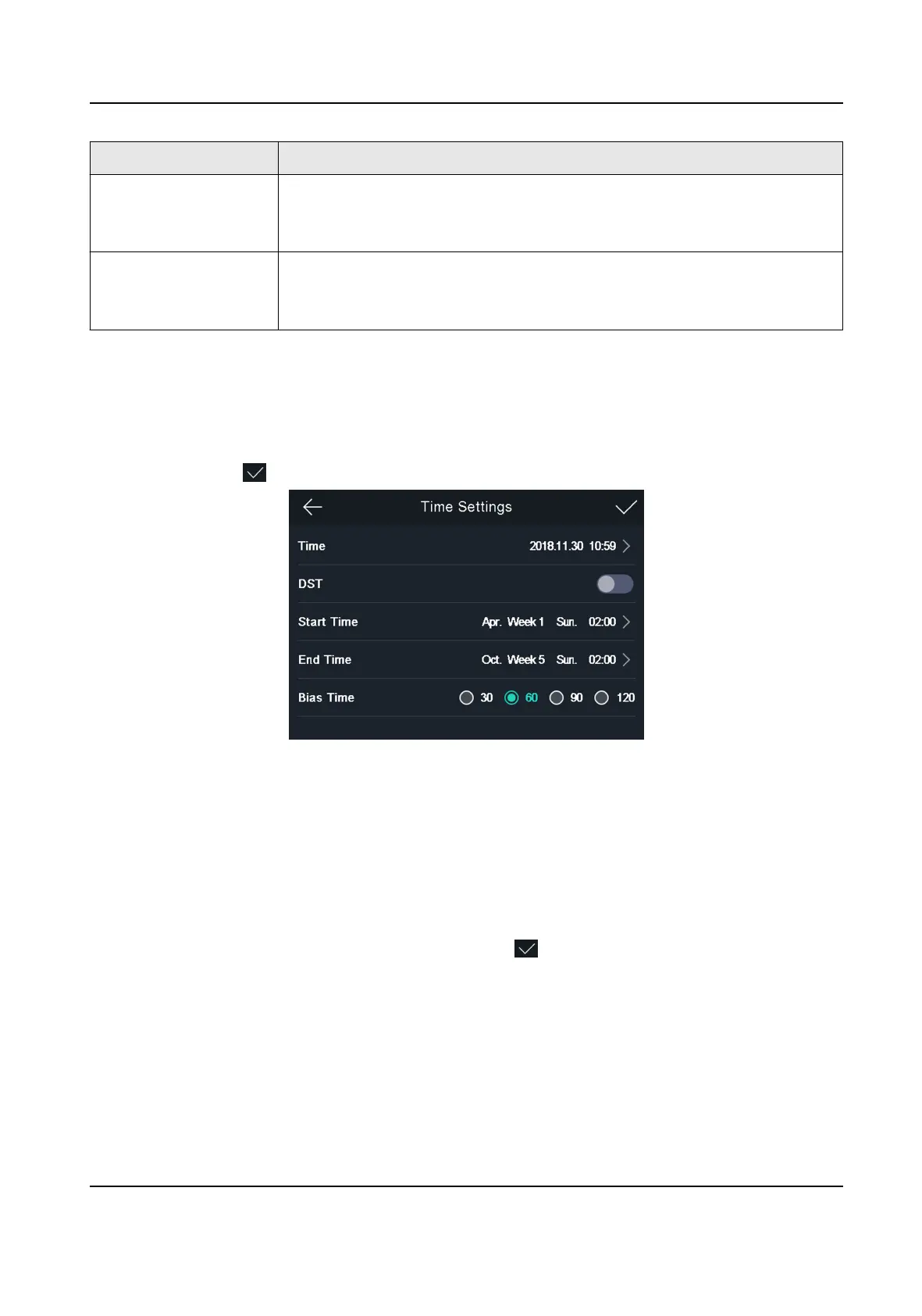
You can set the device me and the DST in this secon.
Tap Time (Time Sengs) on the Home page to enter the Time Sengs page. Edit the me
parameters and tap to save the sengs.
Figure 6-13 Time Parameters
6.9 Set Access Control Parameters
You can set the access control permissions, including the funcons of terminal auth. mode, reader
auth. mode, remote authencaon, door contact, and door locked me, etc.
On the Home page, tap ACS (Access Control
Sengs) to enter the Access Control Sengs page.
Edit the access control parameters on this page and tap to save the sengs.
Face Recognion Terminal User Manual
45



 To Next Page
 Loading...