7.1 Roller Bumpers—P818C08
Chapter 7: Accessories
Page 7 - 4 Century+™ Bed Service Manual (man241)
7.1 Roller Bumpers—P818C08
Tools required: Crescent wrench
Hill-Rom provides docking and wall protection features. The Century+™ Bed
can be equipped (retrofitted) with wall protecting roller bumpers.
Installation
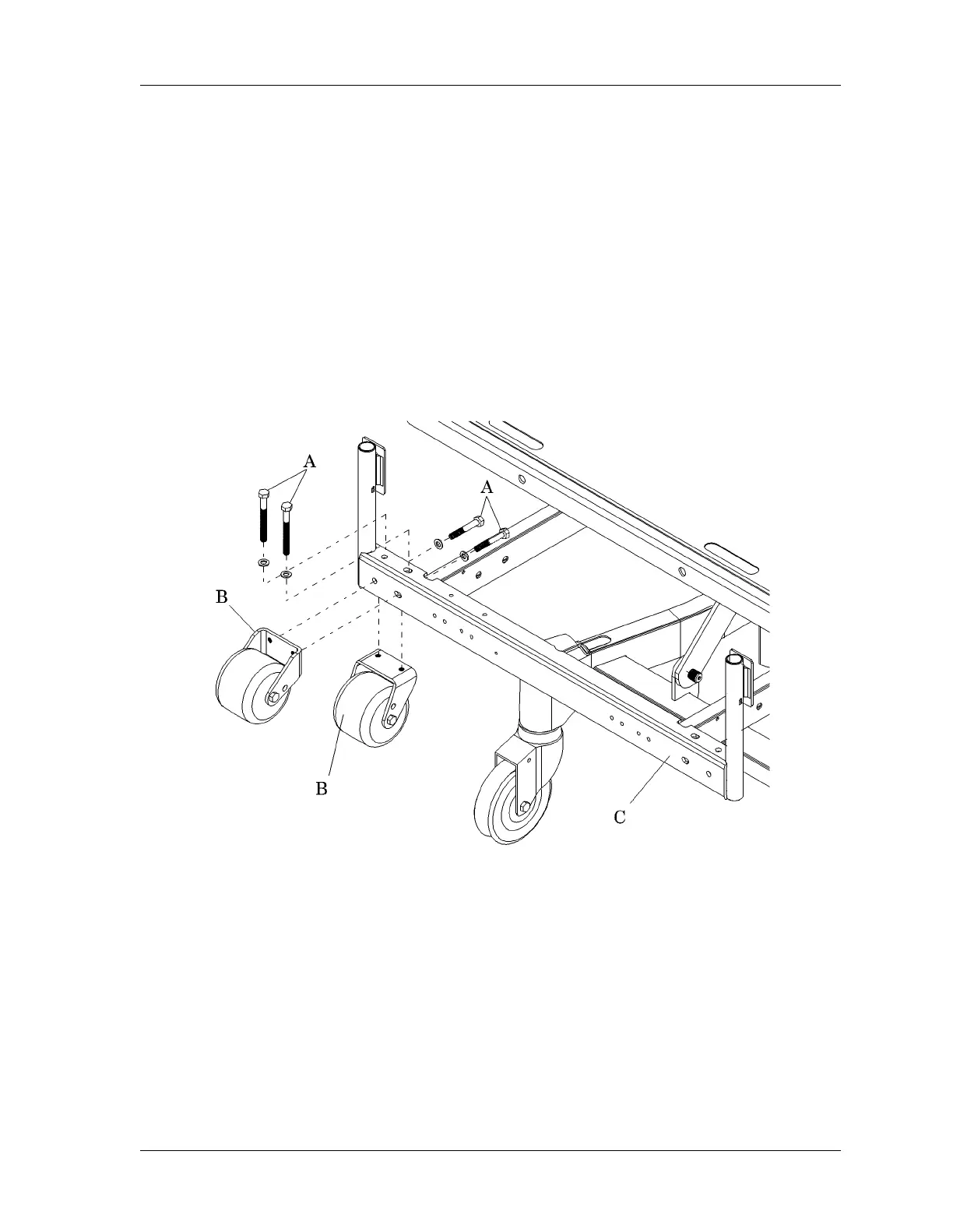
Using the crescent wrench, install the two bolts (A) to secure the roller bumper
(B) to the bed frame (C) (see figure 7-1 on page 7-4).
Figure 7-1. Roller Bumpers
NOTE:
Use only one pair of roller bumpers per bed. Use either top, bottom, or face
mounted roller bumpers.
Removal
Remove the two bolts (A), and remove the roller bumper (B) from the bed
frame (C).
m241_088














 To Next Page