EOS
|
HD OPERATION
27
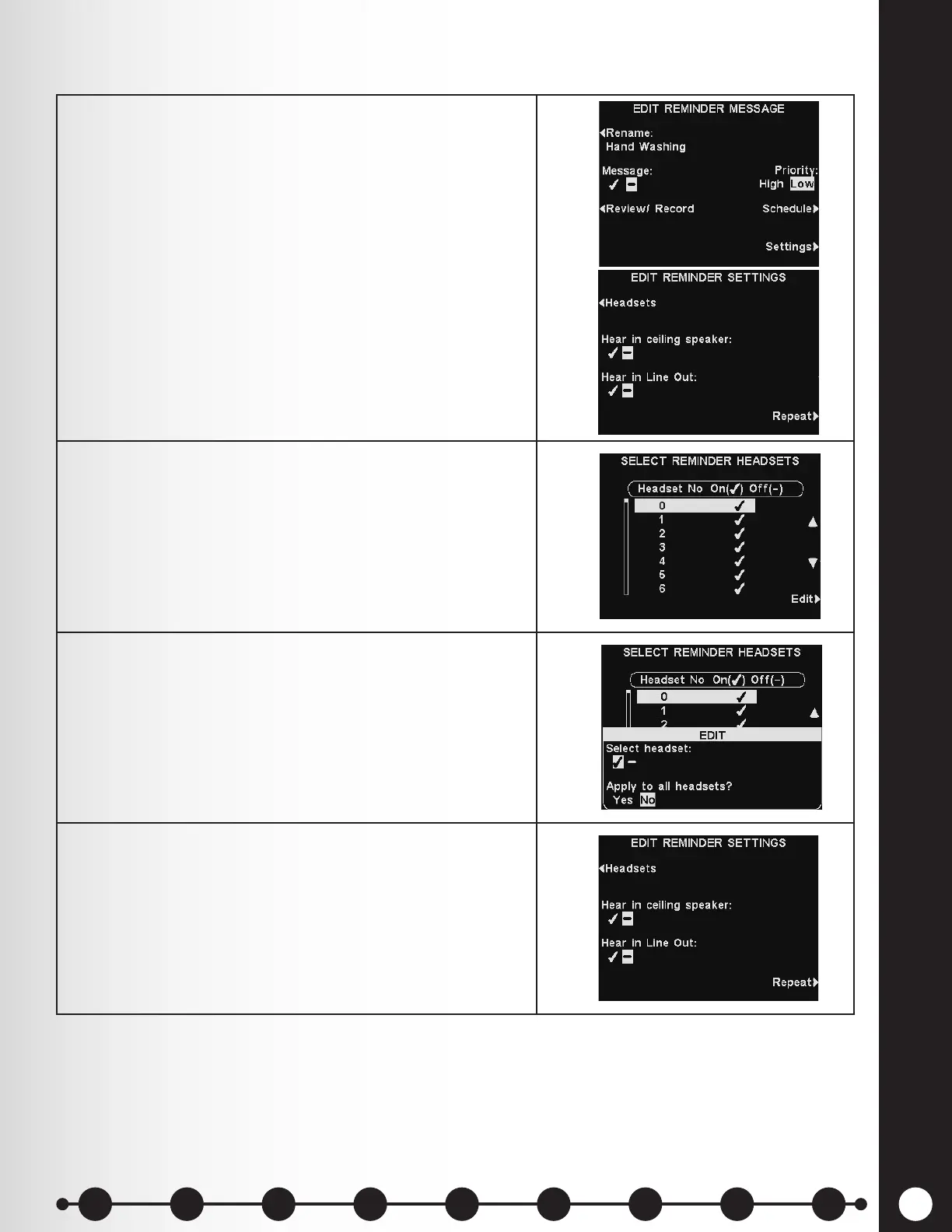
1. To choose where the selected Reminder message will
be heard, press the Settings button on the EDIT
REMINDER MESSAGE display.
Then, press the Headsets button on the EDIT
REMINDER SETTINGS display.
2. On the SELECT REMINDER HEADSETS display,
use the ▲(up) or ▼(down) buttons to highlight the
headset registration number for the headset you
would like to omit or include receiving the selected
Reminder message, and then press the Edit button.
3. To select/deselect the headset, press the Select
headset button on the EDIT display to highlight
✔ (on) or − (off).
To select/ deselect all headsets, press the Apply to all
headsets? button to highlight Yes or No.
Press the Back button to save this setting.
4. To have the selected Reminder message heard or not
heard in the ceiling speaker(s), press the Hear in
ceiling speaker button to highlight ✔ (on) or − (off).
To have the selected Reminder message heard or not
heard in the line out(s), press the Hear in Line Out
button to highlight ✔ (on) or − (off).
Note: After selecting ✔ (on) to hear the message in the ceiling speaker or Line Out, be
certain their volume is set high enough for the message to be heard. To do this, return to
the MAIN MENU and select Volume adjust to make the necessary adjustments.
Message Playback Settings
1 2 3 4 5 6 7 8 9
Introduction
EOS|HD
Equipment
EOS|HD
Operation
Audio Processing
Functions
Equipment Care
and Cleaning
Troubleshooting
Equipment
Specications
EOS|HD Message
Center Guide
Important
Notices



 To Next Page