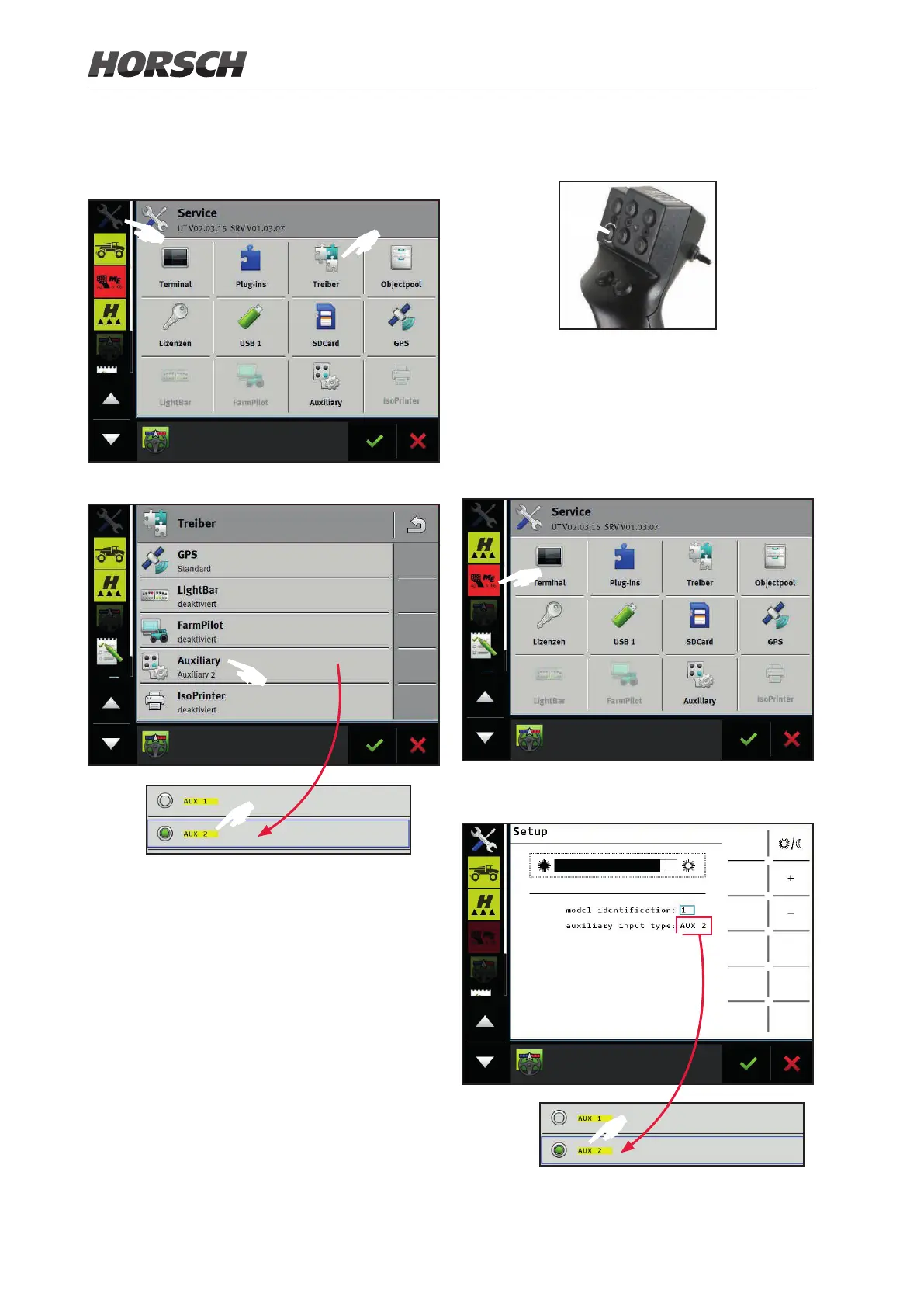
7.2.2 Setting the “Auxiliary” driver
1. Select the “Driver” page in the settings.
F
F
2. Touch “Auxiliary” and select “AUX 2”.
F
F
3. Now restart the terminal.
7.2.3 Register the multi-function
handle as ISOBUS subscriber
If the pool of the multi-function handle has not
yet been loaded, it needs to be registered rst
as ISOBUS subscriber.
1. Switch o the ignition on the tractor or de-
activate the terminal. The LED on the multi-
function handle will also go o at this time.
2. Keep the button with a white frame de-
pressed.
F
3. Switch on the ignition on the tractor or restart
the terminal.
4. Release the button with the white frame after
approximately 5 seconds.
5. Open the application of the multi-function
handle.
F
6. Congure the multi-function handle. “AUX 2”
must be selected at “auxiliary input type”.
F
F
7. Switch the ignition o and on again after a
brief period or restart the terminal.
110











 To Next Page