4. External control for CCS Pro variant machines
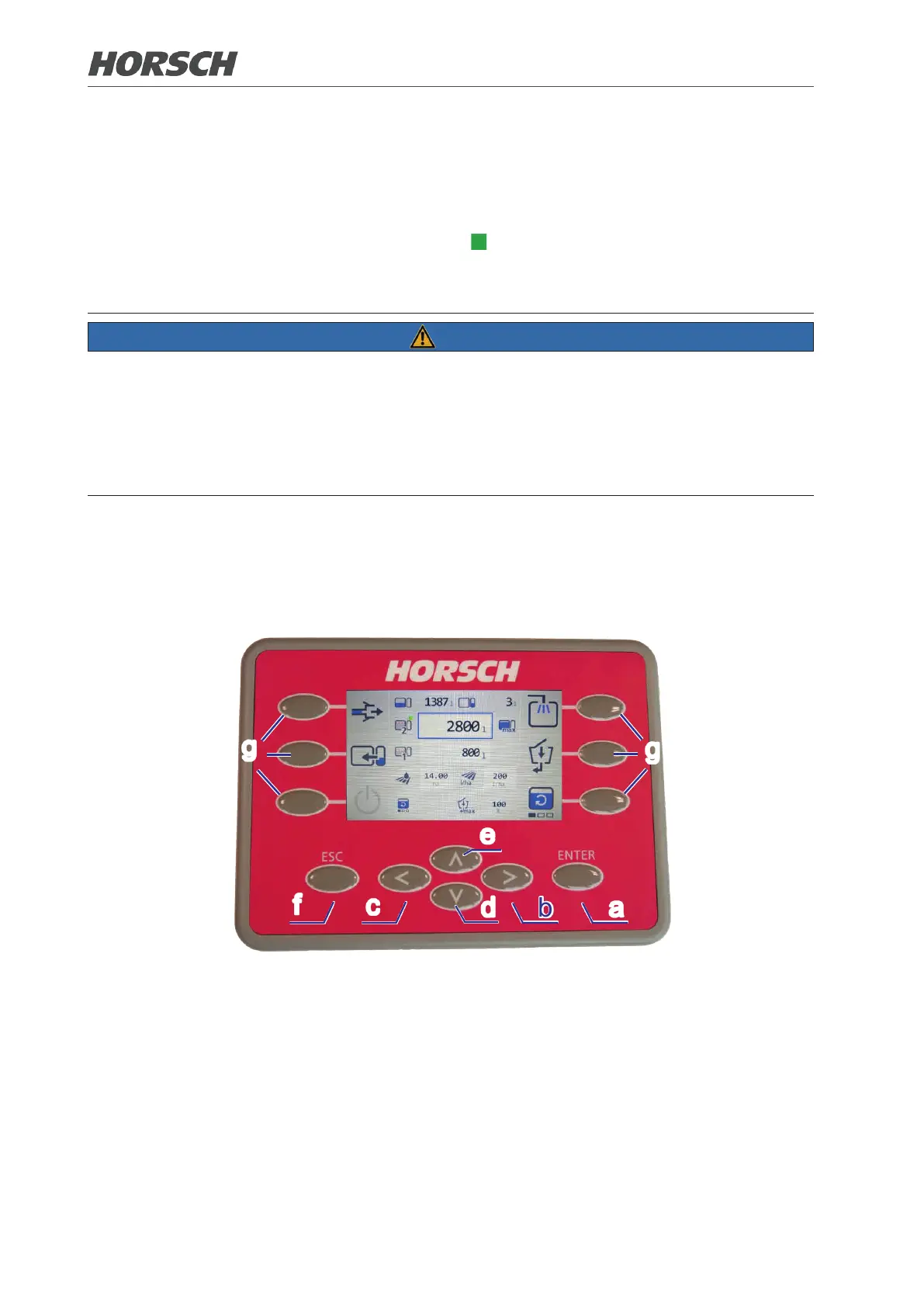
The external control terminal is located next to the illuviation valve. With the external control ter-
minal functions like "Filling" and "Washing program", among others, can be operated via buttons.
Active functions are highlighted by a green square to the right above the symbol.
For symbols with a red frame, functions can be selected; for symbols with a blue frame entries
can be made.
NOTE
¾ Does not replace the operating instructions of the basic machine!
¾ Pay attention to the safety instructions and warnings in the operating instructions of the basic
machine!
¾ The operating instructions must always be carried along!
¾ Operators must have read and understood the complete operating instructions before working
with the machine!
4.1 External control terminal
a
b
c
d
e
f
g
g
Various steps can be executed via the buttons:
(a) Conrm and accept changed value.
(b) Scroll to the next page.
(c) Scroll back to the previous page.
(d) Navigate down in the screen mask.
(e) Navigate up in the screen mask.
(f) Exit area without saving a value.
(g) Select the outer area of the operating screen.
90 91











 To Next Page