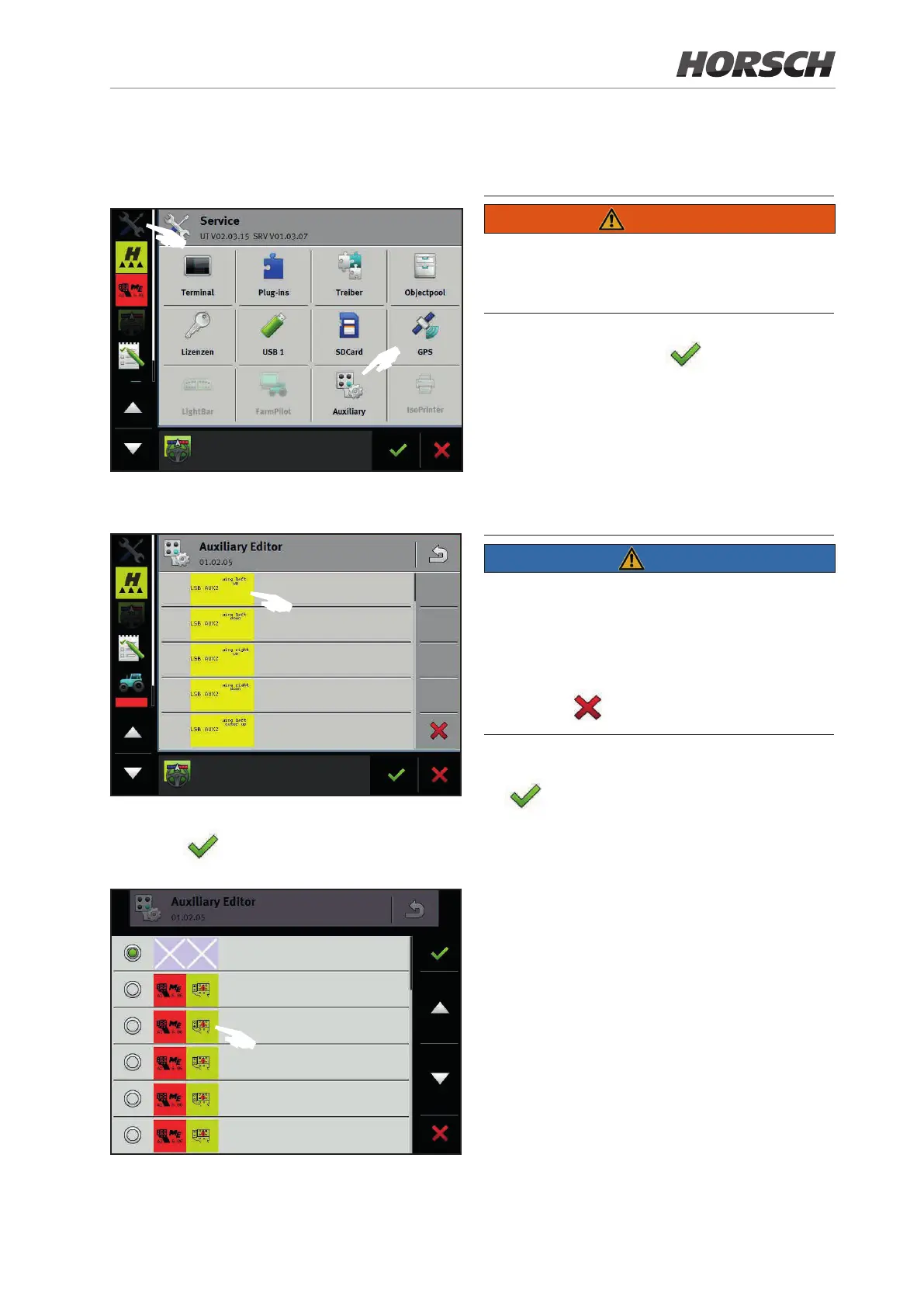
7.3 Assigning functions
1. Select the Auxiliary Editor in the settings.
F
F
2. Select and touch the desired function. Addi-
tional functions can be reached by scrolling.
F
3. Select a button and conrm with the check-
marks . The levels red, green or yellow
can be selected by scrolling.
F
4. Repeat this process until all functions have
been assigned.
WARNING
Buttons with duplicate assignment may cause
damage to the machine or injury to persons!
Assign only one function to each button.
5. Place the checkmark to save the selec-
tion.
6. Switch the ignition o and on again after a
brief period or restart the terminal.
7. The message “Conrm your assignment /
Scroll to the end” appears on the main screen
after the restart.
NOTE
¾ This message now appears with each restart
and must be conrmed.
¾ The multi-function handle does not have any
function if not scrolling to the end.
¾ All assignments can be deleted by
pressing
.
8. Conrm the assignment with the checkmark
.
9. Various assignments can be allocated and
accessed on the main page of the sprayer
implement at Diagnostics / Settings in the sub-
menu Machine geometry.
111











 To Next Page