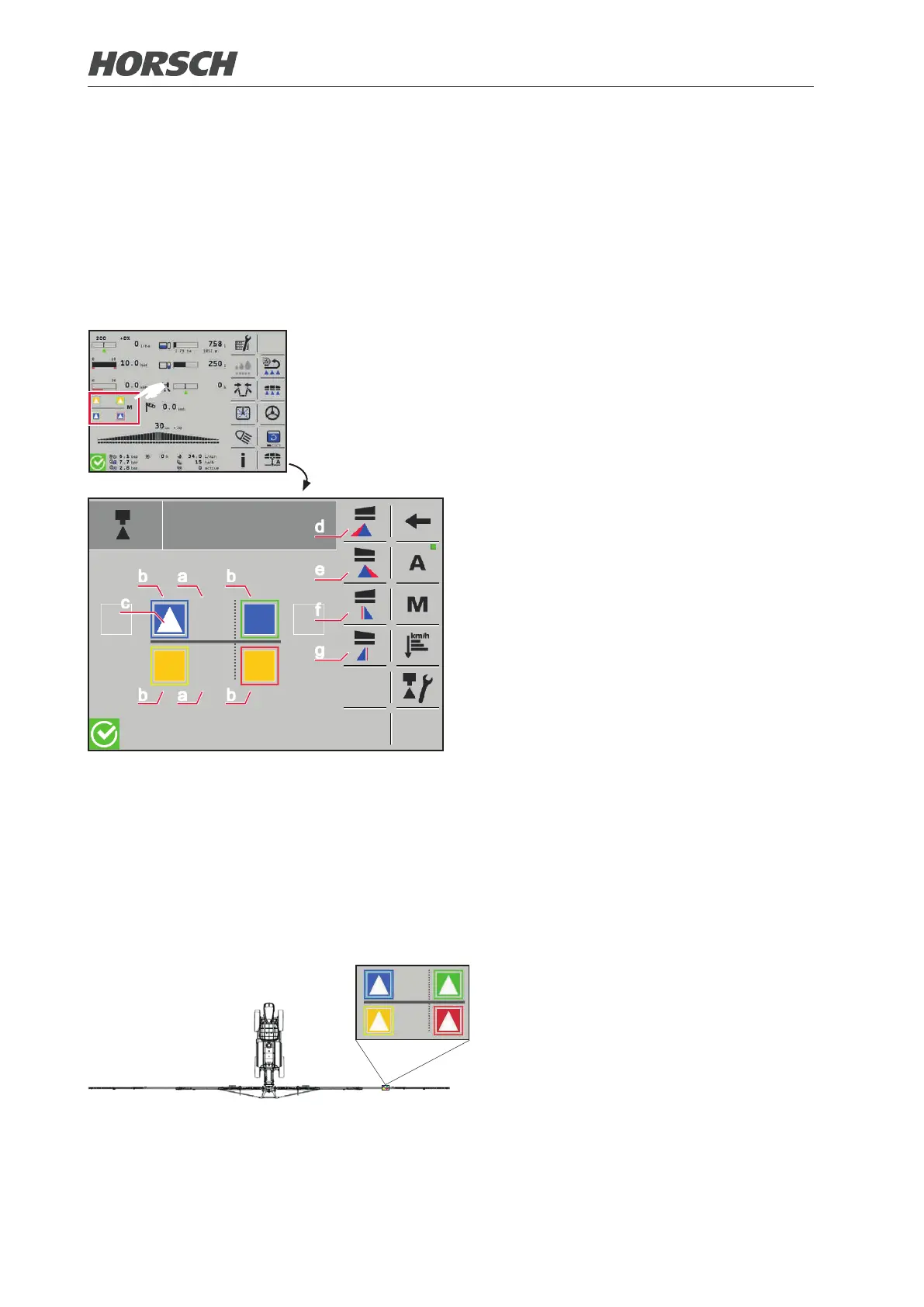
3.2.17 Nozzle conguration
The following settings can be made in the nozzle conguration:
• conguring and selecting installed nozzles
• dening nozzle proles (optional)
• selecting nozzle control (manual/automatic) (option)
• activating edge and border nozzles
F
¾ The coloured border of the respective noz-
zle indicates the connection colour of the
pneumatic hose on the nozzle carrier.
b a b
b a b
c
d
e
f
g
Conguration screen
The nozzle carriers with the individual nozzles
are displayed in the conguration screen. In
addition, the border and edge nozzles can be
selected here.
(a) Nozzle space not occupied
(b) Nozzle space occupied and congured:
Square in the colour of the respective
nozzle
(c) Nozzle active: Spraying cone
(d) Activate border nozzle of the left wing
(e) Activate border nozzle of the right wing
(f) Activate edge nozzle of the left wing
(g) Activate edge nozzle of the right wing
3.2.17.1 Entering nozzles installed
On a main nozzle carrier, max. 4 nozzles and on auxiliary nozzle carrier max. 2 nozzles can be
used (in the example 4 nozzles):
Alignment of a nozzle carrier on the folding boom
40 41











 To Next Page