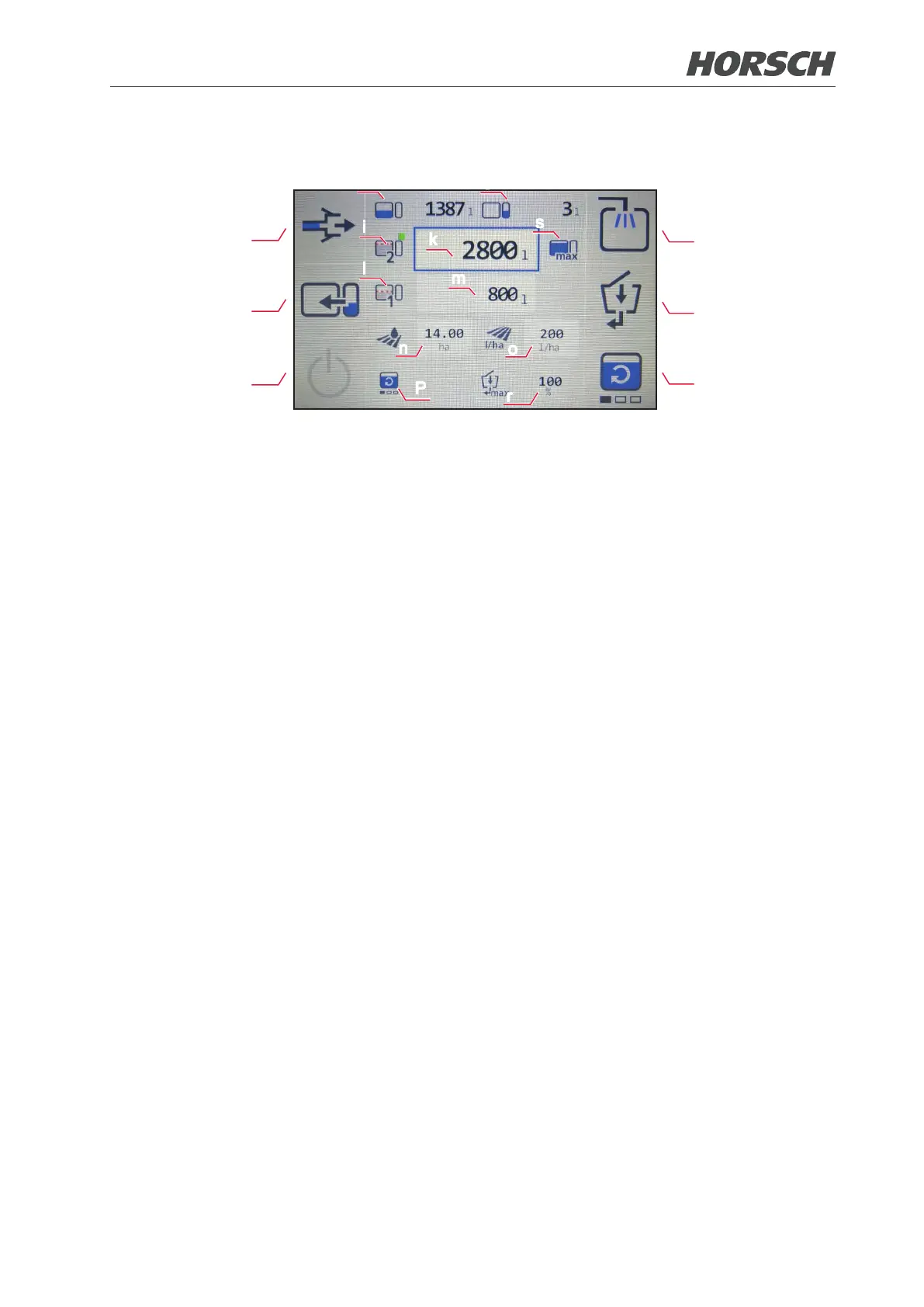
4.2 Filling
d
e
f
a
b
c
h
g
l
m
n
o
P
r
i
k
s
The individual processes can be started and stopped with the corresponding buttons at any time.
(a) Quick lling valve
Start lling via quick lling valve.
(b) Activate the illuviation valve.
(c) Activate/deactivate the agitator.
(d) Pulling suction
The supply line to the quick lling valve is sucked empty.
(e) Pump over fresh water.
Pump fresh water over into the spraying mixture container or dilute the spraying mixture.
When activated in combination with the illuviation valve (b) function:
Water is pumped from the fresh water tank through the illuviation valve into the spraying mix-
ture container.
(f) Stop button
Press the button to stop all active functions.
Active circulation can be disabled on the external control terminal via the stop button.
After disabling, the button on the external control terminal returns to the function as stop but-
ton for the lling functions.
Circulation can only be deactivated on the external control terminal but not activated!
(g) Display of the current lling level in the fresh water tank.
(h) Display of the current lling level in the spraying mixture container.
(p) Adjusting the intensity of the agitator
¾ Use the buttons to navigate up and down. If the symbol is framed in red, the agitator can be
set to 4 levels of intensity using the Enter button. The agitator is switched one level higher
with each touch.
(r) Adjusting the volume of water to be directed to the illuviation valve.
¾ Volume in percent of the max. volume
¾ Switching between User-dened (% value) and Max (100 %) can be one via the symbol to the
left of the input eld. A % value can only be set at User-dened!
¾ Use the buttons to navigate up and down. If the line into which the value shall be entered is
framed in red, select it with the ENTER button. The left and right buttons allow entering the
desired value in increments of 1, the up and down buttons allow entry in increments of 10.
Now conrm the value with the ENTER button.
90 91











 To Next Page