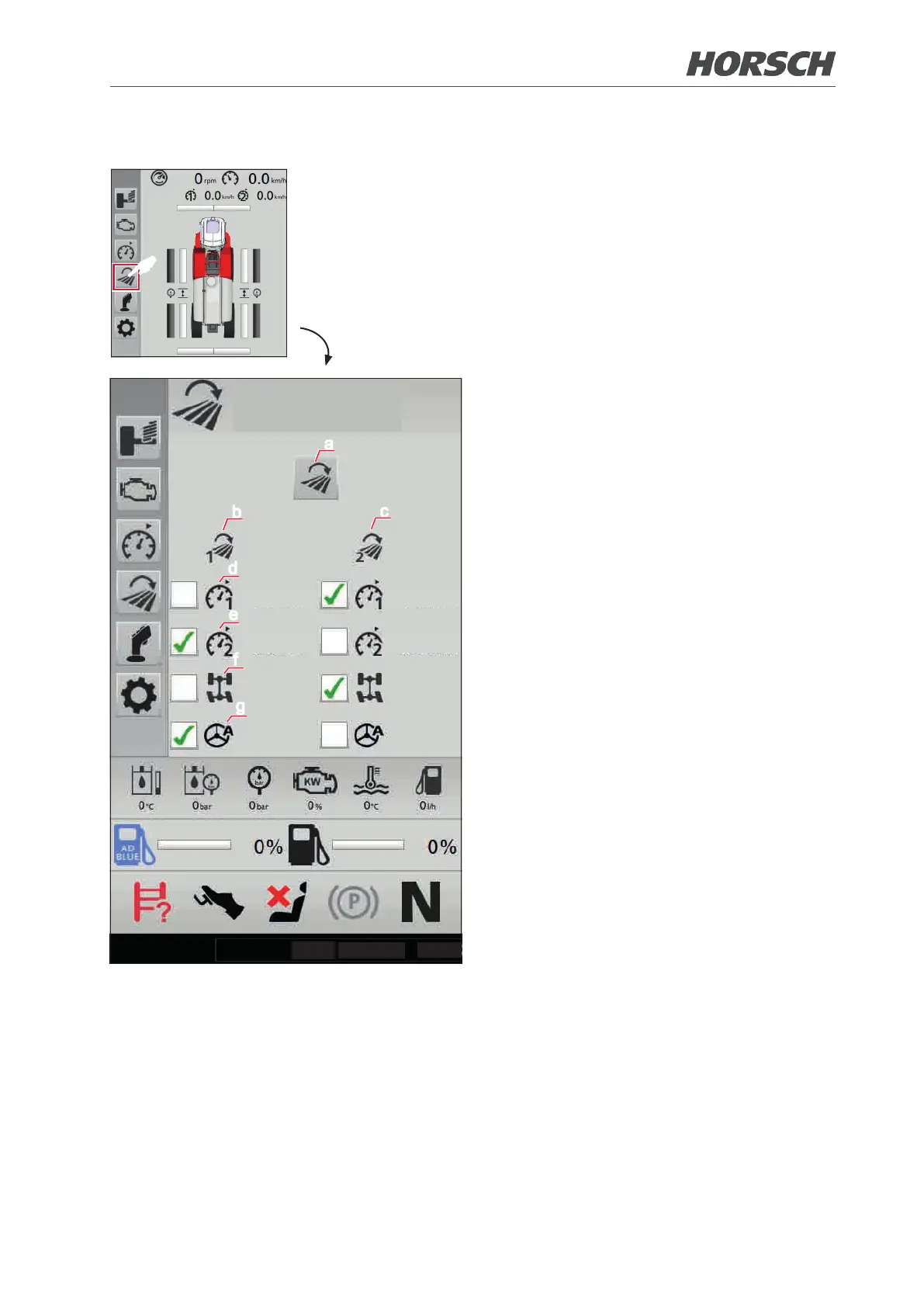
3.4.5 Submenu Headland management
F
a
b
c
d
e
f
g
10.0 km/h
20.0 km/h
10.0 km/h
20.0 km/h
Headland
management
0°C
30/08/2019
10:48
The submenu "Headland management" allows
setting two proles that can be activated and
changed during operation. The function shall
save the operator having to set several individual
functions.
¾ When a prole is activated, the default settings
for cruise control 1 and 2, rear axle steering or
GPS steering become active/inactive.
¾ The individual functions can still be operated
manually.
(a) Activate/deactivate complete headland man-
agement.
¾ When activated, a green square appears at
the upper right.
¾ When headland management is active, a
prole can be loaded or activated via the
activation button and with the joystick all the
way to the right. Prole 1 will be activated if no
prole is active. If a prole is already active,
the respective other prole is activated.
¾ After deactivation, the settings remain until the
next activation.
(b) Prole 1
(c) Prole 2
(d) Cruise control 1
(e) Cruise control 2
(f) Rear axle steering on/o
(g) GPS steering on/o (optional)
80 81











 To Next Page