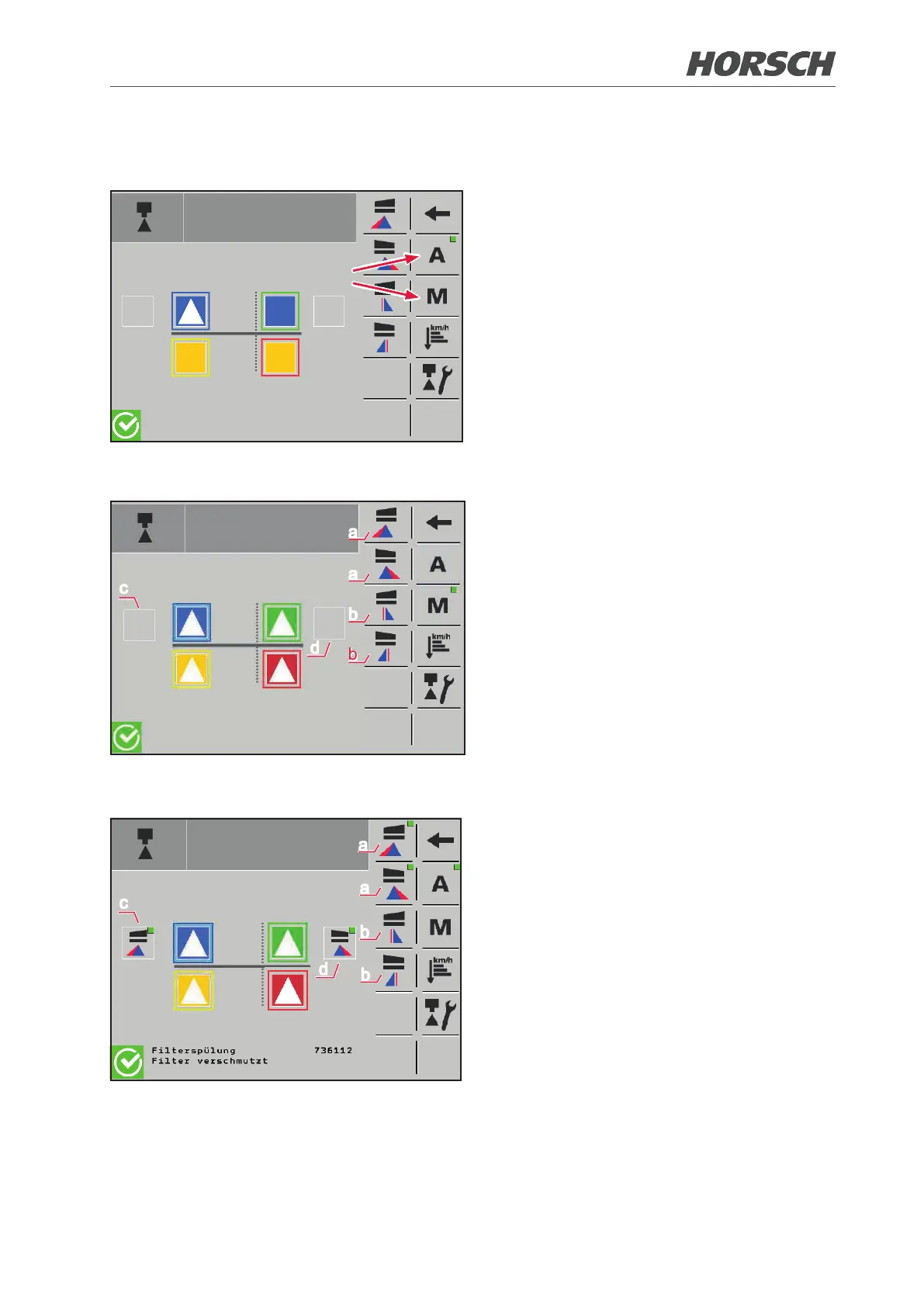
3.2.17.3 Mode selection
¾ Select "A" for automatic nozzle control or
"M" for manual nozzle control.
b
b
a
a
c
d
In the Manual nozzle control mode the individual
border (a) and edge nozzles (b) are activated/
deactivated here. An active border or edge
nozzle of the left (c) / right (d) folding boom
wing is displayed on the screen.
¾ When an edge nozzle is activated, the
border nozzle is always activated as well
automatically!
¾ Border and edge nozzles on one side can
never be active at the same time! However,
a border nozzle may be active on the left
side and an edge nozzle on the right side
an vice versa.
c
d
a
a
b
b
The border nozzles (a) cannot be selected
in the Automatic nozzle control mode, since they
are controlled via nozzle proles. The edge
nozzles (b) are activated/deactivated here
in automatic mod. An active border or edge
nozzle of the left (c) / right (d) folding boom
wing is displayed on the screen.
¾ When an edge nozzle is activated, the
border nozzle is always activated as well
automatically!
¾ Border and edge nozzles on one side can
never be active at the same time! However,
a border nozzle may be active on the left
side and an edge nozzle on the right side
an vice versa.
42 43











 To Next Page