FULLTEST3
EN - 43
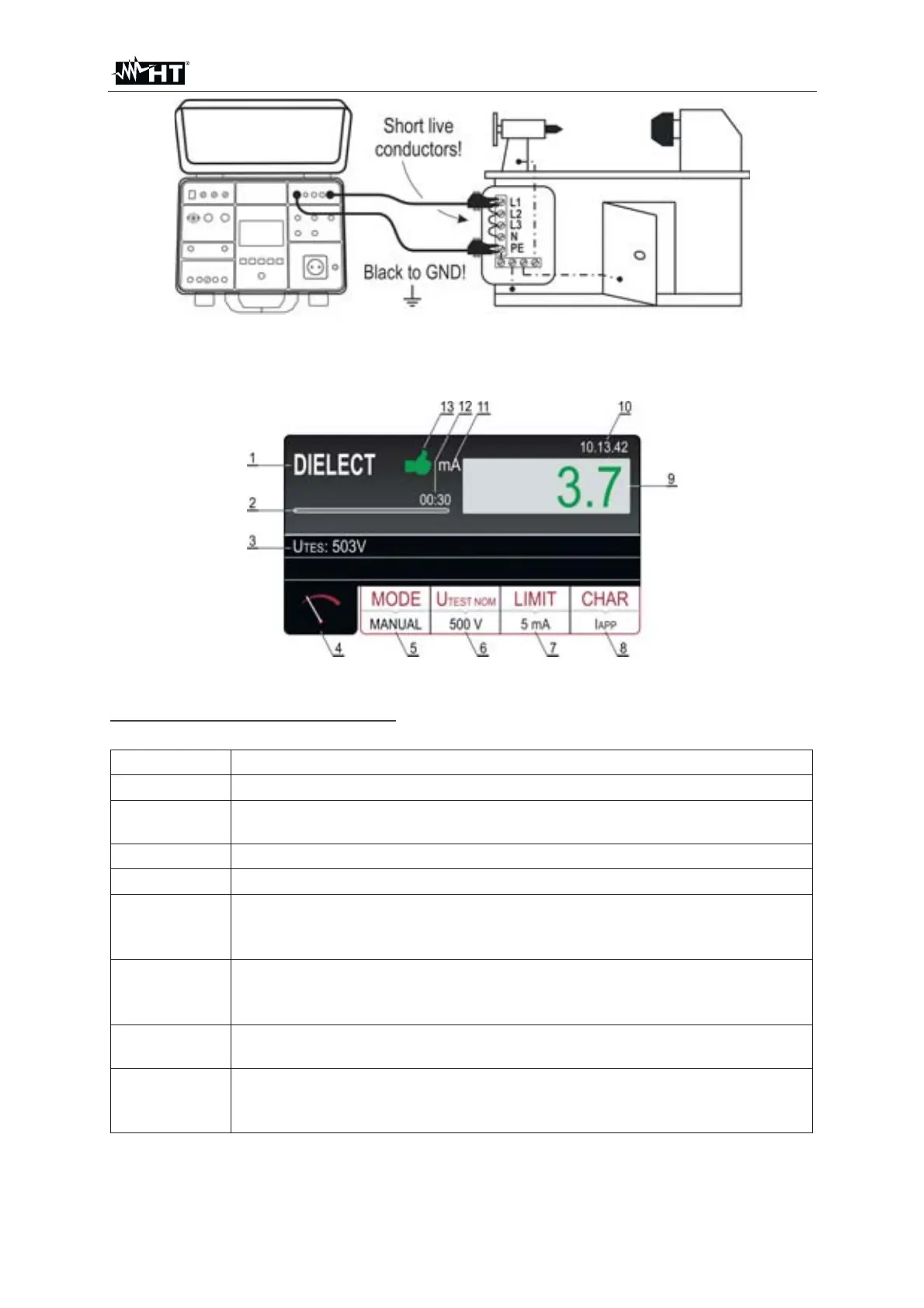
Fig. 39 : Connection of test leads
9. Press the START/STOP key to perform the measurement. The test result is
shown on the display (see Fig. 40)
Fig. 40 : Visualization of DIELECT test result
Meaning of symbols on the display
Item Description
1 Selected function
2
Progress bar, it follows test time during the measurement (in RAMP
mode only
3 Test voltage applied during the measurement
4 Measurement screen touch-screen key
5
MODE touch-screen key to select operation mode (MANUAL,
BURN,PULSE, RAMP 75% or RAMP 50%). Currently selected mode
is displayed on the bottom of the key
6
U
TEST NOM touch-screen key to select nominal test voltage (250 up
to 5100 V AC). Currently selected value is displayed on the bottom of
the key
7
LIMIT touch-screen key. Currently selected limit leakage current (trip
out current) is displayed on the bottom of the key
8
CHAR (character) touch-screen key to select the character of
displayed leakage current (IAPP or IREAL). Currently selected
character is displayed on the bottom of the key



 To Next Page