FULLTEST3
EN - 81
7.2. SAVING AN AUTOTEST
1. Carry out the selected Autotest
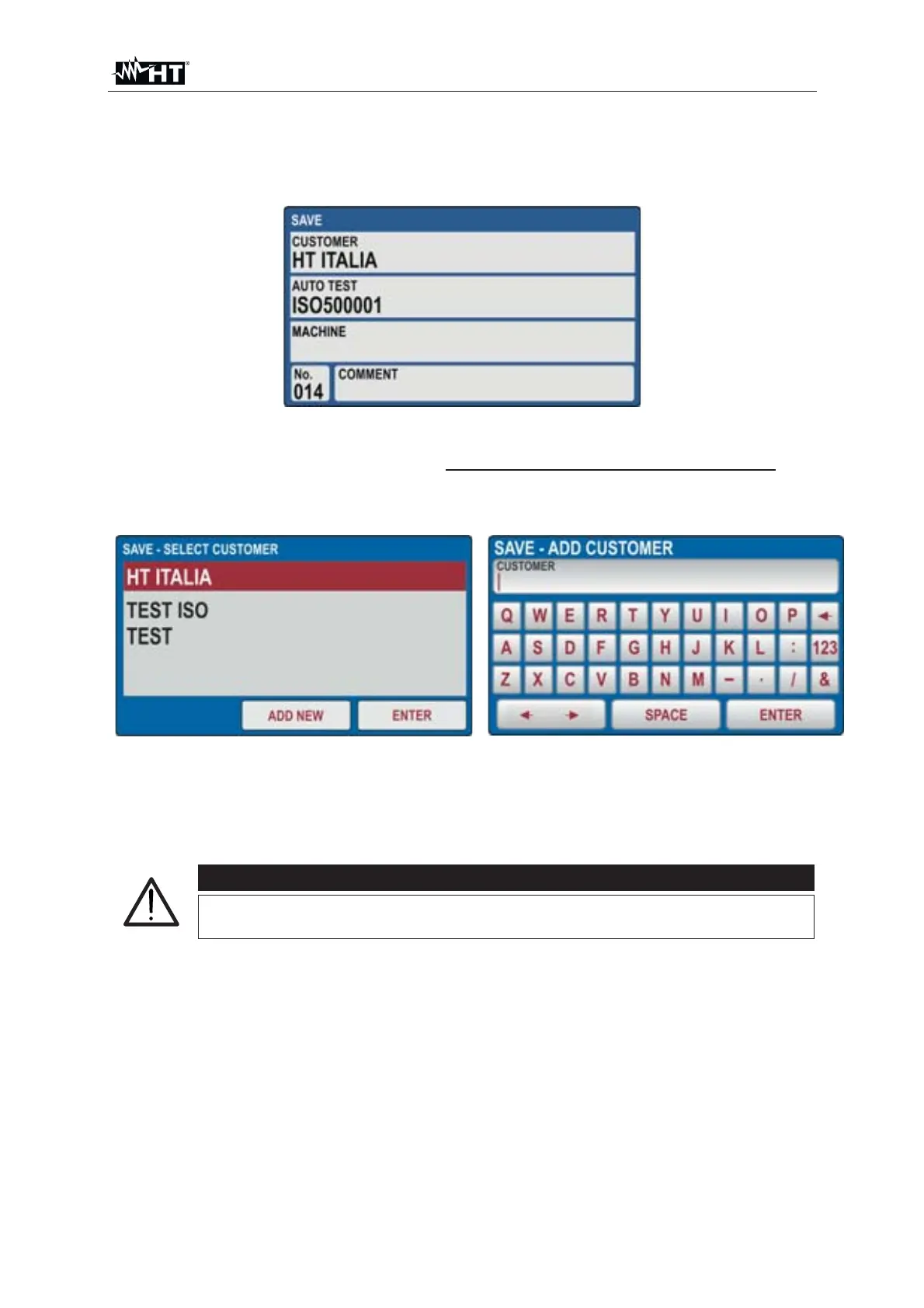
2. Press the SAVE hard key, the following screen is displayed
Fig. 83 : Saving Autotest menu – Step 1
3. It is possible in this phase to modify only the value associated to LEVEL1 (the
values associated with LEVEL2, LEVEL3 and COMMENT cannot be changed).
Touch the LEVEL1 field. The screen of Fig. 84 - left side is shown on the display
Fig. 84 : Saving Autotest menu – Modify name of LEVEL1
4. Press the virtual key ADD NEW to add a new reference and confirm with ENTER
5. Press the SAVE key again to confirm the operation. An acoustic signal will follow
to confirm that the saving has been completed successfully
CAUTION
Possible comments on the measurements can ONLY be entered
within the individual tests included in the Autotest



 To Next Page