FULLTEST3
EN - 24
5.7. AUTOTEST MENU
The AUTO TEST menu allows to define custom test groups (called Autotest), of the
same type or different (max 8 tests for each Autotest), which can be activated one
after the other through the START/STOP key sequentially by the operator without
having to call up the measurement function each time. It is possible to define an
indefinite number of Autotests until the internal memory is filled. The typical
fields of application of this function are:
¾ Rapid execution of repetitive tests of the same type
¾ End-of-line checks on machines
How to define an Autotest
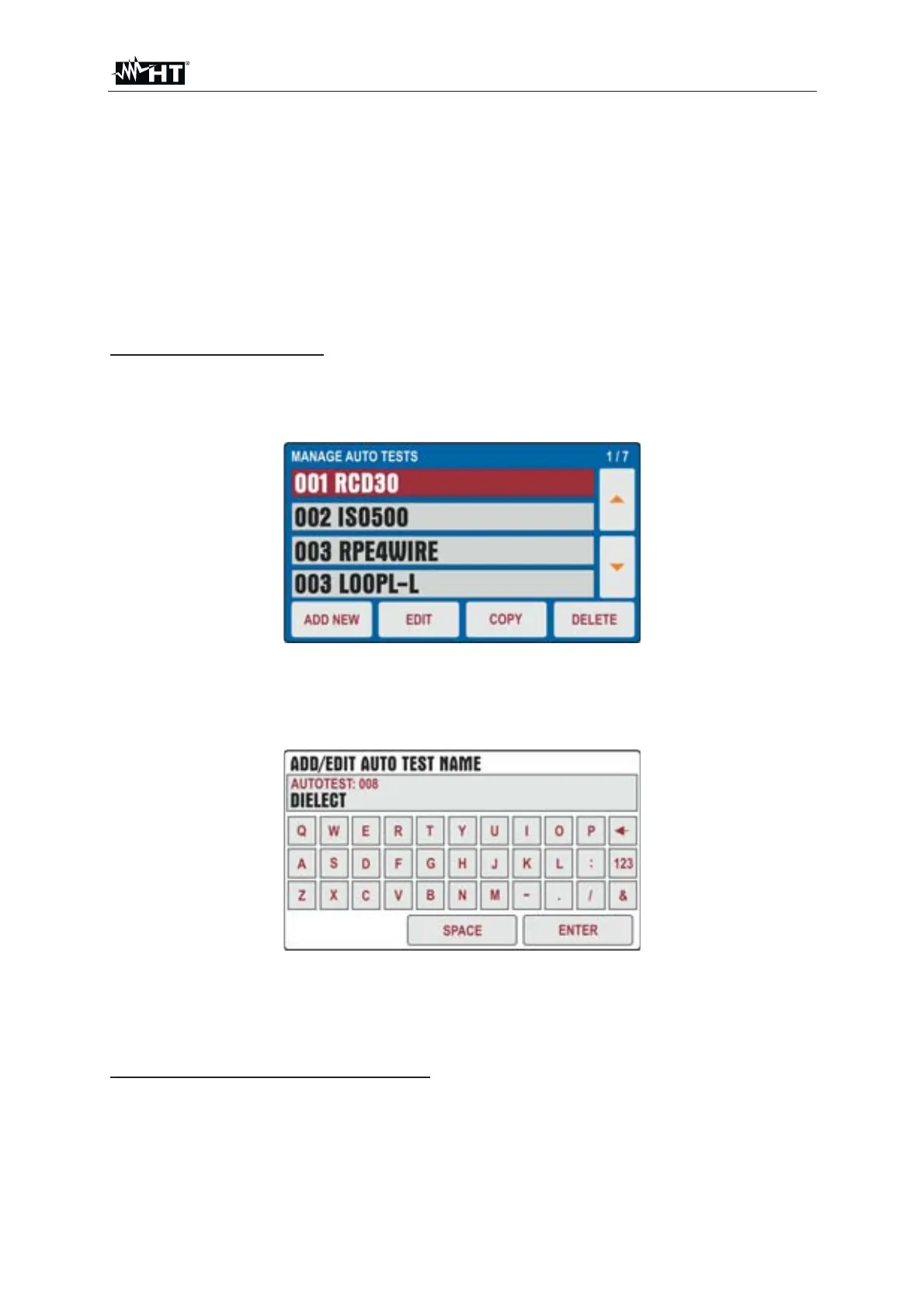
1. Press the MENU key and touch the AUTO TEST icon. The following screen is
shown on the display
Fig. 18 : AUTOTEST Menu
2. Press the ADD NEW button to add a new Autotest. The following screen is shown
on the display
Fig. 19 : AUTOTEST Menu – Add new Autotest
3. Enter the name of the Autotest (max 9 characters) using the virtual keyboard and
confirm with ENTER. The new Autotest will be added to the list sequentially
How to include tests inside an Autotest
4. Press the EDIT key to open the selected Autotest and include the desired test
groups (max 8 tests) or to modify an existing one (see § Fig. 20)



 To Next Page