FULLTEST3
EN - 67
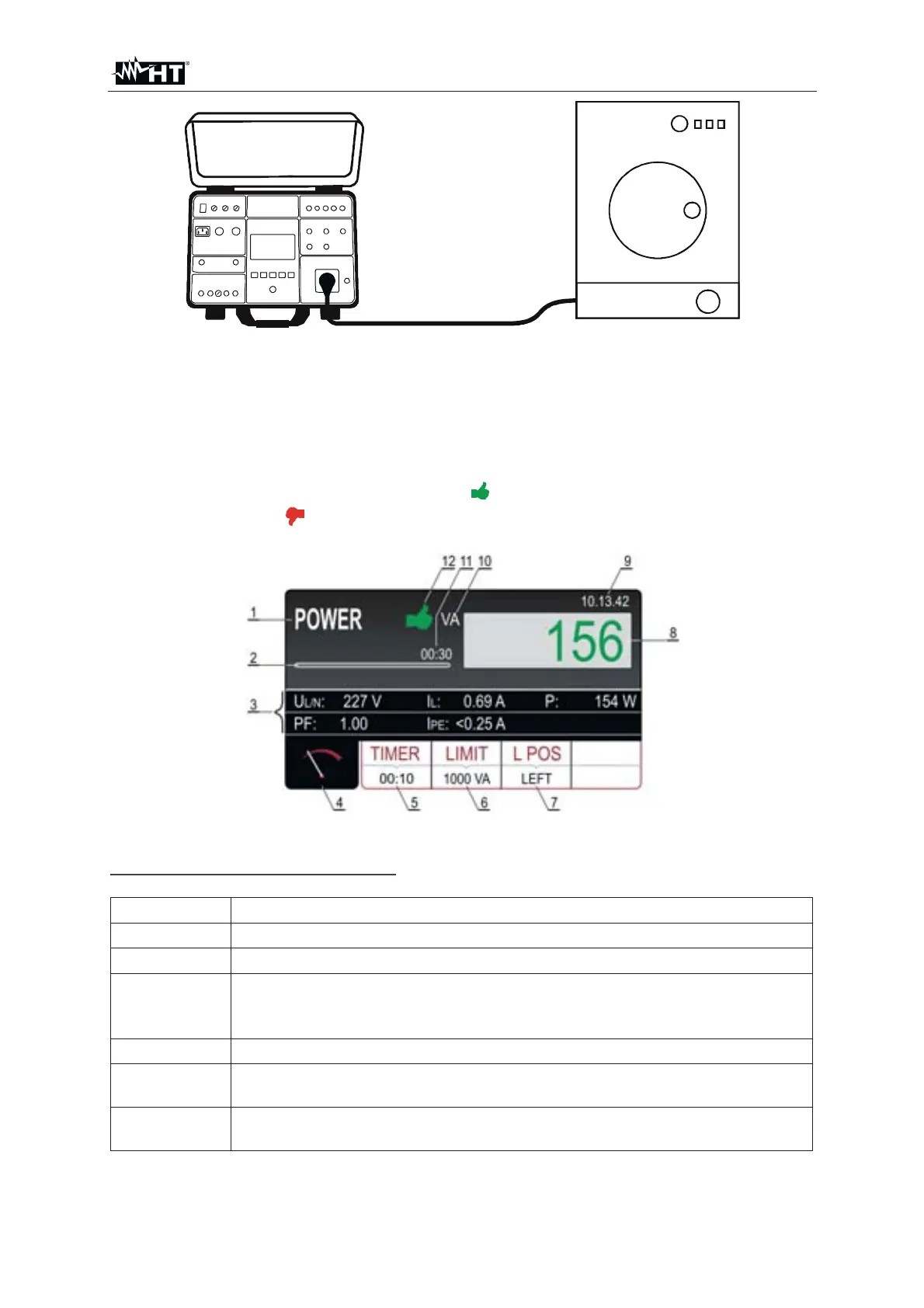
Fig. 63 : Connection of UUT to schuko test socket
8. Start the measurement by pressing the START/STOP key. The measurement will
start to run and will be stopped after pressing the START/STOP key again or after
elapsing set measurement time
9. Test result (apparent power) will be currently displayed in green color if it is lower
than or equal to set limit value or in red color if it is higher than set limit value.
Final result will be equipped with green
symbol and with beep-beep sound if it
is OK or with red
symbol and with longer sound if it is not OK. See the display
outlook with test result on the
Fig. 64 : Visualization of POWER test result
Meaning of symbols on the display
Item Description
1 Selected function
2 Progress bar. It follows measurement time during the measurement
3
Two lines reserved for sub-results as follows: Mains voltages U
L/N,
Load current I
L, Real power P, Power factor PF and Leakage current
I
PE
4 Measurement screen touch-screen key
5
TIMER touch-screen key to adjust measurement time. Currently
selected measurement time is displayed on the bottom of the key
6
LIMIT touch-screen key to select limit apparent power. Currently
selected value is displayed on the bottom of the key



 To Next Page