2 IPC Web Page Introduction
On the IPC web client, you can perform tasks such as viewing video, performing pan-tilt-
zoom (PTZ) control, configuring and maintaining the IPC, and querying logs.
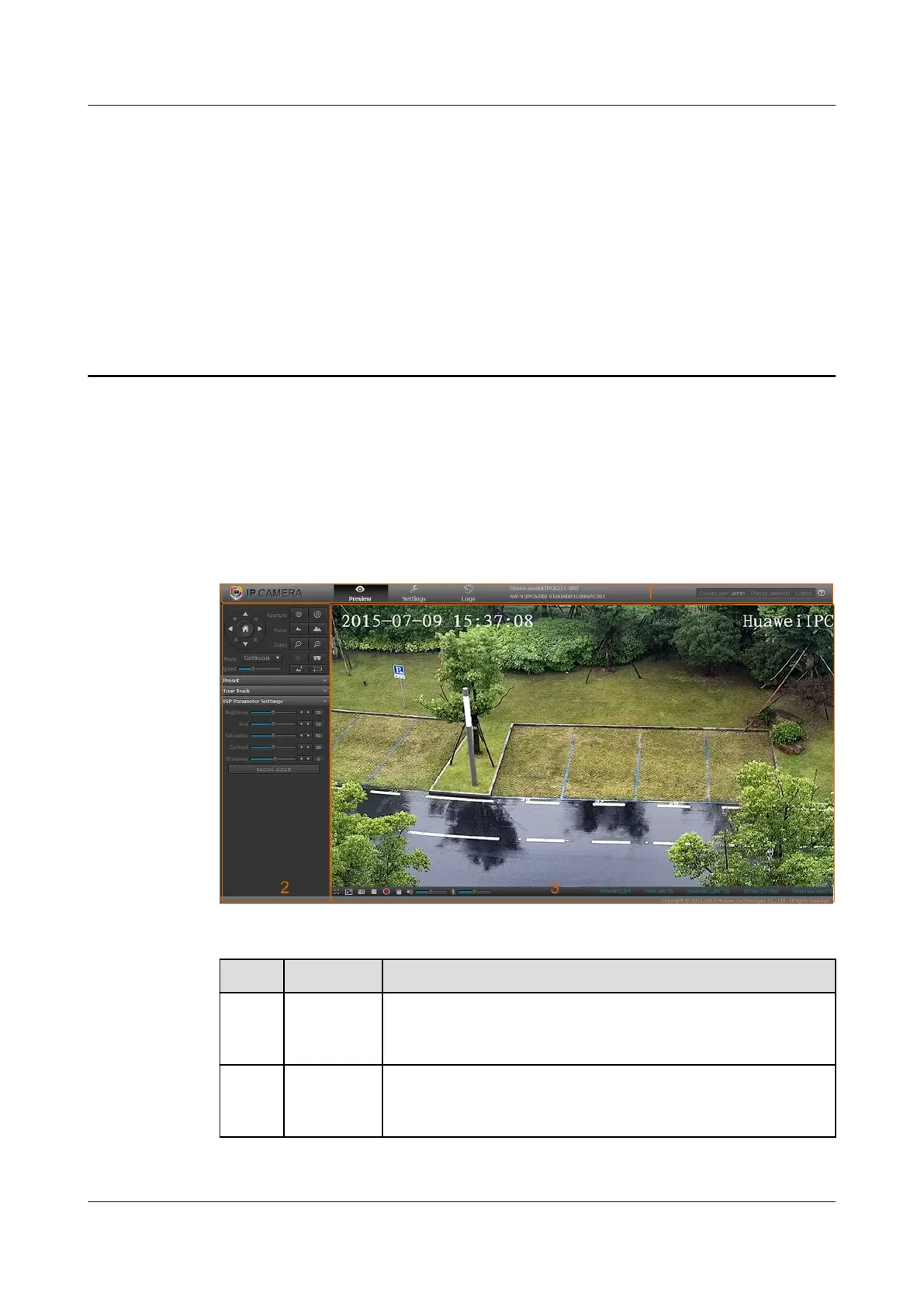
Figure 2-1 illustrates the main page of the IPC web client. Table 2-1 describes the main page
layout. Table 2-2 describes the operations you can perform on the main page.
Figure 2-1 Main page
Table 2-1 Main page description
No.
Name Description
1 Menu bar Includes Preview, Settings, Logs, Device model, SW-
V(Software Vision), Current user, Change password, Logout,
and IPC Online Help menus.
2 Control
panel
Enables you to control the IPC, including controlling PTZ rotation
directions and speeds, invoking a preset position, and enabling or
disabling a tour track.
IPC6221-VRZ-SP
Configuration Guide
2 IPC Web Page Introduction
Issue 02 (2016-04-06) Huawei Proprietary and Confidential
Copyright © Huawei Technologies Co., Ltd.
6



 To Next Page