Step 3 Click Delete.
The dialog box for Delete is displayed.
Step 4 Set Current user password and click OK.
The dialog box for Delete is displayed.
Step 5 Enter the password of the user and click OK. Then delete the user as prompted.
----End
13.1.5 Configuring Account Locking and Unlocking
The system administrator can specify the maximum number of incorrect password attempts
for an account. If the maximum number of incorrect password attempts is reached, the
account is locked.
NOTE
Only the system administrator can configure account locking.
Procedure
Step 1 Choose Settings > System Configuration > User Management.
The User Management page is displayed, as shown in Figure 13-7.
Figure 13-7 User Management tab page
Step 2 Click Advanced.
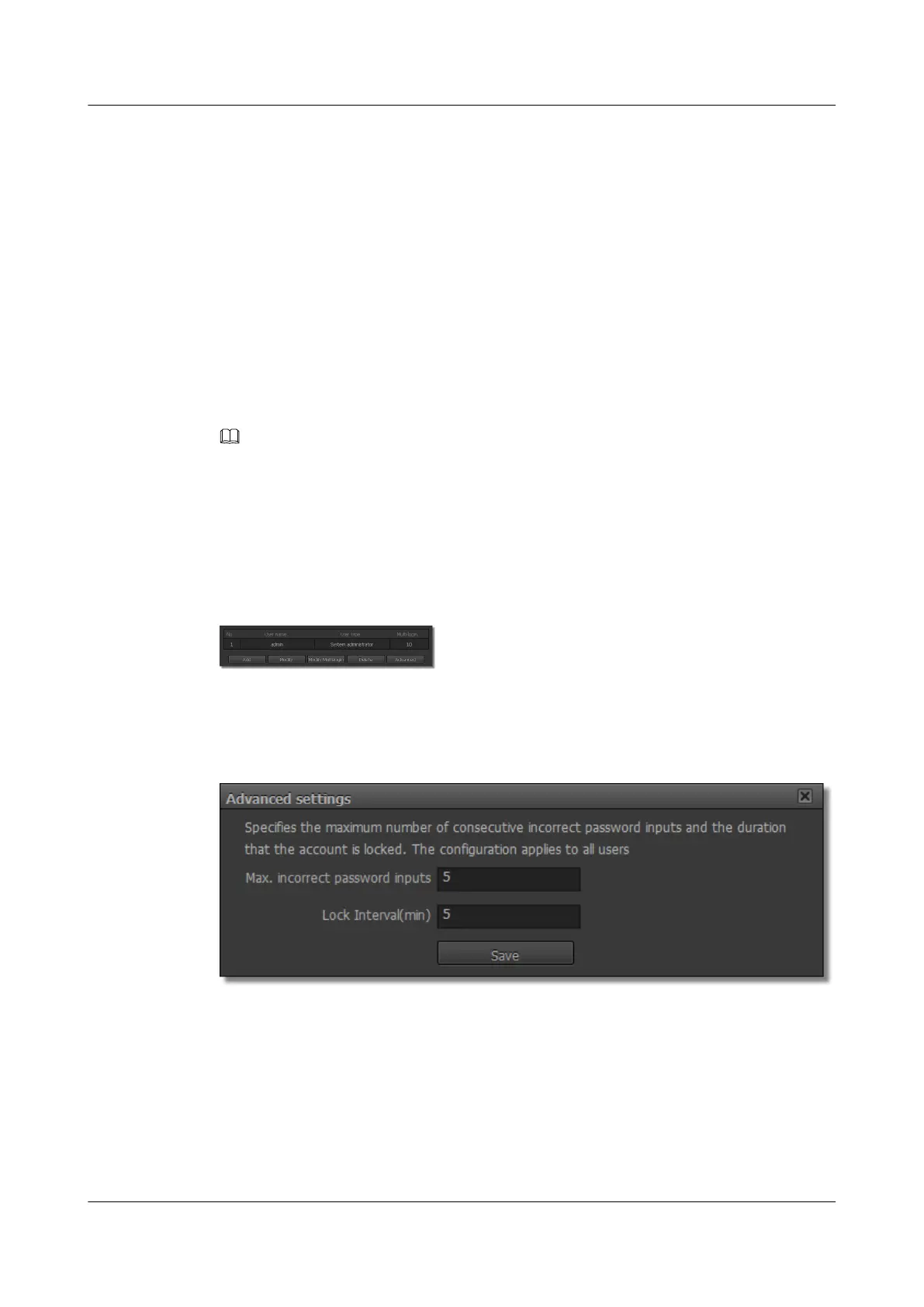
The dialog box for Advanced is displayed, as shown in Figure 13-8.
Figure 13-8 Advanced settings
Step 3 Set Max. incorrect password inputs and Lock Interval.
IPC6221-VRZ-SP
Configuration Guide
13 Managing the System
Issue 02 (2016-04-06) Huawei Proprietary and Confidential
Copyright © Huawei Technologies Co., Ltd.
90



 To Next Page