Step 5 Click Save.
----End
7.6.2 Set SNMP Event Trap Parameters
SNMP event trap parameters must be set for the IPC, so the IPC can actively report related
information to the NMS.
NOTICE
All parameters on the IPC except Receiver IP must be the same as those on the NMS. If they
are different, the IPC may fail to report information to the NMS.
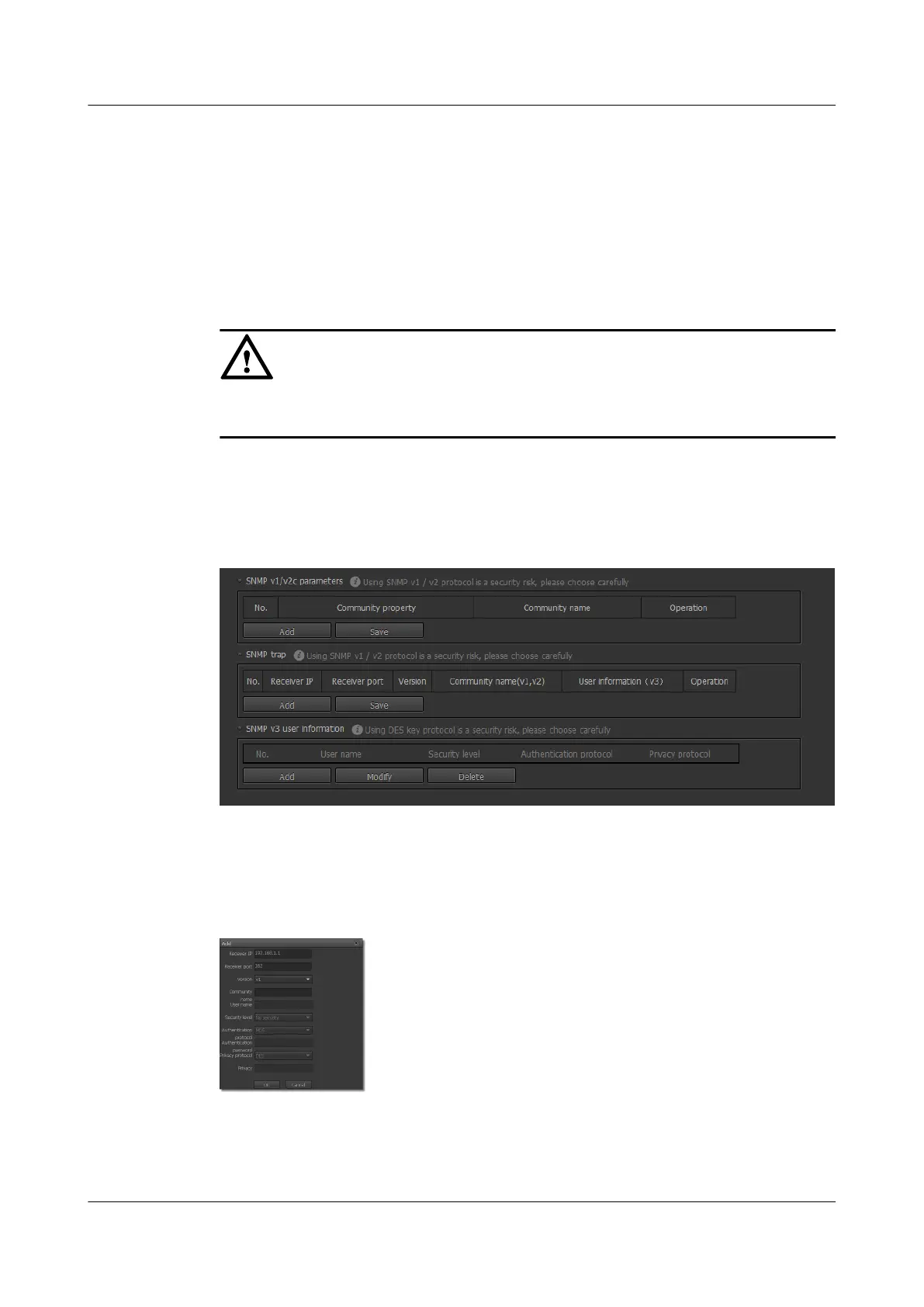
Step 1 Choose Settings > Network Configuration > SNMP Parameters.
The SNMP Parameters page is displayed, as shown in Figure 7-11.
Figure 7-11 SNMP Parameters page
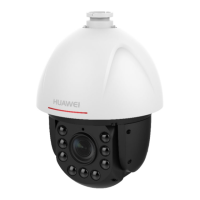
Step 2 Click Add in the SNMP trap area.
The page for setting SNMP event trap parameters is displayed, as shown in Figure 7-12.
Figure 7-12 Setting SNMP event trap parameters
Step 3 Set parameters. For detailed parameter description, see Table 7-1.
IPC6221-VRZ-SP
Configuration Guide
7 Setting Network Parameters
Issue 02 (2016-04-06) Huawei Proprietary and Confidential
Copyright © Huawei Technologies Co., Ltd.
60


 To Next Page