Method 2: Using the web-based management page
1. Connect your computer/phone to the router's Wi-Fi(check the nameplate at the
bottom of the router for the default Wi-Fi name, no password) , or connect the
computer to the router's LAN port using an Ethernet cable. Enter the default IP
address in your browser address bar and log in to the web-based management
page(check the nameplate at the bottom of the router for the default IP address).
● For routers that feature self-adaptive ports, you do not need to distinguish between
WAN and LAN ports.
● If you are connecting your phone to the router's Wi-Fi network, switch your phone's
webpage to the PC-based UI before performing the following operations.
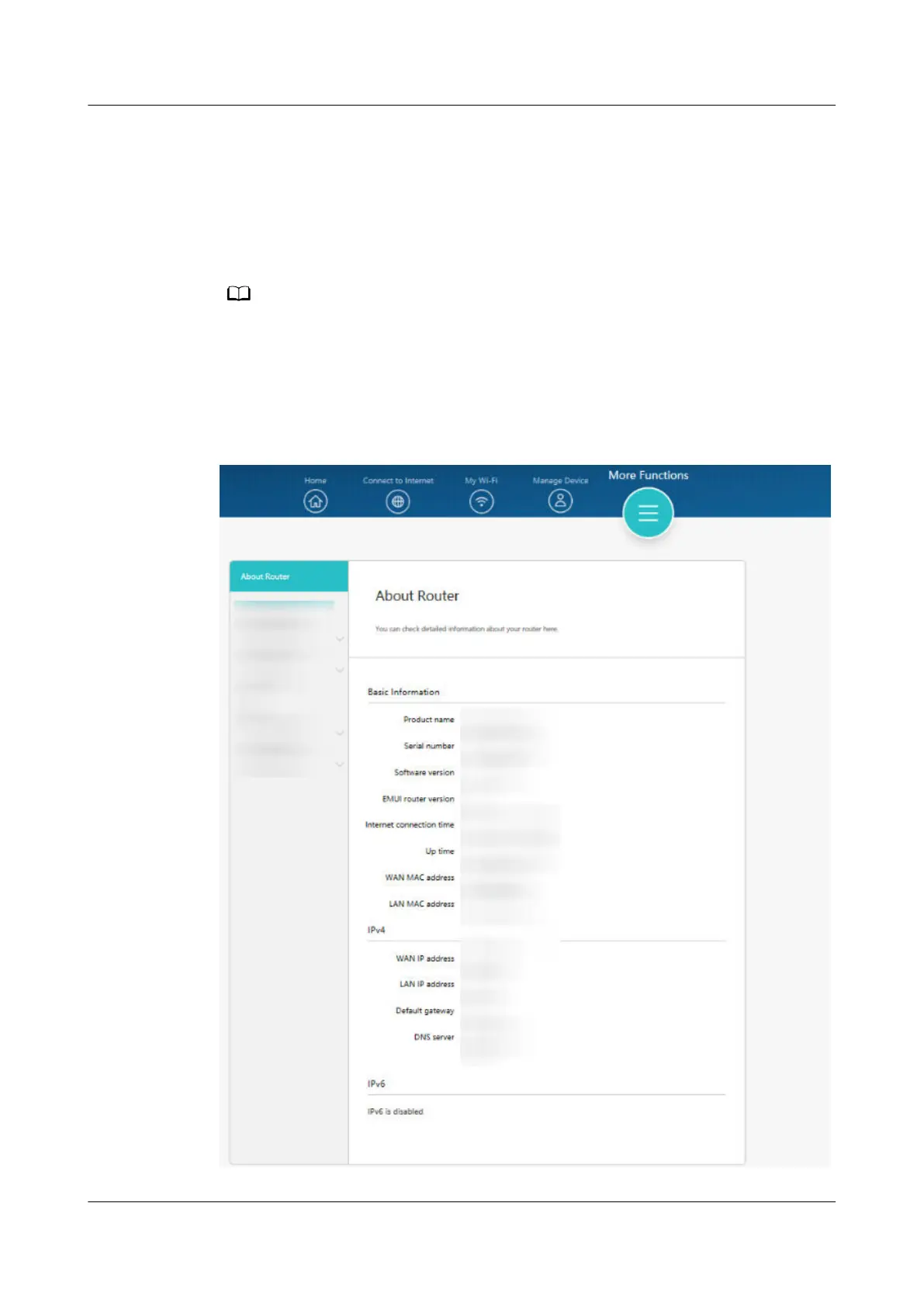
2. Go to More Functions > About Router to view the device information of your
router.
HUAWEI_WIFI_AX2
HUAWEI_WIFI_AX2
49 How do I view my HUAWEI router's device
information
Issue 01 (2022-02-18) Copyright © Huawei Technologies Co., Ltd. 165

 To Next Page
 Loading...