10. Crimp the wire ends and connect the wires to the appropriate multi-pin connectors. Refer to
the electrical schematic for more information.
11. Test each nozzle heater. Refer to Section 6.13 for more information.
12. Remove all locks and tags. Refer to Section 2.5 for more information.
6.10.3 Removing and Installing Bi-Metal Heaters on U750 and U1000 Systems
The following procedures describe how to remove and install bi-metal nozzle heaters on U750
and U1000 systems.
6.10.3.1 Removing Bi-Metal Nozzle Heaters on U750 and U1000 Systems
To remove a bi-metal nozzle heater, do the following:
1. Separate or remove the cavity plate from the manifold.
2. Remove the nozzle retainer.
3. Remove the front ring.
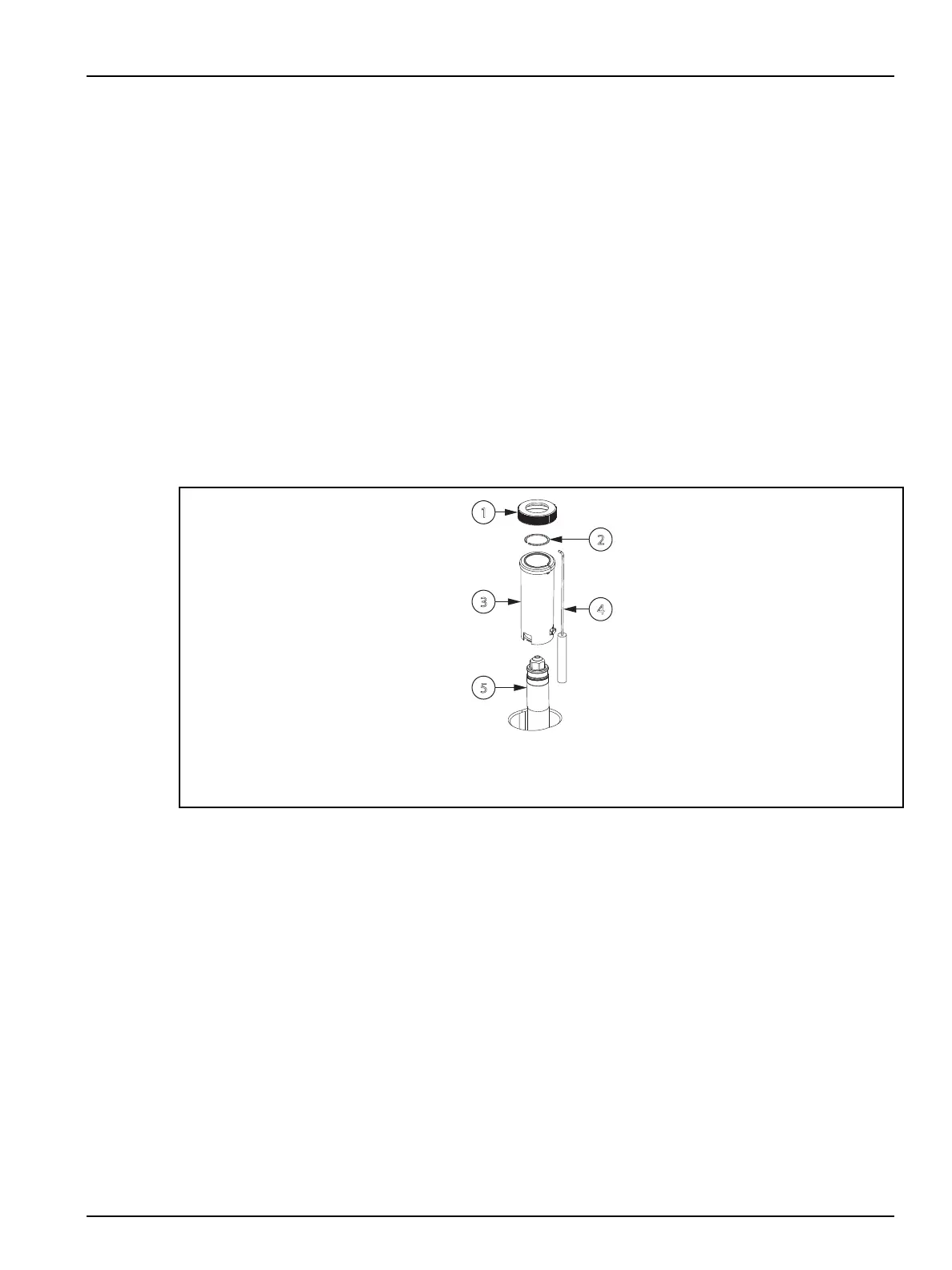
Figure 6-30: Bi-Metal Nozzle Heater Assembly
1. Front Ring 2. Retaining Clip 3. Bi-Metal Nozzle Heater 4. Thermocouple 5. Nozzle Tip
4. Disconnect the thermocouple from the nozzle heater.
5. Remove the retaining clip from the nozzle tip.
6. Remove the necessary wire clips to expose the nozzle heater and thermocouple wires.
7. Remove the nozzle heater and thermocouple.
6.10.3.2
Installing Bi-Metal Nozzle Heaters on U750 and U1000 Systems
To install a bi-metal nozzle heater, do the following:
1. Separate or remove the cavity plate from the manifold.
2. Remove the nozzle retainer.
Hot Runner Installation Manual v 2.2 — March 2021 Maintenance
Removing and Installing Nozzle Heaters 89


 To Next Page