Reading internal measurement memory
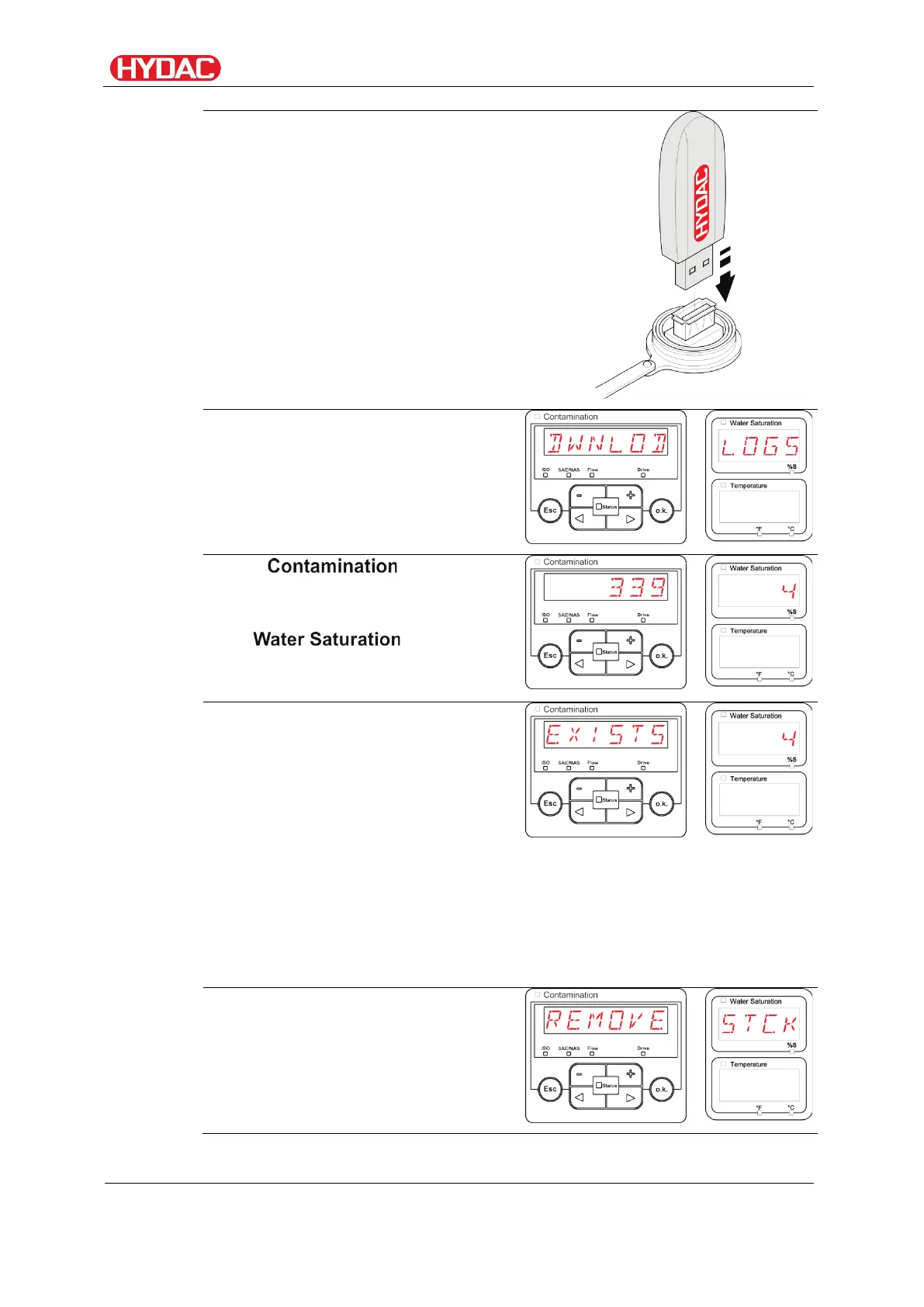
Insert the USB memory stick into the
socket. Note that the stick only fits
one way around.
It must be easy to insert the USB
stick into the socket.
After inserting the USB memory
stick, the FCU will detect it and
immediately start copying the
measurement data.
In the " " display, you
can see the number of measurement
records to be copied (e.g. 339)
The " " display
shows the number of records to be
viewed (e.g. 4).
If the FCU detects existing records
on the USB memory stick, the
following message will appear on the
display.
Example: The FCU has found the
record number 4 on the USB
memory stick.
This function is especially suited to
the synchronization of the copied
data with the FCU's internal
memory. The existing records will be
displayed.
After successfully copying the
records, the following message will
appear on the display.
FCU1310
en(us)
Page 72 / 124
BeWa FCU1310 V300 3371346f en-us 2017-01-27.docx 2017-01-27


 To Next Page