Evaluating measurement records
The measurements are shown as dates
On opening the file, all decimal numbers will be shown as dates. To resolve
this, proceed as follows:
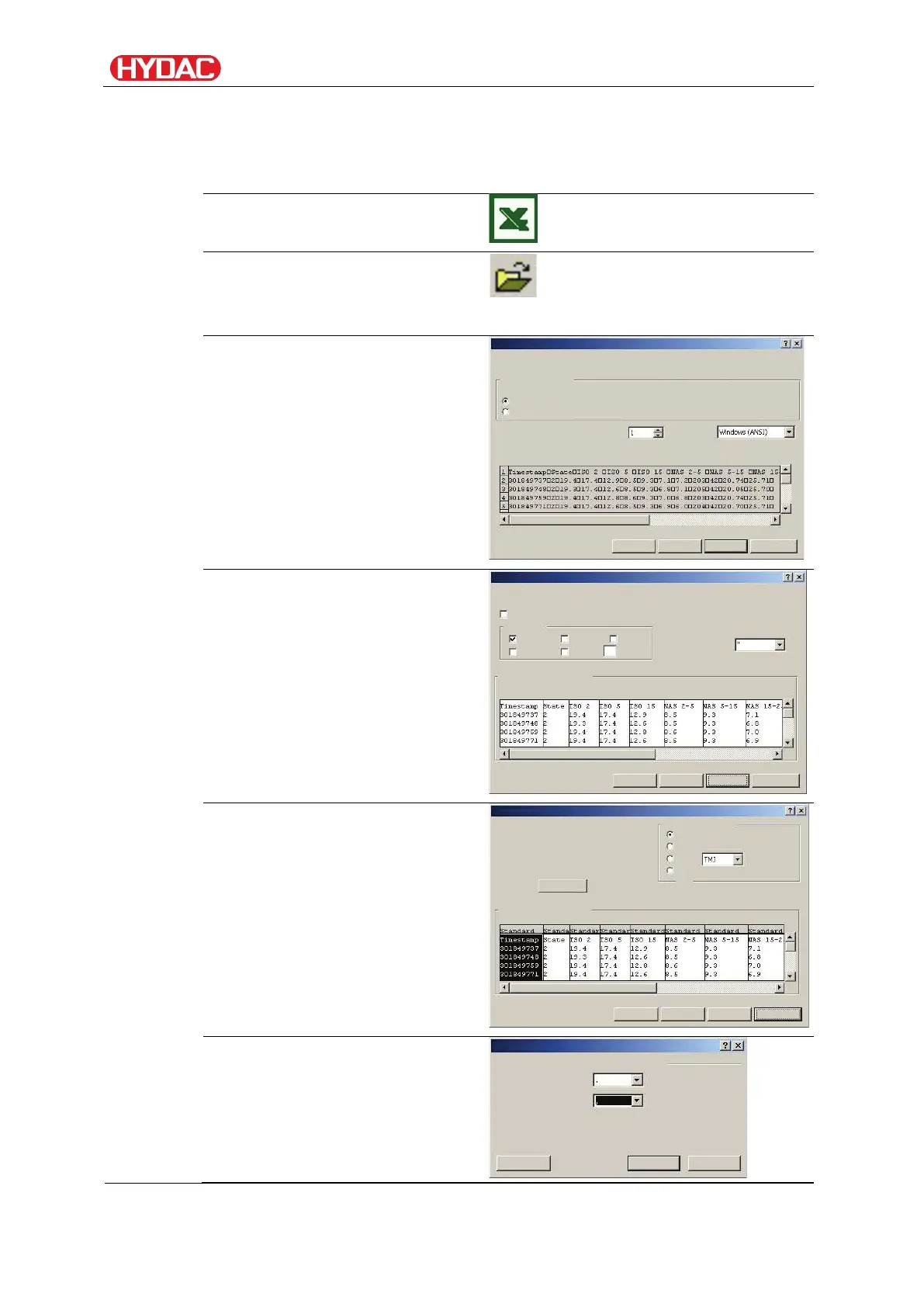
From the menu bar, select the
"Open" command.
Open the measurement file.
Text conversion assistant - step
1 of 3.
Check the settings.
Press the "Continue >" button to
accept the settings.
Text conversion assistant - step
2 of 3.
Check the settings.
Press the "Continue >" button to
accept the settings.
Text conversion assistant - step
3 of 3.
Press the "Other" button.
Change the following settings:
Set the decimal separator to be
a dot and the 1000s separator to
be a comma.
Confirm the changes with the
Select the data type that best describes your data:
Text conversion assistant - step 1 of 3
Preview of the marked data
Treat adjacent delimiters as a character
Text recognition character:
Text conversion assistant - step 2 of 3
Preview of the marked data
Data format of the columns
Text conversion assistant - step 3 of 3
Other text import settings
Delimiter used for numeric data:
FCU1310
en(us)
Page 80 / 124
BeWa FCU1310 V300 3371346f en-us 2017-01-27.docx 2017-01-27


 To Next Page