48
RDX A8 User and Service Guide — Version 1.0
iii. Initializing cartridges
The RDX A8 uses a specially format on the RDX cartridges to support emulation of tape. In order
to apply this special format the user performs a “pre-format” operation via the initialize cartridge
function. This cartridge formatting operation is only necessary to perform once and it is suggested
the user prepare all cartridges which will be used in the media pool at one time.
Preformatting is only required if the system will be used in tape library mode. It is not necessary to
format RDX cartridges if the system will be used in JBOD mode.
NOTICE
Converting the RDX cartridge into tape format mode or
reformatting from tape format back to disk format mode
destroys any previously written user data on the cartridge
(the RDX cartridge will contain no user data - be blank).
Pre-formatting RDX cartridges to Tape Library mode
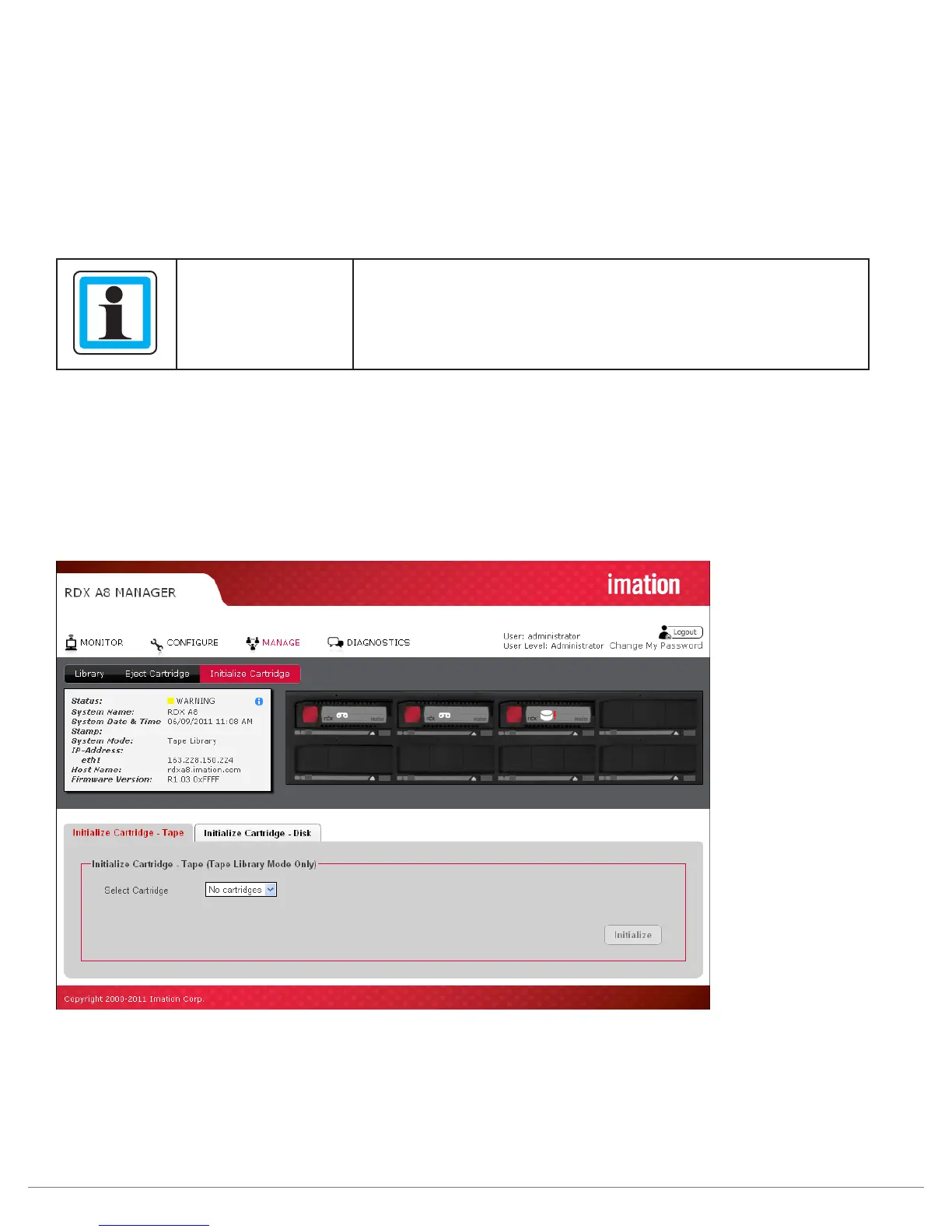
The “Initialize Cartridge” function prepares standard RDX cartridges for use as tape cartridges.
The function is available when the System Mode is set to Tape Library.
To format a cartridge, select the “Initialize Cartridge - Tape” tab. In the Select Cartridge box select
which cartridge will be formatted as Tape, and click Initialize. Only those inserted cartridges which are
formatted as Disk will be available to format as Tape.
Figure 31—RDX A8 Manager Initialize Cartridge



 To Next Page