23
RDX A8 User and Service Guide — Version 1.0
e. Introduction to the RDX A8 Manager
The RDX A8 unit uses the web based RDX A8 Manager to allow the user to configure and
monitor the unit. The RDX A8 IP address may be viewed in the OCP and is displayed between the
cartridge monitoring pages for slot 8 and slot 1 (#1 out of 9 screens in continuous rotation). Once the
RDX A8 IP address is known, browse to the unit with your web browser application by entering the
RDX A8 IP address in your browser address bar. You may enter “XXX.XXX.XXX.XXX” where the “X’’s
indicates the actual IP address. The IP address protocol does not require leading zeros so 172.16.1.43
is a valid IP address.
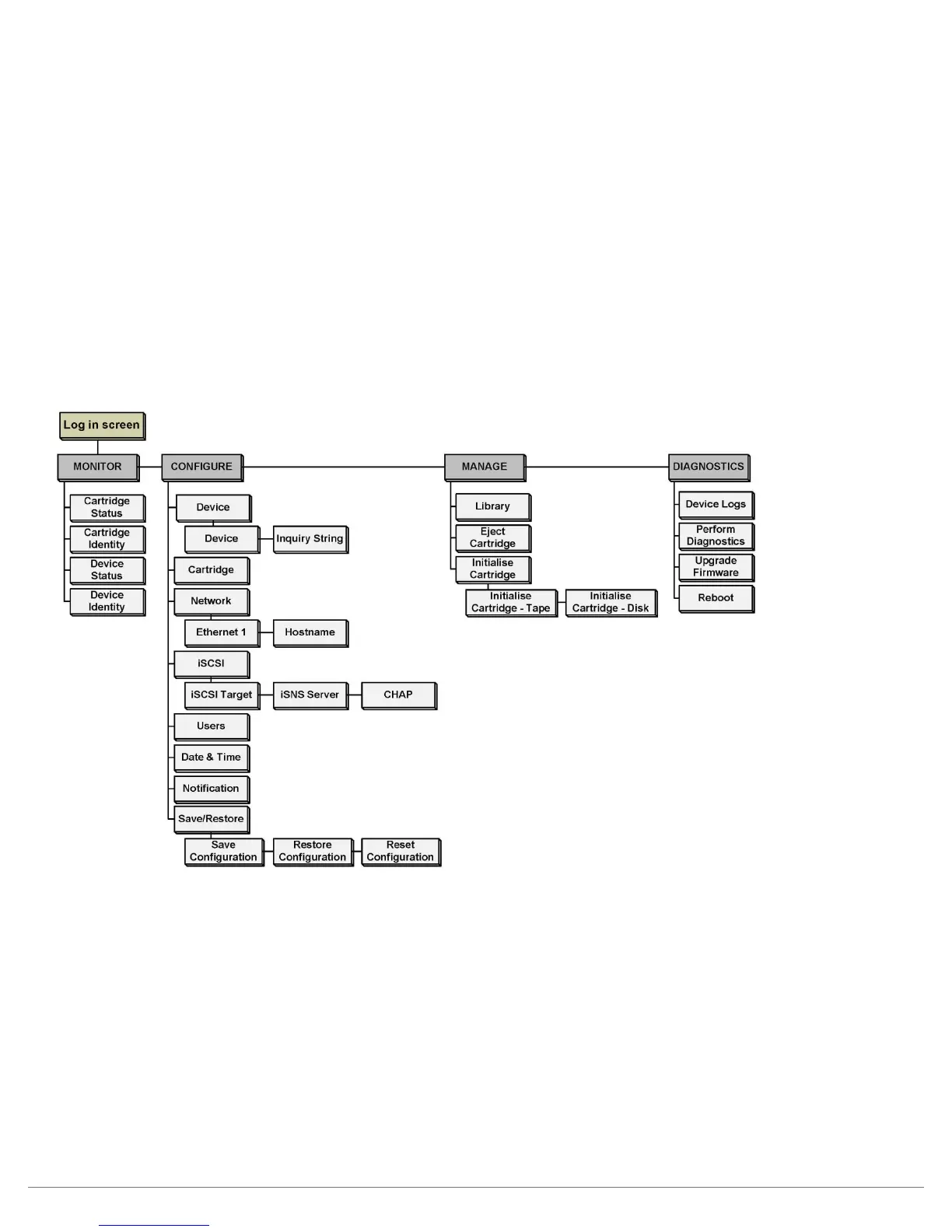
The overall menu structure of the RDX A8 Manager is shown in the chart below. If logged into the
RDX A8 Manager interface with User level credentials the menus for “CONFIGURE”, “MANAGE” and
“DIAGNOSTICS” will neither be visible nor accessible by the user.
i. RDX A8 Manager Flow Chart
Figure 8—RDX A8 Manager Flow Chart



 To Next Page