58
RDX A8 User and Service Guide — Version 1.0
b. Inserting cartridges
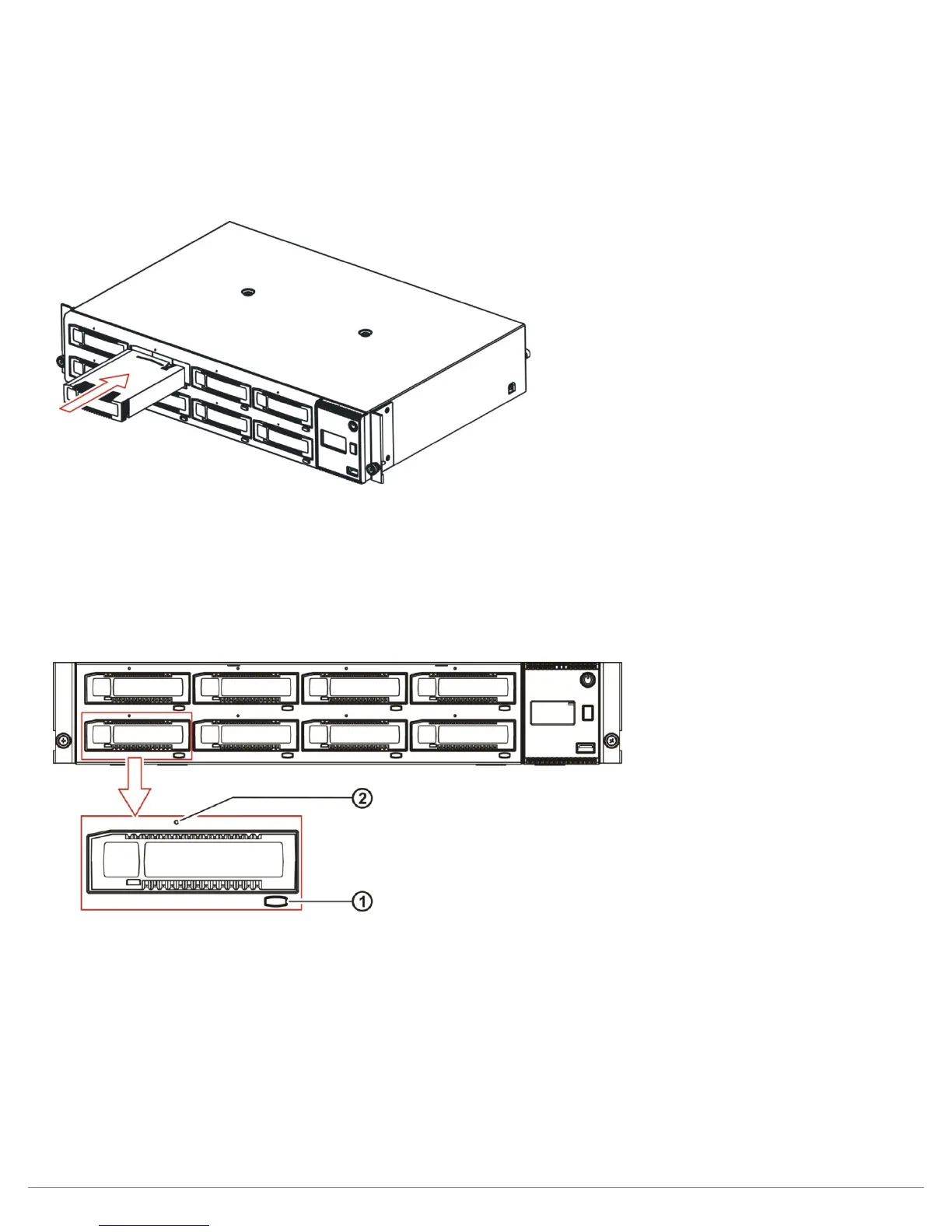
1. Find an empty RDX cartridge slot (8 places) in the unit to be inserted.
2. Push the RDX cartridge gently into the cartridge slot until it seats itself against the back
of the unit.
3. Verify that the cartridge is properly inserted. When the cartridge indicator LED is steady green
the cartridge is ready.
Figure 39—Inserting cartridges
c. Ejecting cartridges
The RDX A8 unit has three methods to eject cartridges:
- Front Panel Cartridge Eject button
- Eject via RDX A8 Manager web interface
- Manually eject cartridge via Emergency Eject Port
Figure 40—Ejecting cartridges
Front Panel Cartridge Eject button
When allowed by the application in Tape Library mode, or when not Ejection Protected in JBOD mode,
cartridges may be ejected via the Cartridge Eject button. Cartridges are ejected by pressing the
Cartridge Eject button for the appropriate slot for approximately 2 seconds. If ejection is allowed,
the eject button will flash green and the cartridge will eject shortly. If ejection is not allowed, the eject
button will flash amber and cartridge will not be ejected.
RDX A8 Manager
Please refer to the section MANAGE/Eject Cartridge for information on this method.



 To Next Page