21
RDX A8 User and Service Guide — Version 1.0
d. iSCSI Connection
In order for data transfer to occur over the network connection it is necessary to configure an
iSCSI Initiator on the host computer system. The following directions pertain to the Windows
operating systems.
The Microsoft iSCSI Initiator comes included with Windows 2008, Windows 2008 R2 and Windows 7.
For other Microsoft operating systems you may search the Microsoft Web site for the Microsoft
iSCSI Initiator.
i. General Set up of the iSCSI Initiator
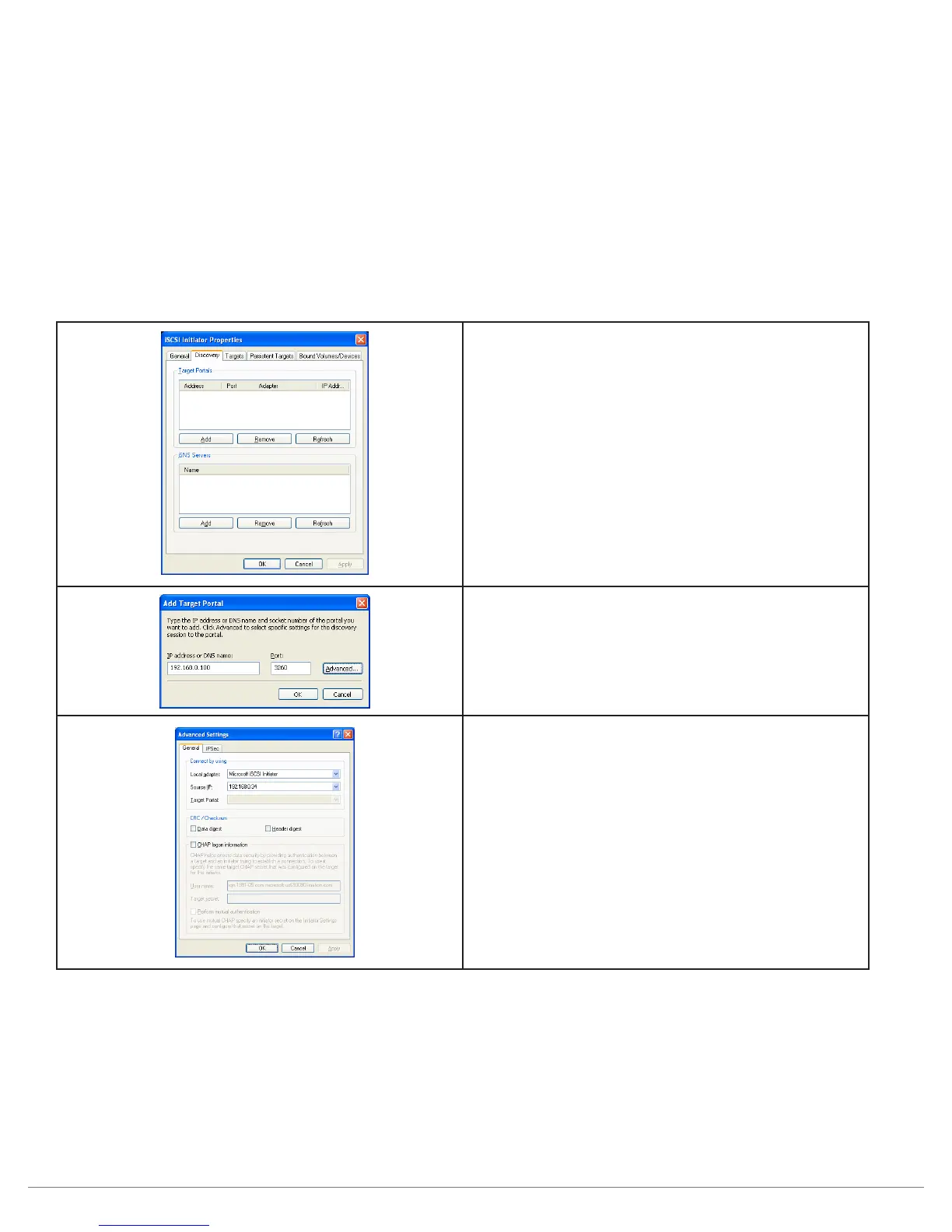
The following procedure is used to set up the RDX A8 as a iSCSI Target.
1. Open Microsoft iSCSI Initiator
2. On the “Discovery” tab and under
“Target Portals” click “Add”
3. Type the current IP address (for DNS or static
IP address) or the DNS name (displayed as
“Host name” in the system information block
of the RDX A8 Manager) of the RDX A8 unit
then click “Advanced”.
4. On the Advanced Settings General tab choose
5. Local adapter – select Microsoft iSCSI Initiator.
6. Source IP – select the appropriate device
IP address.
7. Click “OK”.



 To Next Page