31
2.4 USB Mode
If the P7 is connected to a computer via USB cable, the data transmission through USB mode is
preferred. Under the USB connection mode, the P7 will respond with two or multiple long high
tones which indicates the USB is being configured. You can begin to use the P7 scanner after the
prompt tones stop. Open a text file on computer and move cursor to the blank where scanning
output should be placed. Scanning results can be displayed on computer then.
2.5 Transmission Speed
The scanner works in high speed transmission mode by default with default data transmission
interval at 0 ms. If you want to use the scanner with some low-speed software (like Excel on
Android devices), please adjust the transmission interval of the scanner to avoid data loss.
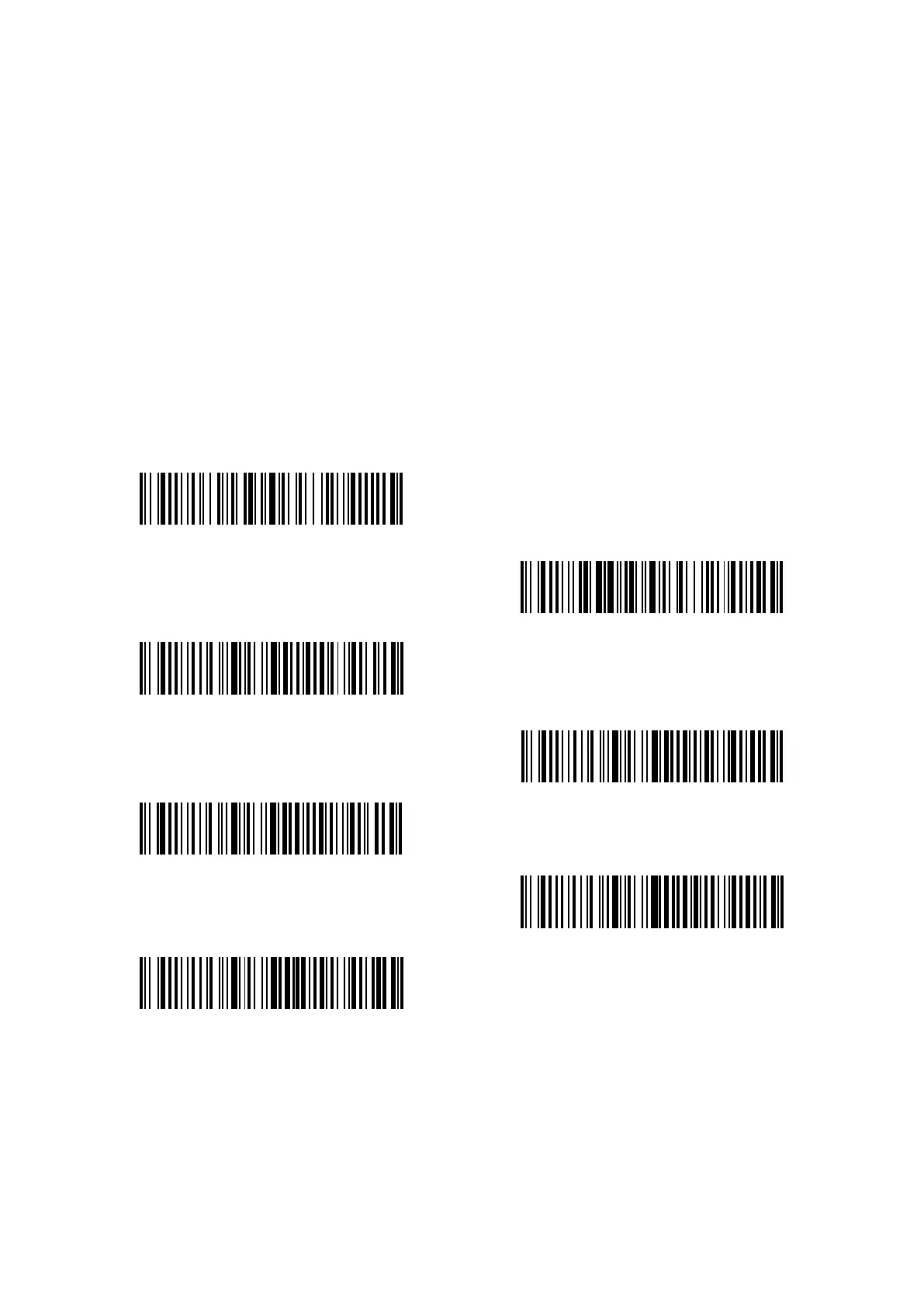
(*)Data transmission interval at 0 ms
Data transmission interval at 16 ms
Data transmission interval at 32 ms
Data transmission interval at 64 ms
Data transmission interval at 96 ms
Data transmission interval at 128 ms
Data transmission interval at 256 ms
Steps to set 16ms as interval for data transmission:
a. Scan “Enter setup”;
b. Scan “16ms”;
c. Scan “Save and Exit”.



 To Next Page