Thermography System VarioCAM
®
HD
9. Introduction
54 © InfraTec GmbH 2016 User Manual
Fig. 100 Continue/abort autosave dialog
9.2.4 Menu item "Directories"
The directory structure and establishment of customer-defined directory names is described in detail
starting on page in chapter 9.2.1. Directory structure of the VarioCAM
®
HD .
9.2.5 Menu item "Comment"
Thermograms can be equipped with comments with the help of an editor to be opened in the "Comment"
menu item. These comments are saved to the header of the IRB file and are available during analysis
using IRBIS
®
3 or IRBIS
®
3 report.
Fig. 101 Menu item "Comment"
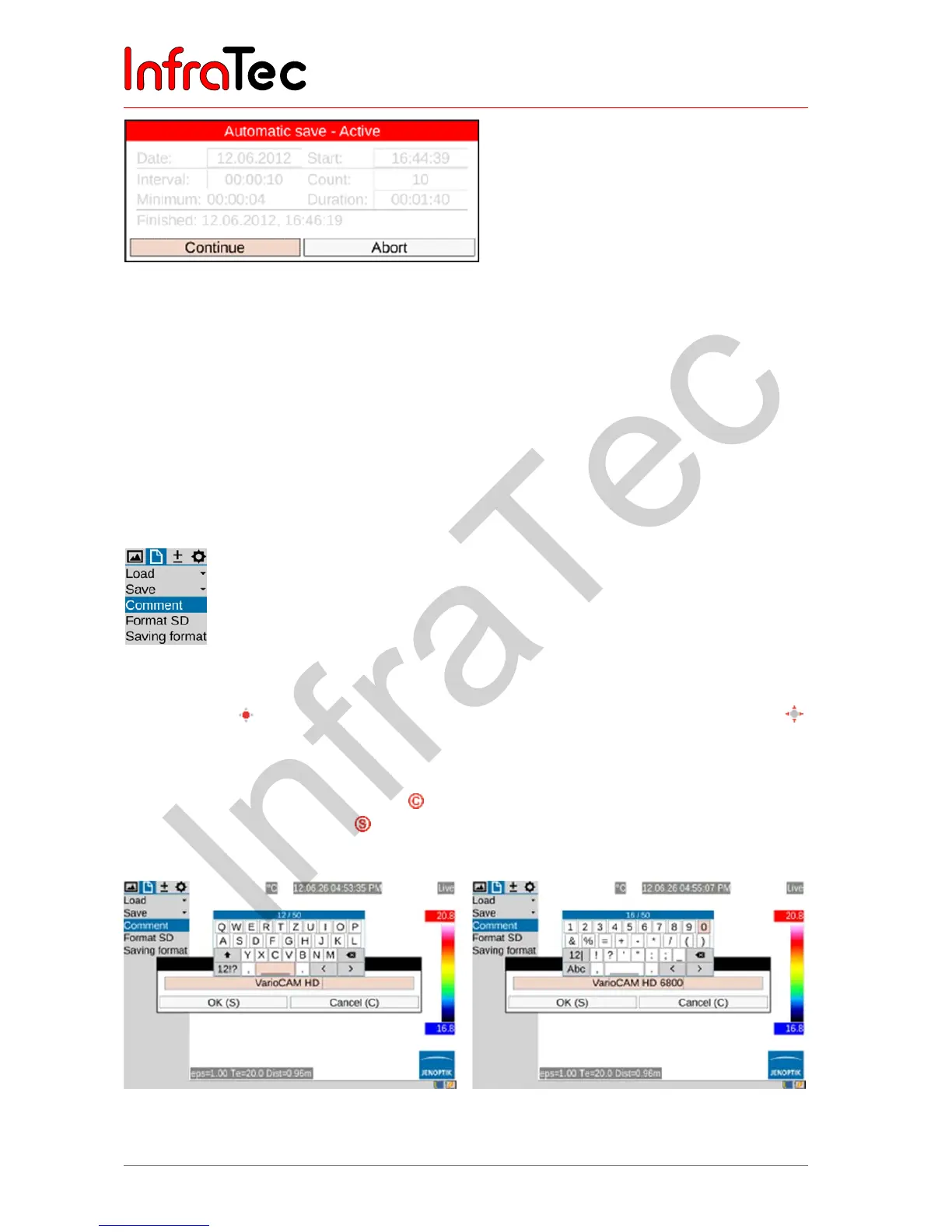
There is a keyboard for entering alphanumeric characters, whereby this keyboard is shown by pushing
the Enter button in the comment line. The keyboard can simply be navigated with the joystick .
Capital and lower-case letters are switched similarly to a computer keyboard. There is an additional
keyboard page for numbers and selected special characters. A maximum of 50 characters can be
entered. The number of the current character is indicated on the upper margin of the keyboard. The
keyboard input is finished by pushing the button, and then the input text comment is accepted by
clicking OK and/or by using the button. The comment is also saved when saving the camera
configuration (see chapter 9.4.8 Menu item "System" – page 75).
Fig. 102 Comment editor: keyboard letters
Fig. 103 Comment editor: keyboard numbers.
special characters



 To Next Page