Thermography System VarioCAM
®
HD
8. Introduction
26 © InfraTec GmbH 2016 User Manual
8 Operation
8.1 Controls
The VarioCAM
®
HD has the following controls:
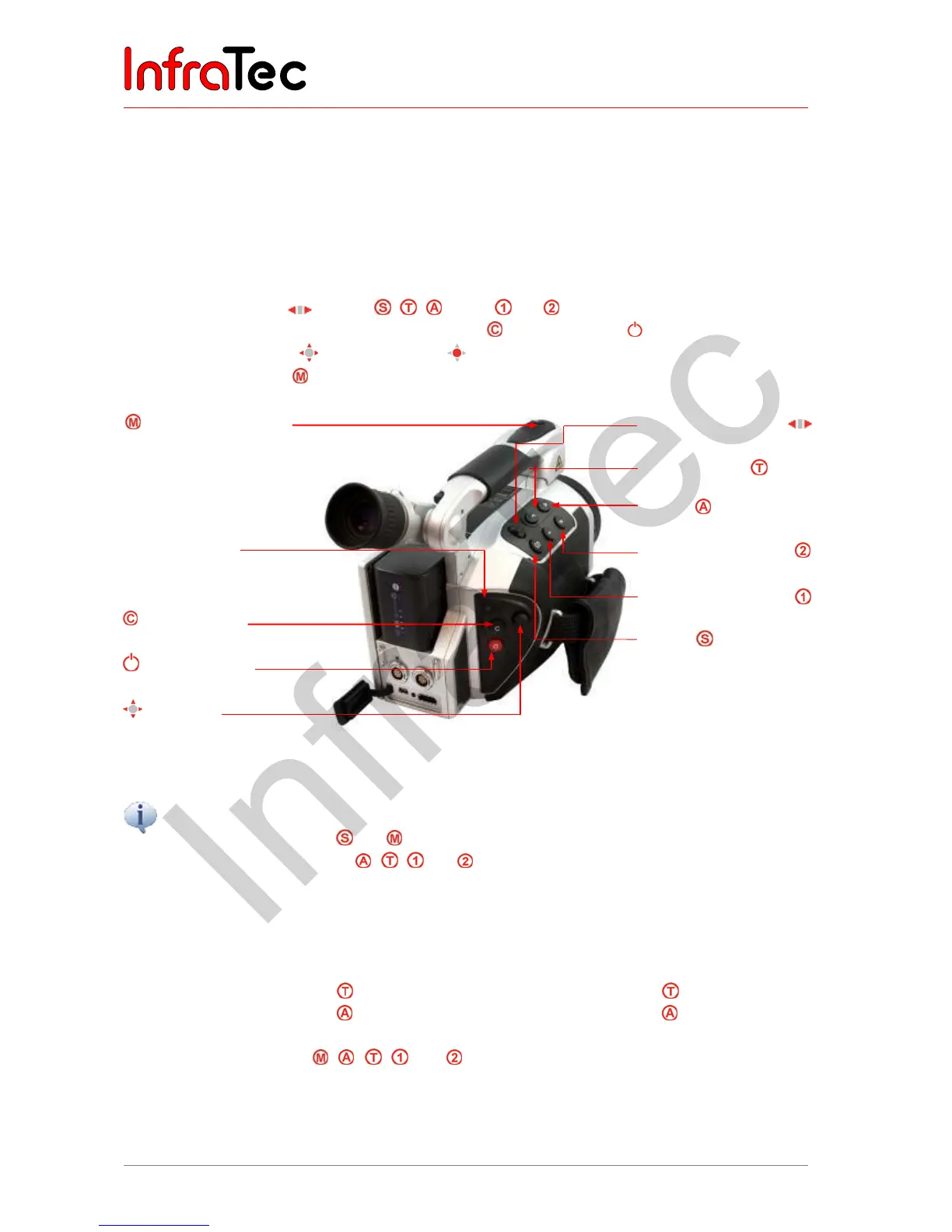
■ Keyboard on the right top camera side
(focus rocker switch , buttons , ,
as well
and )
■ Keyboard on the right of the backside (ESC button
and power button )
■ Multi-function joystick
with Enter function on the right of the backside
■ Multi-function button
on the top of the front camera handle*
Multi-function button
Power-on LED
"ESC" button
Power button
Joystick
Focus rocker switch
with autofocus function
"Temperature"
"Auto"
Multi-function button
Multi-function button
"Save"
Fig. 22 Representation of the controls
All buttons can be used for multiple functions triggered either by
■ Half or full pressing: and and/or
■ Short or long pressing: , , and .
Within the framework of the description of the camera functions, the letter L is attached to the symbol of
the respective function button if a button must be pushed for a longer period of time.
Example:
Shortly pressing the T button: Long pressing of the T button: L
Shortly pressing the A button: Long pressing of the A button: L
The functions of the buttons , , , , and can be changed by setting the buttons (see chapter
9.4.5 Menu item "Buttons" – page 72. Furthermore, the function of the buttons depends on the current
mode of operation and. depending on the aforementioned, is displayed in the menu and the help line at
the lower margin of the screen.



 To Next Page