26
Speaker Placement
—Continued
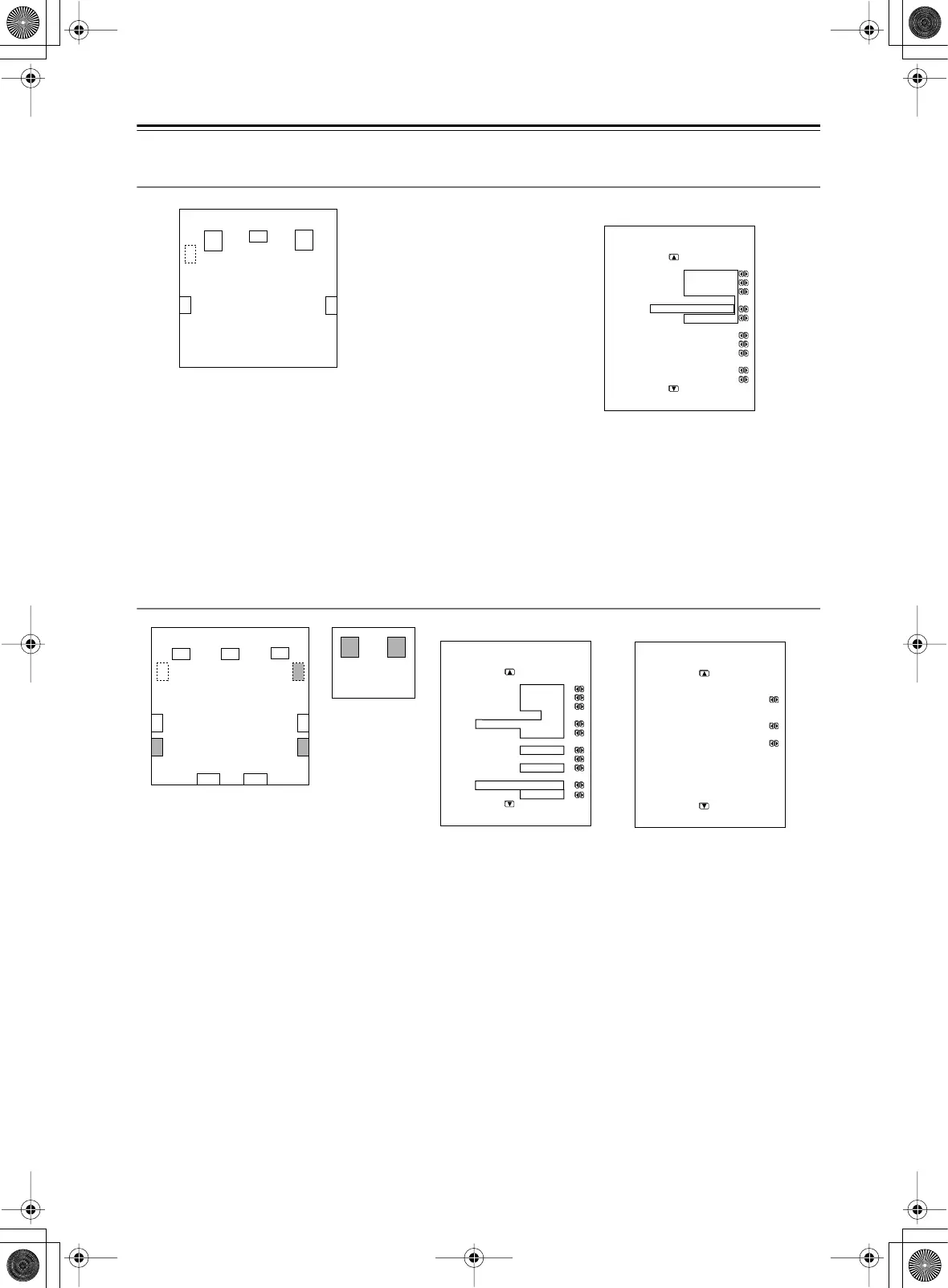
Main room A: 5.1 ch speaker system including the front speakers connected through the BTL or bi-
amp connections
• For speaker system [A], set the surround back speaker parameters to “BTL for Front ” or “Bi-Amp for Front” and all
the other speaker parameters to “Main A” (For details on speaker connections, see page 29).
• For speaker system [B], set the speaker parameters to “Not Used.”
*When using the BTL or bi-amp connections, you cannot use Zone 2 since the surround back channel is used for the front speakers of
main room A.
Main room A: 7.1 ch from speaker system [A] and additional subwoofer and surround speakers from
speaker system [B] (suitable for enjoying more powerful and lively surround sound in main room A);
Main room B: two front speakers from speaker system [B] using the BTL or bi-amp connections
• For speaker system [A], set all the speaker parameters to “Main A.”
• For speaker system [B], set the surround speaker and subwoofer parameters to “Main A,” the front speaker
parameters to “Main B,” and the surround back speaker parameters to “BTL for Front” or “Bi-Amp for Front” (For
details on speaker connection, see page 29).
• When you want to use the surround speakers and subwoofer of speaker system [B] for specific sources, select the
source and set the parameters for these speakers to “B” or “A+B” in the listening mode setup menu.
When you set the parameter to “B,” the audio signal comes out from the surround speakers and subwoofer of
speaker system [B]. When you set the parameter to “A+B,” the signal comes out from the surround speakers and
subwoofer of both speaker systems [A] and [B].
FL
C
SW
FR
SR
SL
Main room A
1-1.Speaker Config
=====================
Speaker A
a.Front L/R :Main A
b.Center :Main A
c.Surr L/R :Main A
d.Surr Back
:BTL for Front
e.Subwoofer :Main A
Speaker B
f.Front L/R :Not Used
g.Center :Not Used
h.Surr L/R :Not Used
i.Surr Back
:Not Used
j.Subwoofer :Not Used
FL C
SBL SBR
SW
SW
FR
SR
SL
SR
SL
FL FR
Here is an example of the
multichannel listening mode.
1-1.Speaker Config
=====================
Speaker A
a.Front L/R :Main A
b.Center :Main A
c.Surr L/R :Main A
d.Surr Back
:Main A 2ch
e.Subwoofer :Main A
Speaker B
f.Front L/R :Main B
g.Center :Not Used
h.Surr L/R :Main A
i.Surr Back
:BTL for Front
j.Subwoofer :Main A
3-5.Multichannel Input
=====================
b.Re-EQ :Off
e.Surr L/R Sp :A+B
g.Subwoofer :A+B
Main room A
Main room B



 To Next Page